Archiv für den Monat: September 2026

3 AI visibility tools for small agencies, with 2 free options

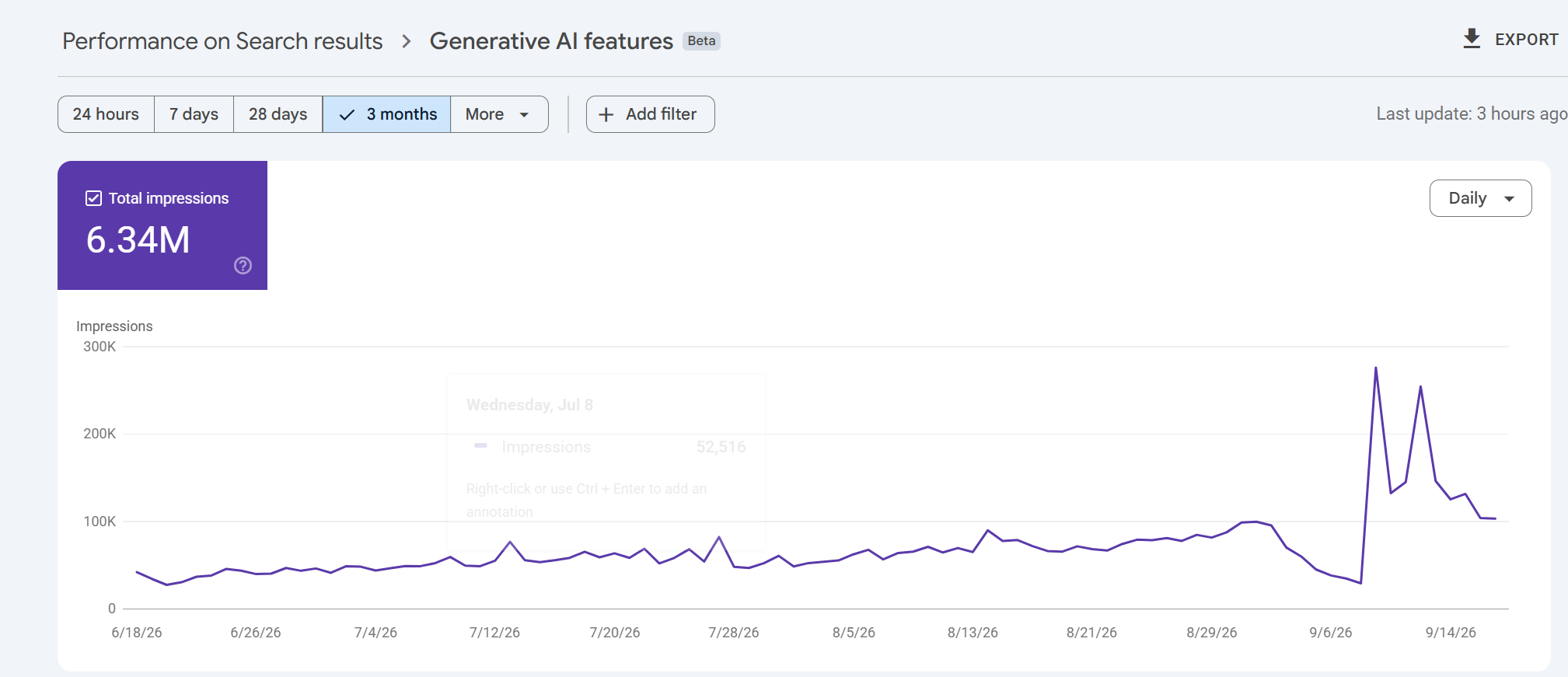
For a small agency reporting where a client’s pages appear in Google and Microsoft AI answers, I’d start with Google Search Console and Bing Webmaster Tools. Their free reports let you identify the pages appearing in the AI experiences each provider covers.

To follow what ChatGPT, Gemini and Perplexity say about a client and its rivals, consider HubSpot AEO. Its $50-per-brand monthly plan checks questions you choose each day. You can read the answers it collects to see whether the business is merely mentioned or actually recommended.

Tool Monthly software cost What it helps you answer The main limit
Google Search Console $0 Which pages appeared in Google’s AI Overviews and AI Mode? The dedicated report measures impressions, with no query breakdown.
Bing Webmaster Tools $0 Which pages were cited, and what retrieval phrases appear in the report? Covers Microsoft Copilot, Bing AI summaries and selected partners. Citation share does not name rivals.
HubSpot AEO $50 per brand How do answers to 25 chosen prompts describe the business and its competitors across three engines? Each brand needs a separate subscription. Agency exports and client permissions remain unverified.

Based on published features and terms, with the main claims rechecked on 20 September 2026. We haven’t tested tracking accuracy. Prices use monthly billing in US dollars, before tax; setup and reporting still take agency time.

1. Google Search Console: see which pages appear in Google’s AI answers

Search Console now has a dedicated view of impressions from AI Overviews and AI Mode. Google introduced its generative AI performance reports in June 2026 and says the rollout reached websites worldwide on August 31. Agencies can now report those appearances separately from the broader search-performance figures.

The report shows which pages appeared, with breakdowns by country, device and date. An impression records a link to the site appearing in a supported AI feature. It doesn’t establish that someone visited the page.

Suppose a client sells commercial coffee machines. Look for its buying guides, product pages and installation advice in the page report, then group those URLs in your own monthly report. You can show the client which kinds of content appeared and how their impressions changed over equivalent periods. That is more informative than handing over one site-wide total.

The report won’t explain why one page appeared more often than another. Google’s documented metrics and dimensions contain no dedicated clicks, click-through rate or query breakdown. It also doesn’t cover the Gemini app. Sites with too few impressions may not see the report at all.

There is a small export detail worth catching before it reaches a client: Google says unavailable values shown as ~ or become zeros in the downloaded data. Check those against the screen before describing a zero as a loss of visibility.

2. Bing Webmaster Tools: see cited pages and the subjects being looked up
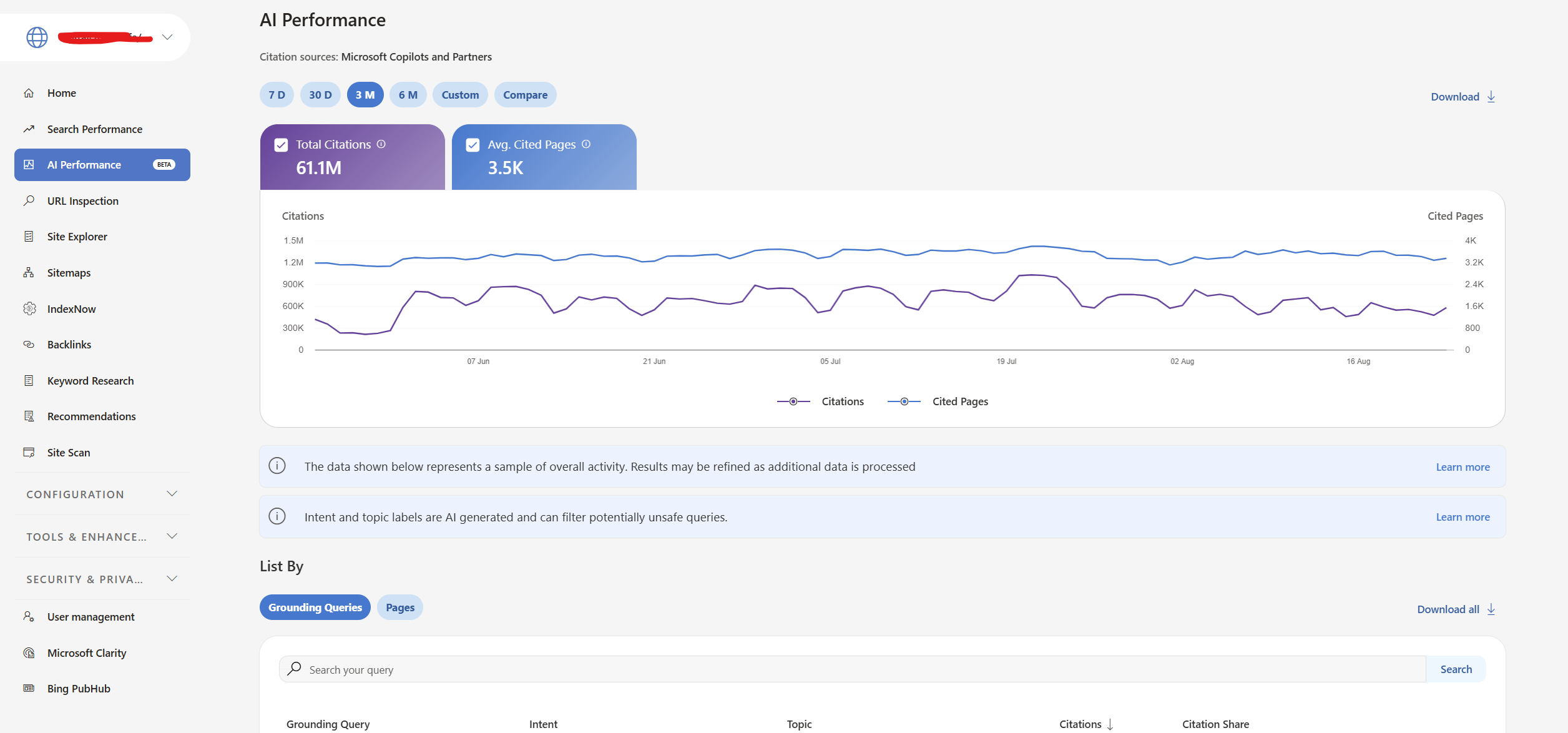
Bing Webmaster Tools gives the agency a second free source of AI visibility data. Its AI Performance report covers citations in Microsoft Copilot, AI-generated Bing summaries and selected partner integrations. It shows cited URLs, citation counts and phrases used to retrieve source material.

Those phrases are called grounding queries. They describe what the system looked up while assembling an answer, which can differ from the question a person typed. An answer about the cost of equipping a café could involve searches for maintenance and cleaning as well as machine prices. SEW’s explanation of query fan-out shows how that branching works. Treat these phrases as retrieval context, rather than a transcript of customer questions.

Microsoft’s June update added topics, intents, citation share and period comparisons, in global preview. Citation share measures your site’s portion of all citations for the same grounding query. It does not reveal the competing domains or measure your share of traffic. Comparing periods shows whether citation activity changed; changing demand or AI systems can affect that activity alongside your own page updates.

For a monthly client report, record the cited pages, relevant retrieval phrases and changes over the same reporting periods. Keep Bing’s citation totals separate from Google’s impressions because they count different things. Agencies already managing verified Search Console properties can import those sites into Bing Webmaster Tools, reducing the setup work.

3. HubSpot AEO: pay for daily checks on questions you choose
A client asking “Does ChatGPT recommend us over our competitor?” needs a different kind of evidence. Their own site might be cited without the business being recommended. Equally, an answer could recommend them using information from another website.

HubSpot AEO, currently in beta, lets you follow chosen prompts, inspect returned answers and see the brands and sources involved. Its standalone subscription costs $50 a month for 25 prompts checked daily across ChatGPT, Gemini and Perplexity. No additional HubSpot subscription is required.

For the coffee-equipment client, you could track a question such as “Which commercial coffee machines suit a café serving 200 drinks a day?” Review which suppliers the collected answers recommend and the reasons they give. A brand-mention score alone won’t tell you whether an answer describes the client’s products accurately or recommends them for the wrong setting.

Consider an agency starting with three clients and 25 questions for each. HubSpot sells a separate instance for each brand, so the cost is 3 × $50 = $150 a month for 75 tracked questions. Adding a fourth client with the same allowance brings the bill to $200. Daily checks build a history for each question; they don’t turn those 25 questions into a representative sample of everything a client’s customers ask.

If a client already has Marketing Hub Professional or Enterprise, AEO is included. Check that account’s allowance before adding a standalone subscription.

Agency reporting needs a closer look before purchase. We couldn’t verify the available export formats or how access can be separated between clients. During the trial, try producing the report you intend to deliver and check who can view each brand’s data. HubSpot belongs here for its documented monitoring features and price; its suitability for an automated agency-reporting workflow remains unconfirmed.

Choose prompts from the decisions the client’s customers actually face. For the coffee business, that might include selecting equipment for a particular café size, comparing running costs and finding local servicing. Keep the wording consistent when comparing periods, and record any additions separately. Changing the questions can change the score even when nothing about the business has improved.

As SEW’s reporting on the limits of AI visibility scores explains, the questions, platforms and repetitions affect the result. Include the tracked questions and dated example answers in the client report. That gives the client enough context to distinguish an accurate recommendation from a passing mention. Report visits and enquiries separately using your analytics and sales records.

The post 3 AI visibility tools for small agencies, with 2 free options appeared first on Search Engine Watch.

Source:: searchenginewatch.com
Reciprocal links in SEO: when linking back becomes a problem

Reciprocal links happen when two websites link to each other. They aren’t automatically bad for SEO. You might cite a useful article on another site, and its editor might later recommend something you’ve published. The trouble starts when people arrange links primarily to manipulate search rankings, which falls under Google’s link-spam policy.

So you don’t need to remove a good citation just because that website links to you. You do need to look more closely at an offer that makes a backlink conditional on inserting someone else’s link.

What reciprocal links look like in practice

Imagine you run a marketing publication. You write about email campaigns and link to a software company’s research because it supports a point in your article. A few months later, that company publishes a guide and links to your explanation of newsletter sponsorships.

You now have reciprocal links. The articles cover different subjects, the links appeared at different times, and neither editor needed permission from the other. Each found something worth recommending.

The same thing can happen between businesses that work together. A hotel might link to a walking-tour company so guests can book an excursion. The tour company might recommend the hotel to visitors who need somewhere to stay. Both links give someone a useful next step.

Now imagine an agency asks you to add its client to an old article. In return, it promises a link from another website, provided you use the exact words it supplies and leave the link in place.

That offer asks you to publish a link to secure one for yourself. A backlink report may show the same two-way connection in all these examples, but it won’t show you the emails behind the arrangement.

What Google says about reciprocal links

Google lists Excessive link exchanges and partner pages created solely for cross-linking as examples of link spam. It also flags contracts that require a link without letting the publisher qualify it, for example with nofollow. The policy focuses on links created mainly to manipulate rankings.

Google doesn’t publish a permitted percentage or monthly allowance. A small exchange isn’t automatically acceptable simply because it is small.

For a publisher considering an offer, the terms provide a useful starting point. Can you choose the source that best supports the article? Can you reject the proposed wording? Would the other party still want the placement if you qualified the link? Their answers help explain what they are trying to buy or trade.

A related website can still propose an awkward placement. An email-marketing company, for example, might have relevant research for your newsletter guide but insist that you link to its pricing page instead. Review the actual page readers will reach, rather than approving the request because the companies cover similar subjects.

Related reading: black hat SEO techniques to avoid.

What about three-way link exchanges?

In a three-way exchange, your site links to a company and a separate website supplies the promised backlink. You may never receive a link from the company you recommended.

Our assessment is that adding another website doesn’t resolve the underlying problem if the arrangement still trades links for ranking credit. It also exposes a weakness in reciprocal-link audits: a report looking only for two sites linking to each other can miss the deal entirely.

Can reciprocal links help your SEO?

A useful link can bring readers to your website, whether or not you have linked to its source. Google also uses links to discover pages and help assess their relevance. Neither point establishes that arranging a swap will improve your rankings.

An Ahrefs study, last updated in March 2020, found reciprocal links on 73.6% of 140,592 websites in its sample. The sites each had more than 10,000 estimated monthly visits from Google, and the research compared followed incoming and outgoing links.

Plenty of those sites had reciprocal links and still received search traffic. But the study didn’t test what happened when websites started swapping links. It also selected sites that already had traffic, so sites that had lost theirs could be missing from the sample. Ahrefs explicitly acknowledges that limitation.

The finding helps explain why discovering reciprocal links shouldn’t cause immediate alarm. It doesn’t establish that a link-exchange campaign works.

Why a reciprocal-link percentage can mislead you

Before worrying about a percentage in a backlink report, check what it counts. The same website can have a reciprocal-link ratio of 30% or 2%, depending on the calculation.

Take this made-up example: your site links to 40 other domains, receives links from 600 domains, and has 12 domains in both groups.

Two ways to measure the same set of links
What you’re measuring Calculation Result
Of the domains you link to, how many link back? 12 ÷ 40 30%
Of the domains linking to you, how many receive a link back? 12 ÷ 600 2%

Both numbers are correct. Neither tells you whether the links were independently chosen or negotiated.

Counts of individual links introduce another difference. A link repeated in a website’s footer can appear on hundreds of pages while representing a connection with just one domain. Before comparing your number with someone else’s, establish whether both reports count links, pages or domains and use the same calculation.

These percentages can help you find relationships to investigate. They can’t give you a safe quota for future swaps.

A link can stop helping without a manual penalty

Google explained in its December 2022 link-spam update that its SpamBrain system could neutralize unnatural links, removing the ranking credit they had passed. That gives you another possible outcome to consider: time spent arranging links that no longer provide the benefit you expected.

A manual action is a separate matter. It follows a human review, and Google reports it in Search Console’s Manual actions report. An empty report doesn’t prove your exchanged links are helping. Equally, a fall in traffic doesn’t prove reciprocal links caused it.

How to check the reciprocal links you already have

If you are reviewing a handful of known exchanges, start with the pages and the original emails. Those emails may tell you exactly why a link was added, including whether someone promised a return placement or specified the wording.

To find incoming examples for free, open Google Search Console’s Links report. Under External links, select More beneath Top linking sites. Choose a domain, then one of your linked pages, to investigate the pages linking to it.

Google’s documentation explains that this is a sample, not a complete backlink list. It can include links that have since disappeared and doesn’t identify nofollow links. A link missing from Search Console may simply be missing from its sample.

Find your links to those websites separately, using your CMS or an existing crawl. Then open both pages and read the paragraphs containing the links. Check where they lead, what the clickable words say, and whether the destinations still support the surrounding text.

Keep a useful citation if it still belongs in the article. If a link was inserted purely to complete a swap, revisit that placement. A spreadsheet of domains alone won’t tell you which sentence needs changing.

For a large website, a crawler can help locate outgoing links across thousands of pages. A separate backlink index may find incoming links that Search Console’s sample misses. Those tools can save time finding the pages; you still need to examine what was published and any agreement behind it.

When to use nofollow or sponsored

You don’t need to add nofollow to an ordinary editorial link just because the destination links back to you. Google’s outbound-link guidance says regular links need no special rel attribute.

For advertising and paid placements, Google prefers rel="sponsored", although it also accepts nofollow. For other cases where you don’t want Google to associate your site with the destination, nofollow may be appropriate. Apply the attribute to the actual relationship.

If you are cleaning up manipulative outgoing links, Google’s manual-action guidance calls for removing them or changing them so they no longer pass ranking credit. Changing a link on your own site doesn’t change the backlink on somebody else’s.

Should you disavow reciprocal links?

Finding a reciprocal link is not, by itself, a reason to disavow it. Google says most sites don’t need the disavow tool. Its criteria are considerably narrower: a substantial number of spammy, artificial or low-quality incoming links, together with a manual action or a likelihood of one.

Where those conditions apply, Google recommends trying to get the problematic links removed first. Disavowing is for incoming links you can’t remove. It won’t fix an outgoing link that you control.

SEW’s take: keep the decision with the editor

For publishers, a useful test is what happens when the proposed link doesn’t survive editing. Can you leave it out, replace it with a better source, or change the wording without owing someone another backlink?

If you’ve promised to publish the link regardless, you’ve given away that decision. A relevant domain or an impressive backlink score won’t make the sentence any more useful to the reader.

You can still invite people to send research, tools or explanations worth citing. A reply to an exchange request could be as simple as:

Send the resource and tell us which part of the article it supports. We’ll consider it on that basis. You don’t need to link to us.

The post Reciprocal links in SEO: when linking back becomes a problem appeared first on Search Engine Watch.

Source:: searchenginewatch.com
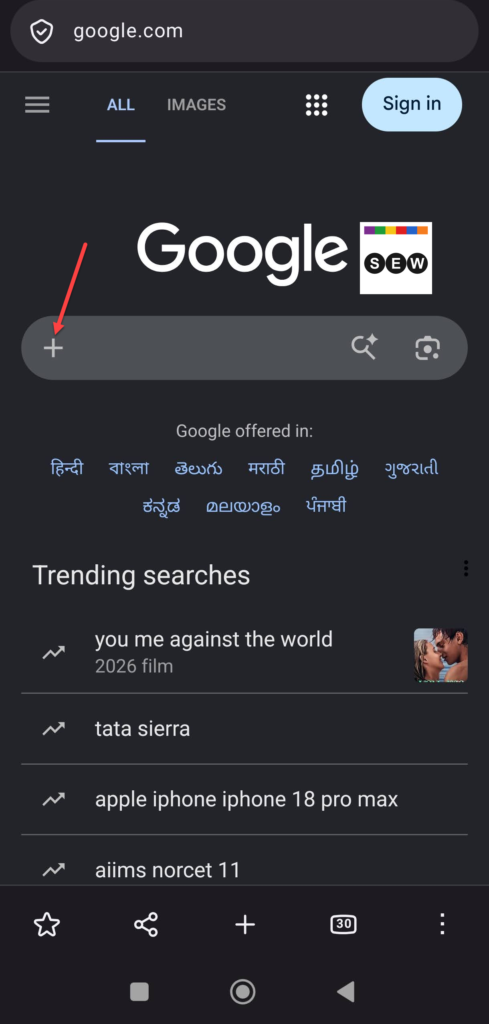
Google Homepage Tests “+” Button for AI Mode on Mobile

Google is testing a new “+” button in the search bar on its mobile homepage, replacing the magnifying-glass icon that normally appears on the left.

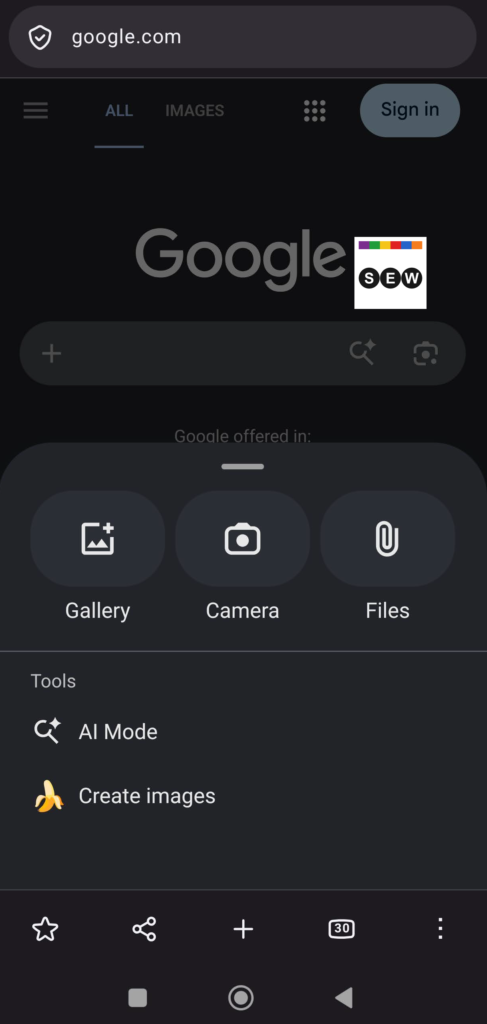
The change turns the familiar search box into a starting point for more than text searches. Tapping the “+” opens a menu with options including Gallery, Camera, Files, AI Mode, and Create images.

Image Credit: Venkat | Search Engine Watch

The menu closely resembles the “+” menu Google added to Chrome on mobile. Chrome’s mobile “+” menu provides access to Camera, Gallery and Files, along with AI features.


Image credit: Venkat | Search Engine Watch

Google first added a “+” button to the Search homepage in December 2025. That version replaced the magnifying glass on desktop and provided options to upload an image or file, which then opened AI Mode. At the time, the feature was reported as being available on desktop web, not mobile.

The same interaction has since appeared on other mobile surfaces. In April 2026, the Google app and Android Search bar tested a “+” menu with options including Gallery, Camera, AI Mode and image creation.

Bringing the menu to the mobile homepage puts those options one tap away from where many users start a search. Users can start an AI Mode session or provide an image or file without first opening a separate search mode.

It isn’t clear how widely the mobile homepage test has rolled out. Google has not announced the change, so it could remain an experiment or reach more users as part of a gradual rollout.

Why it matters: If Google expands the “+” menu to more users, AI Mode and multimodal search could become a more prominent part of the mobile search experience. That could make it more important for SEOs to understand how their content appears when searches start with images, files and other non-text inputs.

The post Google Homepage Tests “+” Button for AI Mode on Mobile appeared first on Search Engine Watch.

Source:: searchenginewatch.com

3 best SEO MCP servers for Claude I use daily

DataForSEO is my pick for using Claude to research which pages rank for a set of keywords. It gives you access to the underlying results without requiring a full SEO suite subscription. If you already pay for Ahrefs or Semrush, connect that account first: you can bring its supported reports into Claude without taking on another provider.

SEO MCP server Why it’s on this list Access and pricing Limit to know
1. DataForSEO Our pick for buying raw SEO data to use in your own analysis. Pay as you go; $50 minimum payment. Each API and request method has its own rates.
2. Ahrefs Connects Claude to Ahrefs keyword, competitor and backlink research. Lite or higher; Lite is $129/month on monthly billing. Lite permits 100 rows per request, alongside a monthly API allowance.
3. Semrush Brings Semrush research and supported project data into Claude. One Starter is $199/month on monthly billing and includes 50,000 API units per renewal. Other eligible plans differ. Report type and row count determine consumption; some datasets require separate subscriptions.

We compared official documentation, access requirements and published pricing, checked on September 19, 2026. We have not benchmarked the servers hands-on. Provider prices are in US dollars; any paid Claude plan is separate.

What an SEO MCP server gives Claude

An MCP (Model Context Protocol) server connects an AI assistant to external tools. With an SEO connection, Claude can request a keyword report or a set of search results from your authorized provider account and use the response in its answer.

For example, it could retrieve the pages ranking for related searches and count which domains appear across them. The provider supplies the search data; Claude performs the comparison.

All three providers offer hosted connections, so you do not need to run a server yourself.

1. DataForSEO: raw data without a suite subscription

DataForSEO sells access to search results, keyword data and backlink records. You can request the records needed for an analysis without buying a package of research dashboards.

Its SERP API returns results for specified searches, with controls for location, language and device. For publishing research, I’d use those results to investigate whether a group of searches is dominated by retailers, publishers or the product manufacturers themselves. That comparison starts with the ranking URLs and their positions.

Here, raw data means individual results and records that you can inspect and reuse. Ahrefs and Semrush also provide structured API data. DataForSEO’s advantage here is the ability to purchase it separately from a full SEO suite.

The current server documentation describes optional field filtering, and its API request tool uses .ai paths by default. Standard paths can be requested with noAiMode. Access to the API does not mean every configuration sends every response field to Claude.

DataForSEO’s minimum payment is $50. That funds the account; usage is then charged according to the APIs and options you request. The $50 is not a monthly subscription.

For Google organic search results, its published base rates distinguish between queued requests and the Live method:

  • Standard queue: $0.0006 per ten-result SERP.
  • Priority queue: $0.0012 per ten-result SERP.
  • Live: $0.002 per ten-result SERP.

For a hypothetical daily ranking check, 200 keywords across two locations over 30 days would produce 12,000 tasks. At the base Live rate, that is $24 in data usage. A new account would still need the $50 minimum payment.

That calculation assumes ten results per task, one device setting and no paid extras or retries. It excludes other APIs and Claude costs. Scheduling the checks is a separate part of the workflow; connecting an MCP server does not, by itself, establish a daily schedule.

You do need to specify the country, device, result depth and API method; those choices can change the answer or the charge.

2. Ahrefs: use the research you already subscribe to

Ahrefs is the practical choice when your competitor and backlink research already uses its database. Connecting that account keeps Claude’s analysis tied to the same provider as your existing reports.

Its documented tools cover Site Explorer, Keywords Explorer, SERP analysis, Site Audit and Rank Tracker. A possible content-research task would be to retrieve a competing page’s ranking keywords and group them against the outline of an article you’re updating. The returned keywords would come from Ahrefs; the grouping would be Claude’s interpretation.

Access requires Lite or higher. Lite costs $129 a month on monthly billing. The $29 Starter plan does not qualify under the documented MCP requirements.

Ahrefs sets both a per-request row limit and a monthly API allowance. Its MCP plan table lists:

  • Lite: 100 rows per request and 200,000 API units per month.
  • Standard: 250 rows per request and 800,000 units per month.
  • Advanced: 500 rows per request and two million units per month.

Those limits affect different parts of the job. A Lite account can have plenty of units left and still be unable to return 200 keyword rows in one request. Splitting the request depends on the report’s available parameters.

When a report hits the row cap, ask whether more results were available. A summary of the returned rows should not be presented as an exhaustive view of the competitor’s keywords.

Ahrefs‘ API consumption rules account for the number of rows and the cost of the fields involved. Chargeable uncached requests have a 50-unit minimum; some endpoints are free, and cached requests can avoid charges. Its 200,000-unit allowance therefore cannot be compared directly with Semrush’s 50,000 units as though both bought the same number of reports.

3. Semrush: research and project data, with report-level charges

Semrush is worth connecting when you already maintain research or projects there. Its MCP documentation covers SEO reports, subscription-dependent Trends data and read-only access to the Projects API. SEW previously covered the official Claude connector launch.

Semrush One Starter costs $199 a month on monthly billing. One Starter, One Pro+, SEO Classic Pro and SEO Classic Guru include 50,000 API units per subscription renewal. SEO Classic Business and One Advanced require a purchased API units package under the published MCP rules.

There is no extra MCP usage fee. The reports consume API units, and Traffic & Market data requires a Trends API subscription.

The report you choose matters as much as the number of domains. Semrush’s unit documentation prices current Domain Organic Search Keywords data at 10 units per returned row and historical data at 50.

A hypothetical review of 20 competitors, taking 200 current keyword rows from each, would cost:

20 domains × 200 rows × 10 units = 40,000 units.

That is 80% of a 50,000-unit allowance. The same row count at the historical rate would cost 200,000 units, before other reports or retries.

A request to “compare these competitors with last year” could therefore have a materially different cost from a current snapshot. Specify the period and row limit before asking for the comparison. Semrush also documents partial returns for some reports when the remaining balance cannot cover all requested rows, so the returned row count belongs alongside the analysis.

A live connection does not guarantee fresh rankings

Claude can retrieve a report today that contains rankings collected earlier. The time of the API call and the date of the underlying observations are different things.

SEW’s reporting on Google’s bot crackdown and SEO reporting documented collection delays and gaps in some providers‘ data. That reporting does not establish a problem with every service here, but it explains why a working connection alone cannot prove freshness.

For a ranking comparison, retain the provider, search location, device and collection date where supplied. If the response does not include a collection date, describe that date as unavailable. The date on Claude’s answer is not a substitute.

The post 3 best SEO MCP servers for Claude I use daily appeared first on Search Engine Watch.

Source:: searchenginewatch.com
Codex users question Astra’s value as paid allowances run dry

Some Codex subscribers are urging each other to avoid GPT-6 Astra after reporting that the model exhausts their paid usage allowances too quickly. A discussion in r/codex tells users to stick with GPT-5.6 Sol when their limits reset, with replies describing depleted subscriptions and a return to Claude.

“We are sick of paying 200$ to use it for a day,” wrote the post’s author, DivideHorror3217. In a reply, they said they were paying for two $200 subscriptions, both with 1% remaining. The discussion contains no usage logs establishing how much work those accounts performed.

Experiences in the same thread differ. One commenter reported completing three Astra projects using 9% of their weekly allowance. Another said a single five-hour Sol task had consumed half their allowance. Those accounts show the frustration around usage, but they are not comparable tests of the two models.

Astra’s higher rates explain part of the complaint

OpenAI’s published credit rates show the difference:

Model Input Cached input Output
GPT-5.6 Sol 100 10 500
GPT-6 Astra 250 25 1,250

Credits per million tokens, checked September 19, 2026. Sol’s listed rates are promotional.

Astra’s Fast mode adds a further 2.5-times multiplier. Multiplying the two gives a rate 6.25 times standard Sol’s for the same token volumes. These ratios compare token rates, not completed-task costs.

OpenAI says allowance consumption also depends on context, tools and task complexity. Local and cloud work share the plan’s allowance, and weekly limits can apply. Its model guidance separately notes that higher reasoning settings use more tokens. The Reddit post’s recommendation to use Sol at “xhigh” therefore does not establish which setting gets the most work done per allowance.

OpenAI has confirmed incorrect rate limiting before

There is a documented precedent for account-specific usage complaints. In a June incident report, OpenAI said its abuse and fraud prevention systems were incorrectly rate limiting certain accounts, contributing to reports that Codex allowances were depleting faster than expected.

The company described the impact as limited and said it had not observed broader degradation in Codex usage. The incident was marked resolved on June 29. That history gives users a concrete reason to question unexpected consumption, but it does not establish that the same fault has returned.

The Reddit author goes further, alleging that OpenAI has deliberately weakened Sol for some users to push them toward Astra. The thread supplies no evidence establishing selective degradation or that motive. The earlier incident concerned rate limiting and supplies no evidence of intentional changes to Sol’s answers.

Astra has to earn back its higher token cost

If both models deliver an acceptable result with the same input, cached-input and output proportions, standard Astra must use 60% fewer billed tokens to match Sol’s token cost. Halving token consumption would still cost 25% more. This is rate-card arithmetic, not a performance test.

Astra could still save money if it solves a problem Sol cannot or substantially reduces human correction. For an agency paying staff to repair generated code, that labour could outweigh the token premium. For repeated tasks that Sol already completes correctly, the higher rate leaves less room within a fixed budget.

Related: SEW’s tests of five free ChatGPT alternatives, covering writing, fact-checking and image analysis.

The post Codex users question Astra’s value as paid allowances run dry appeared first on Search Engine Watch.

Source:: searchenginewatch.com