Archiv für den Monat: November 2026

Bing AI Mode shows no results error for common queries

Bing AI Mode shows a no results error for some queries

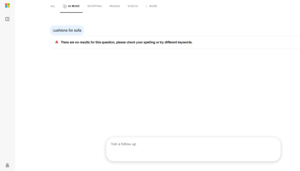
Bing AI Mode is showing an error for some common queries. When I searched for “cushions for a sofa,” Bing AI Mode returned this message: “There are no results for this question. Please check your spelling or try a different keyword.”

Here is a screenshot of this.

I don’t think this happens on other AI search tools. Google AI Mode and ChatGPT will still give an answer even if a query has a spelling mistake. In this case the query was spelled correctly, and Bing still showed the error. This could be a bug, but it is not a good experience for users.

The post Bing AI Mode shows no results error for common queries appeared first on Search Engine Watch.

Source:: searchenginewatch.com
Google AI Overview sponsored ads now show advertiser name below title and description

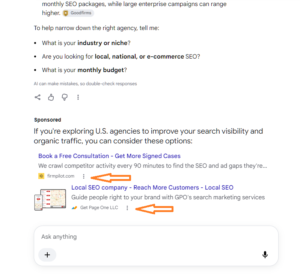
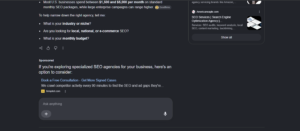
Google is testing a new sponsored ad layout in AI Overviews, with the advertiser name appearing below the ad title and description and the title displayed in a different colour.

In this layout, the advertiser name is displayed below the ad title and description, rather than appearing above them. The ad title also appears in a different colour, giving the sponsored listing a slightly different visual treatment.

The ad continues to display an image thumbnail on the left, with the title and description positioned alongside it.

Here is how the new sponsored ad format appears in Google AI Overviews.

We previously covered a similar layout in Google tests new ad format below AI Overviews, where the image thumbnail was positioned on the left side of the sponsored listing.

Google has also been testing different designs for sponsored ads at the bottom of AI Mode responses, as covered in our earlier article, Google tests new design for ads at bottom of AI Mode responses.

This latest variation brings another visual change to Google’s sponsored results, with the advertiser name moving below the ad content and a different colour applied to the title.

The post Google AI Overview sponsored ads now show advertiser name below title and description appeared first on Search Engine Watch.

Source:: searchenginewatch.com
Google tests table-style questions in AI Overviews that lead to AI Mode

table-style questions in AI Overviews that lead to AI Mode

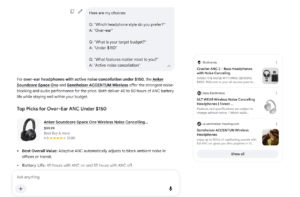
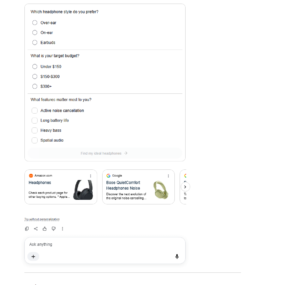
Google is testing a table-style question format in AI Overviews. We covered a similar test in AI Mode before, but today I spotted it in AI Overviews.

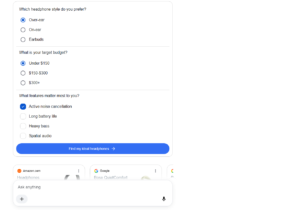
The layout looks like the one ChatGPT uses. Google shows about three questions. After the user selects an answer for each one, a button appears below the table with a “Find my ideal and user keyword” label followed by the keyword. Clicking it redirects the user to AI Mode.

Here is a screenshot of how it looks.

table-style questions in AI Overviews that lead to AI Mode

table-style questions in AI Overviews that lead to AI Mode

This looks like one more way Google is sending users into AI Mode. Google has tested several similar approaches recently, and this may be part of that same push.

The post Google tests table-style questions in AI Overviews that lead to AI Mode appeared first on Search Engine Watch.

Source:: searchenginewatch.com
Google Business Profile adds Facebook Messenger as a chat option

facebook messenger chat GBP

Google Business Profile is now showing Facebook Messenger as an additional option under its Chat feature, allowing businesses to add Messenger as a way for customers to contact them.

The option was spotted by Syed Amir, who shared on X that Facebook Messenger had finally become available under the Chat feature after receiving Google’s emails about it.

We came across this update through SER which reported that Facebook Messenger is now available as a chat option in Google Business Profile.

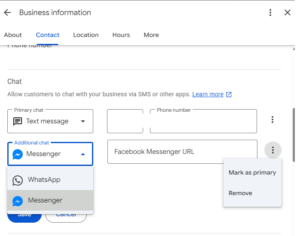
I also checked the Chat settings in Google Business Profile and Facebook Messenger available under the additional chat options, alongside WhatsApp.

There is also a three-dot menu next to the additional chat option. Clicking it provides two controls: “Mark as primary” and “Remove”.

This means businesses can make Messenger their primary chat method or remove it from their profile if they no longer want to offer it as a contact option.

Here is how the Facebook Messenger option appears in Google Business Profile.

This gives businesses another way to manage how customers contact them directly through their Google Business Profile.

The post Google Business Profile adds Facebook Messenger as a chat option appeared first on Search Engine Watch.

Source:: searchenginewatch.com
ChatGPT tests a new web links format in responses

ChatGPT tests a new web links format in responses-1

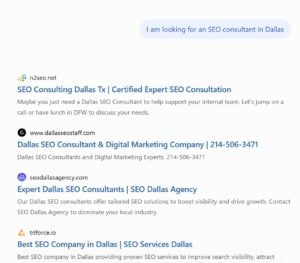
ChatGPT appears to be testing traditional blue links above its answers. Joe Youngblood spotted the test and shared it on X.

Joe wrote: “ChatGPT appears to be experimenting with replying to prompts / questions with blue links! They are showing 5 blue links above the response. This is on the desktop, logged out, and in incognito mode.”

The links look like standard web results, with a favicon, a blue title, and a description.

Here is screenshots Joe shared:

ChatGPT tests a new web links format in responses

Joe shared variations of this design, showing how ChatGPT may display web links alongside its responses.

Personally, I like the blue titles appearing alongside the content. It makes the linked websites more visible and could help users discover and visit those sites, potentially driving more referral traffic.

We found this via SER.

The post ChatGPT tests a new web links format in responses appeared first on Search Engine Watch.

Source:: searchenginewatch.com