Archiv für den Autor: Andreas

Google tests showing website names or URLs in AI Mode ads

website name formats for ads in AI Mode

Google is testing different ways to display website identifiers within ads in AI Mode on mobile. Sometimes ads show the website name, and other times they show the website URL instead.

Here is a screenshot showing the URL format.

Here is a screenshot showing the website name format.

website name formats for ads in AI Mode

Here is a screenshot showing both formats mixed together within AI Mode.

website name formats for ads in AI Mode

It’s unclear which format is the newer test and which is the original, but this inconsistency is worth sharing since it’s a noticeable difference across ads.

The post Google tests showing website names or URLs in AI Mode ads appeared first on Search Engine Watch.

Source:: searchenginewatch.com

Google AI Mode now showing three ads at the bottom instead of two

three ads at the bottom

Google AI Mode previously showed only two website ads at the bottom of the page. I spotted today that AI Mode is now showing three website ads instead.

I assume this is a new change and could be good for advertisers, as Google appears to be increasing the number of ad units shown in AI Mode.

Here is a screenshot showing the three ads appearing within AI Mode.

Here is a screenshot showing the two ads appearing within AI Mode.

two ads at the bottom

This could mean Google is increasing the number of ad slots available within AI Mode, which would be a positive development for PPC advertisers, giving them a new opportunity to gain visibility within this placement.

The post Google AI Mode now showing three ads at the bottom instead of two appeared first on Search Engine Watch.

Source:: searchenginewatch.com

Google tells site owners how many users selected them as Preferred Sources

Preferred Sources

Google is now sending emails to site owners, informing them how many users have added their site as a “Preferred Source” on Google. We’ve seen a number of posts about this from marketers on social media.

Glenn Gabe posted about this on X with screenshots, wrote:

“Whoa, GSC is now telling site owners how many people are adding them as ‘preferred sources.‘ Just received a flurry of emails from Google. This would be cool to see in GSC. :)”

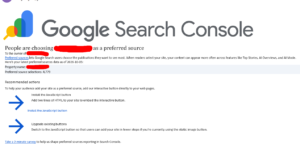
Here is a screenshot of the email he shared.

In the email, Google shows the total number of “Preferred source selections” for the site, along with information about the Preferred Sources feature and recommendations for adding the interactive button to the site.

We’ve previously covered Google Preferred Sources feature you can check that article here for more context.

Personally, I think this is a genuinely good feature for site owners, giving them visibility into how their Preferred Source adoption is growing, even if it’s currently only available via email rather than directly within Search Console.

The post Google tells site owners how many users selected them as Preferred Sources appeared first on Search Engine Watch.

Source:: searchenginewatch.com

Google app for desktop gets hands-free voice search

Google is adding more features to its Google app for desktop while also improving its performance. After recently introducing in-app search modes, the app now supports hands-free voice search, along with changes that Google says reduce memory usage and speed up startup.

Voice search has long been available through Google Search, but this update brings the experience directly to the desktop app. Users can now speak a query through the app’s search box instead of typing it, making quick searches more convenient when they do not want to use the keyboard. Google promotes voice search as a hands-free way to search.

Version 1.0.25.0, released on October 5, adds a microphone button to the search box. Google says voice search provides “real-time speech-to-text transcription”, allowing users to see their spoken query converted into text before the search runs.

When you click the microphone button for the first time, the app asks for permission to use your microphone. You must select Allow before you can use voice search. The permission prompt identifies wga.google.com as the site requesting microphone access.

After you grant permission and click the microphone button, a waveform-style animation appears at the bottom of the search box while the app listens. The animation responds to your voice as you speak, while the app converts your words into text in real time. Once you stop speaking, the transcribed query is used to perform the search.

The update also includes performance improvements. According to Google, background-process optimizations reduce memory usage by around 30% and help the app start faster.

Google has also streamlined window loading to provide a faster and more reliable startup experience.

The post Google app for desktop gets hands-free voice search appeared first on Search Engine Watch.

Source:: searchenginewatch.com

Google tests new loading animation for related products and services section

new loading animation for related products and services section

Google “Find related products and services” section is now loading with a new animation, similar to the “thinking” animation used in AI Overviews. I spotted this yesterday while the section was loading.

When I first saw this animation, I assumed clicking the result would redirect me into AI Mode, since the loading style closely resembles how AI Mode and AI Overview content typically loads. However, clicking it still redirected me to regular Google Search results instead.

Here is a screenshot of this.

new loading animation for related products and services section new loading animation for related products and services section

Google appears to be testing this on both mobile and desktop, so this seems to simply be a new loading animation for this section, without any actual change to where the results redirect.

The post Google tests new loading animation for related products and services section appeared first on Search Engine Watch.

Source:: searchenginewatch.com