Google is testing changes to Local Services Ads (LSA) in its search results, making the listings appear larger. Previously, these ads appeared smaller in comparison.
Anthony Higman spotted this new version and shared it on X, writing: “Google is making Local Services Ads listings biggerrrrrr!!!!!!!!!!!”
Here is a screenshot of this.
Making LSA listings larger could help catch more attention within search results, especially since these ads are already positioned prominently — a bigger size could make them even harder to miss.
For a new blog or business site, start with Twenty Twenty-Five if you’re comfortable building with WordPress’s own blocks. You can change your article layouts, header and footer without buying a premium edition. Blocksy is the better fit when you’d prefer to choose and adjust prepared layouts through a settings panel.
GeneratePress suits a more conventional blog with a main menu and optional sidebars. All three have ongoing free versions, so you can build the site before deciding whether extra design controls deserve a subscription. Hosting and your domain are separate costs.
Theme
Choose it for
Free version includes
Main trade-off
Twenty Twenty-Five
A new site built with WordPress blocks
Editable site templates, headers and footers; blog and page patterns
You’ll work in the Site Editor and take responsibility for the layout.
Blocksy
A business site or blog you want to customise through settings
Header and footer builders, sticky header, blog layouts and page-level controls
Conditional headers and the custom template system require Pro.
GeneratePress
A straightforward blog with conventional layout controls
Typography, colours, navigation and sidebar settings
The visual Block Elements system requires GP Premium.
This shortlist is based on current documentation and free-versus-paid feature checks, reviewed on September 21, 2026. We haven’t run a controlled speed comparison or measured ranking changes. The order reflects different editing needs.
1. Twenty Twenty-Five: best for editing your whole site for free
Twenty Twenty-Five deserves a look before you buy a theme builder. It’s a community-developed WordPress theme, and the year in its name doesn’t mean it has been abandoned: the theme directory lists version 1.5, updated in May 2026.
Its main advantage is that WordPress’s Site Editor lets you change the layouts around your content. You can edit a header once and apply it across the pages using that header, or change the template that displays your articles. There’s no separate premium edition to unlock those controls.
Suppose your company publishes guides alongside its service pages. You want a short “Start here” introduction above the article feed, followed by links to three useful guides. You can build that into the template with ordinary WordPress blocks. The same approach lets you rearrange the article title, author information and content without editing each post separately.
There’s one default worth changing for many sites. The personal blog layout displays entire posts in the feed. That can become unwieldy when you publish long guides. The theme also has text-only, photo and news blog designs; look at the news layouts if you want visitors to browse a selection of articles before opening one.
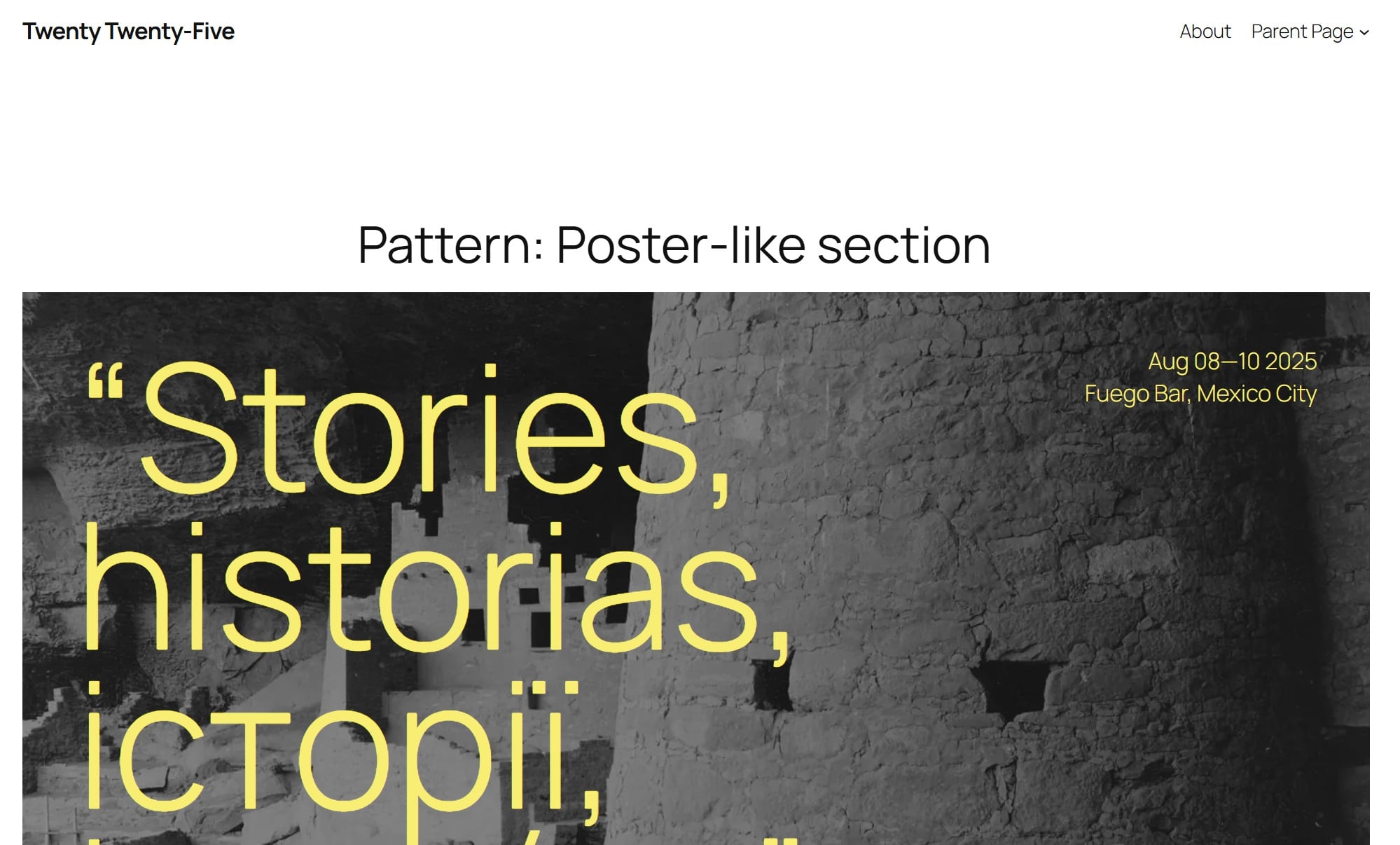
Twenty Twenty-Five includes news layouts as well as its default personal blog design. Official theme preview: WordPress documentation.
The trade-off is the editing process. You’re arranging blocks and working with shared templates, so a change can affect several pages at once. Someone who wants to select a layout, adjust a few settings and get back to writing may prefer Blocksy.
2. Blocksy: best for adjusting layouts through settings
Blocksy puts a useful amount of control into its free version. Its feature comparison includes header and footer builders, a transparent header and a sticky header in the free column. You can organise the navigation around your business without immediately buying an upgrade.
You write posts with WordPress blocks, while most theme settings live under Appearance → Customise. There are controls for the overall layout, typography and sidebars, plus overrides for individual pages and posts. For example, a service page can use a different content layout from the articles in your blog.
The blog controls are a particular reason to choose it. You can select a simple list, grid or other archive layout, then adjust the article cards. An archive is a page that lists posts, such as your blog index or a category page. Showing clear titles, summaries and useful links there gives readers a way into your older work.
That also gives Blocksy a concrete advantage over Astra for this job. Astra’s comparison table puts post-grid controls and masonry layouts in Pro, although basic post structure and content-width controls are free. Blocksy already includes several archive layouts in its free theme. For a business building an article library, that distinction is more useful than another “SEO optimised” badge.
Blocksy’s limit appears when you want to build an entirely custom archive or article template, or show different headers on selected pages. Those belong to its Pro system. The published Personal plan is $69 a year for one site and includes those features. A standard business site and blog can use the free layouts without that purchase.
3. GeneratePress: best for a straightforward blog setup
GeneratePress makes sense when you want familiar controls around your writing: a menu, readable typography and a sidebar where it helps. The free theme includes colour, typography and navigation controls, and works with WordPress’s block editor for your page content.
Its sidebar settings show the sort of practical flexibility you get. You can choose layouts separately for the site overall, the blog and archives, and individual posts. A page can override the general setting. That means a service page can have no sidebar while your blog keeps a list of topics beside the articles.
The free version covers that setup. For custom sections managed through the block editor and display rules, GeneratePress offers Block Elements through GP Premium.
Block Elements let you create sections with the block editor and control where they appear. Imagine a box linking to your main beginner guides, placed after articles in one category and excluded from the rest of the site. The location and exclusion rules give you a way to manage that placement centrally.
For that job, the relevant purchase is GP Premium, listed at $59 a year. The $149-a-year GeneratePress One bundle adds other products; the Block Elements documentation recommends the free GenerateBlocks plugin for building those sections.
This upgrade makes the most sense for a site already using GeneratePress that needs more control. For a fresh build where editing shared templates is the priority, Twenty Twenty-Five already provides that workflow for free.
What makes a WordPress theme good for SEO?
A theme affects how your content is presented and contributes to the code and resources a browser loads. It can give visitors clear navigation, readable articles and a layout that works on a phone. Those are useful qualities to assess on the pages you intend to publish.
Google says Core Web Vitals are used by its ranking systems, but good scores don’t guarantee top rankings. That’s why a theme demo scoring 100 in a performance test isn’t enough to decide this question. Your site will have different images, plugins, scripts and content.
Navigation deserves as much attention as the homepage design. Google recommends crawlable links with descriptive text, and every important page should have a link from another page on the site. Keep your service pages and main categories easy to reach, then add relevant links within the articles themselves. Our internal-linking guide explains that editorial work in more detail.
The purchase price tells you little about any of this. For a small site with five company pages and 20 articles, all three free themes cover the basic publishing job. The decision changes when you specify the layouts you need: shared templates built from blocks, ready-made archive designs, or conventional posts with sidebars.
Before switching, compare the pages people actually visit
Make a backup and test the replacement on a copy of your site. Our guide to changing WordPress themes safely explains the staging approach. Keep the content, plugins and hosting environment the same while you compare the themes.
Page to compare
What to check
Your homepage or main service page
Does the mobile menu work? Are the important links easy to find? Does a large banner push the useful content too far down?
A long article that receives search traffic
Check the title, headings, author information, images and internal links. Look for content that disappears or becomes difficult to read after the switch.
A category archive with several pages of posts
Can readers open the listed articles and reach older posts? Check the summaries, pagination and links, including on a phone.
For the performance comparison, Lighthouse in Chrome DevTools can audit a protected staging page. Run it before and after the theme change with the same device settings, and repeat the runs so you don’t base the decision on one unusually good result. Inspect the reported causes of slow loading as well as the score.
On public pages, PageSpeed Insights adds real visitor data where enough is available. That data covers the previous 28 days and may describe the whole site rather than the individual page. It won’t immediately isolate the effect of a theme you activated this morning.
Google’s documentation example shows how PageSpeed Insights reports real visitors‘ loading experiences. These are example values, not results for the themes in this article. Source: Google, CC BY 4.0; image unmodified.
Keep your existing page addresses and SEO configuration intact during the comparison. A redesign shouldn’t quietly remove an important navigation link, change a canonical URL or hide content that brought people to the page.
Already using Astra, Kadence or another theme that handles these pages well? This comparison gives you no ranking-based reason to replace it. If the audit points to a large image or a third-party script as the bottleneck, fix that first and measure again before committing to a theme change.
I want people asking AI tools about SEO to come across Search Engine Watch. We’re putting work into rebuilding the site, and I want that work to be found. If an assistant keeps overlooking us for relevant questions, I’d like to understand why.
But if someone wants me to take money out of reporting or audience development to improve an AI visibility score, they’ll need to explain what I’m getting. Being mentioned more often would interest me. It wouldn’t, on its own, tell me that the money was well spent.
I’d start by looking at the questions
Say we track 100 questions and SEW appears in 60 answers. I’d want to see those questions before getting excited about the percentage. “Which publications cover SEO?” and “How do I fix a canonical tag?” could both matter to us, but they’re asking for different things. A set built mainly around recommending publications would tell me something different from one built around solving readers‘ problems.
If we change the questions, we could change the score without improving a single thing about the site. So I’d be quite annoyed to discover that we’d spent a month trying to improve a number whose meaning nobody had properly explained.
The fact that AI answers vary doesn’t make all of this pointless.
Profound’s own two-week frequency study also reported similar aggregate visibility readings when it ran 753 prompts once or ten times daily across seven platforms.
There’s a case for tracking those patterns. I just don’t think repeating a question more often gets us out of explaining why we chose it. Nor does a fresh question necessarily reflect a conversation in which someone has already explained their budget, preferences and circumstances.
The volume estimates deserve the same attention.
Ahrefs explains that its AI adjusted volume comes from Google search volume, adjusted using platform-specific website traffic ratios. It explicitly says this cannot tell you how many people saw your brand in an AI response or establish an AI-only addressable market. If someone uses that estimate to tell me how many people saw SEW, I’m going to ask them to read the explanation again.
Profound advertises “exact keyword volumes,” then explains in its FAQ that it uses licensed consumer-panel conversations and modeling to estimate activity across a wider population. That can be useful research. I still don’t understand the need for “exact” when “estimated” would save everyone some explaining.
What would make me put money behind it?
If an assistant repeatedly describes our business incorrectly, I want to know. If it keeps citing an outdated page, I want someone to investigate. Those are specific problems a tool can help us find, and I can decide how much fixing them is worth.
There are also records we can inspect. Profound’s beta v2 documentation describes answer and citation exports. Saying there’s no possible audit trail goes too far. The limit is what the record proves: an answer collected by the tracker doesn’t establish that a prospective customer received it. And a link in that answer doesn’t, by itself, tell us how much the linked page influenced the recommendation.
I’m interested in research that gets closer to actual behavior. Profound’s July study analyzed more than two million AI conversations and associated browsing activity from a US panel. It found higher subsequent brand-site visit rates than a baseline forecast from users‘ earlier behavior. Its methodology also says this wasn’t a randomized experiment or a purchase study, and that selection bias remained possible.
I’d take that as a reason to investigate further. I wouldn’t take it as proof that paying to improve our visibility score will bring us more subscribers or advertisers.
For SEW, I’d start with a limited test around questions our intended readers actually ask. Keep the question set consistent, record what we change, and look at whether relevant visits, subscriptions or enquiries improve. Ask new customers how they found us. Account for other work happening at the same time. It won’t give us perfect attribution, but it gives us something to discuss beyond whether the score went up.
And if all we can show at the end is more mentions in the answers we tracked, we should say so. I’d still need to decide whether that’s a good enough reason to keep paying.
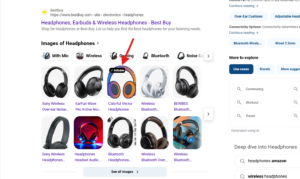
Bing Image results are now showing an “Editable” tag on certain images. This suggests that AI-generated images from Bing can now rank within its own search results.
I spotted this while searching for “headphones” one of the images in Bing’s Images results had this “Editable” tag attached to it.
Clicking on it takes you to the Bing Images tab, where you can actually edit the image, along with the original prompt used to generate it.
If you already edit articles in Microsoft 365 Word, check its similarity checker before buying a Copyscape replacement. It can point you to matching online passages while you work on the draft. For an occasional article, that may cover the job you need done.
For a dedicated publishing tool, I’d start with Originality.ai. Copyleaks deserves a closer look when you need to investigate material copied across languages, although that feature requires its much more expensive Pro plan. These are three different reasons to switch; checking a few English-language drafts more cheaply usually isn’t one of them.
Alternative
When I’d consider it
Cost and main restriction
Microsoft Word
Reviewing a draft in Word when your account already has Similarity.
No extra tool subscription in that situation. Access depends on your Word account; don’t assume free Word includes it.
Originality.ai
Regular article checks with reports you can send to another editor or writer.
Multilingual publishing, especially investigating translated source material.
Personal: $16.99/month. Cross-language detection is listed under Pro at $99.99/month.
USD, monthly billing, before tax. Sources: Microsoft, Originality.ai and Copyleaks. Checked September 20, 2026.
I’ve spent 20 years building sites and counselling clients. For this shortlist, I’m interested in what happens when an editor receives a draft: can they find the matching source, understand the passage and send useful feedback to the writer? I’ve compared documented features, prices and restrictions here. I haven’t run a detection benchmark, so the order doesn’t claim that one tool catches more copying than another.
1. Microsoft Word: check what you already have
A separate subscription is hard to justify for occasional checks if the editor you already use can show you the source. That makes Word the first option I’d investigate for someone whose articles already arrive as Word documents.
In Word, open Home → Editor → Similarity → Check for similarity. Microsoft’s instructions describe a result that identifies matching passages and links to online sources. You can review each passage and insert a citation from the same pane. The support page applies to Word for Microsoft 365 on Windows and Mac. Microsoft explains the steps here.
Imagine a contributor sends you a draft about email marketing. A paragraph closely follows an article the writer used during research. Seeing that source beside the draft gives you something specific to discuss: whether the wording needs attribution, whether a direct quotation would be appropriate, or whether the writer needs to develop the explanation themselves.
The recommendation depends on having access already. If Similarity isn’t available in your account, don’t buy Microsoft 365 solely on the assumption that it will appear. Confirm eligibility for your plan first. This also isn’t a documented replacement for a publishing queue, a website-wide check or continuing alerts about copies of your published pages.
Word earns its place because reviewing one document where you already edit it can be enough. Once you need to collect and pass around a separate report for every commissioned article, the next option becomes more relevant.
2. Originality.ai: for a regular flow of articles
Originality.ai is the dedicated option I’d start with when checking drafts is a recurring editorial task. Its published plan includes shareable reports and URL or full-site scans. Those features suit an editor who needs to return source evidence to a contributor, then keep the result with the article’s other production notes.
For example, an editor handling several commissioned articles can send the writer a report and ask about a specific passage. The useful part is having evidence that both people can inspect. A message saying “your score is too high” gives the writer much less to work with.
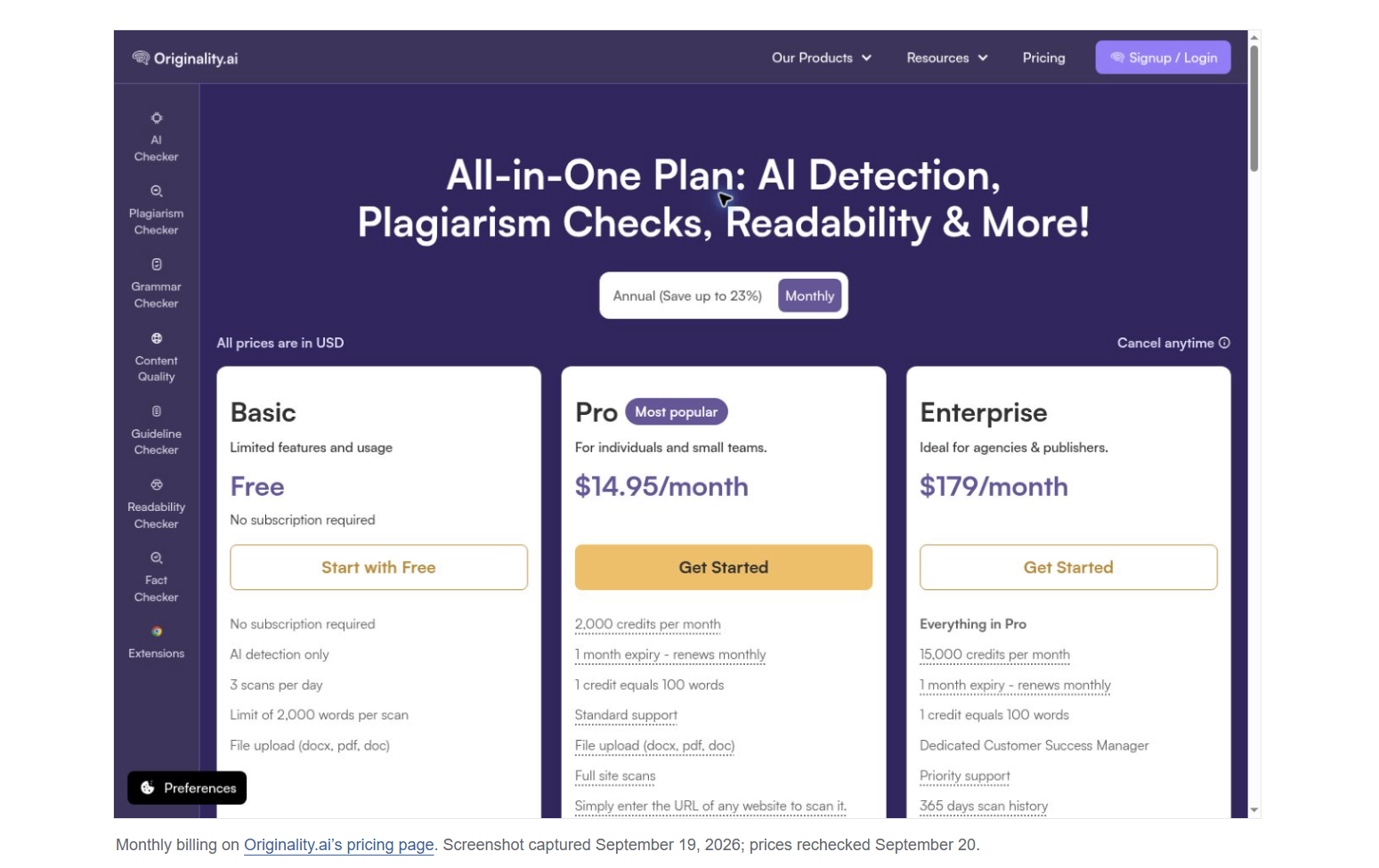
Pro supplies 2,000 monthly credits, with one credit covering 100 words. Its free Basic plan is for AI detection only, so it doesn’t replace a paid plagiarism check. Unused subscription credits expire each month. An additional Pro seat costs $9.95 monthly, which matters if several editors need their own access.
There’s also a content-use decision to make before uploading confidential work. Originality.ai’s privacy policy says submitted scan text may be used for training and that users can opt out. Check that setting and your organization’s requirements before submitting an unpublished client draft. A plagiarism result and the service’s handling of the submitted text are separate questions.
I wouldn’t switch merely to get batch checking or an API. Copyscape Premium already offers both. Originality.ai’s case rests on whether its reporting and editing workflow fit your publication, with enough monthly use to make the subscription sensible. The worked example below shows where its price starts to compete with Copyscape’s usage charges.
3. Copyleaks: when the source may be in another language
Copyleaks has the most distinct specialist reason for inclusion: you may publish in one language while a contributor researches in another. Checking a Spanish draft against Spanish pages and checking it for material translated from an English source are different jobs.
Copyleaks advertises plagiarism checking in more than 100 languages. Its product documentation says a normal scan compares content in the submitted language. Cross-language detection extends the search to other languages. Its API documentation currently lists nine supported input languages and more than 30 result languages, so check the direction you need as well as the headline language count.
The plan restriction changes the buying decision. Personal includes 100 credits a month; translated-source detection is listed under Pro, which includes 1,000 credits and 25 seats. The current pricing matrix puts those features in different tiers. An individual checking ordinary same-language drafts has a much weaker reason to pay for Pro than a publication working across languages.
For a concrete trial, use a source passage you have permission to test, translate it into your publication’s language and see whether the report identifies that known source. Repeat with a genuinely original passage. This gives you a way to assess the exact language pair you need before paying for a capability described by a broad coverage number.
Cross-language scanning can also use more credits. Copyleaks‘ API documentation charges separately for the original-language scan and each additional language selected. On that model, a 1,500-word document costs six credits for the base scan and another six for each extra language. That is an API billing example; confirm the allowance and estimated charge in the consumer product before treating Pro’s advertised word capacity as translated-source capacity.
What the same publishing workload costs
Suppose you check 50 articles a month, each exactly 1,500 words long, once before publication. That is 75,000 submitted words. Holding the document length and number of passes constant makes the different pricing units easier to compare.
Service or plan
What one 1,500-word check uses
What the base plan covers
Word Similarity
No separately listed per-scan charge for an account with access.
An included feature to check first. Microsoft’s cited support page doesn’t give a monthly scanning allowance.
Copyscape Premium
$0.16 in usage charges
Pay from prepaid credit; no subscription assumed.
Originality.ai Pro
15 credits for plagiarism checking
133 complete drafts from 2,000 credits
Copyleaks Personal
6 credits for a standard check
16 complete drafts from 100 credits
Copyleaks Pro
6 credits for a standard check
166 complete drafts from 1,000 credits
SEW calculations from Copyscape, Originality.ai and Copyleaks published rates. Plagiarism checking only; one operator; no repeat checks, additional languages, private-index fees or top-ups. Complete-draft counts round down and leave small credit balances.
Copyscape charges three cents for the first 200 words and one cent for each additional 100 words or part of 100. Our 1,500-word article therefore costs 16 cents: three cents plus 13 cents. Fifty such checks use $8 of credit. That is credit consumed, not necessarily the amount you must deposit at checkout.
At this document length, Originality.ai’s monthly subscription first becomes cheaper than Copyscape’s usage charges on the 94th check: $14.95 against $15.04. Both remain within the allowances used here. If you publish ten articles a month, though, Copyscape consumes just $1.60. Buying a separate subscription would need to solve a workflow problem that the lower usage bill doesn’t.
Copyleaks Personal’s allowance doesn’t cover the 50-article example. You would need extra credits or another plan. Top-ups are offered, but their unit price wasn’t available on the public pricing page, so this comparison doesn’t invent a total for them. Pro covers that volume of standard checks, but its main reason for making this shortlist remains the language capability.
Count checks as well as articles. If an editor scans all 50 drafts again after revision, the modeled workload becomes 100 checks. Copyscape would consume $16; Originality.ai would use 1,500 credits. If you also enable AI detection or other paid checks, recalculate using the charge for that combination.