Archiv für den Monat: September 2026

Google tests Chrome desktop Search with AI Mode from the Windows taskbar

Google is preparing a new way to search from the Windows desktop without first opening a Chrome window.

The latest Chrome Canary onboarding for the feature shows how users can access it. The setup screen is titled “Search with Chrome from anywhere” and tells users to “Open from the Windows task bar.” Chrome says the experience can stay available while the browser is minimized or running in the background.

Google Lens is a central part of the experience. Users can share what’s visible on their screen, including content in another app or an open file, and use it as the starting point for a Google query.

The desktop Search interface also includes an AI Mode button, allowing users to submit conversational prompts without opening a regular Chrome tab first.

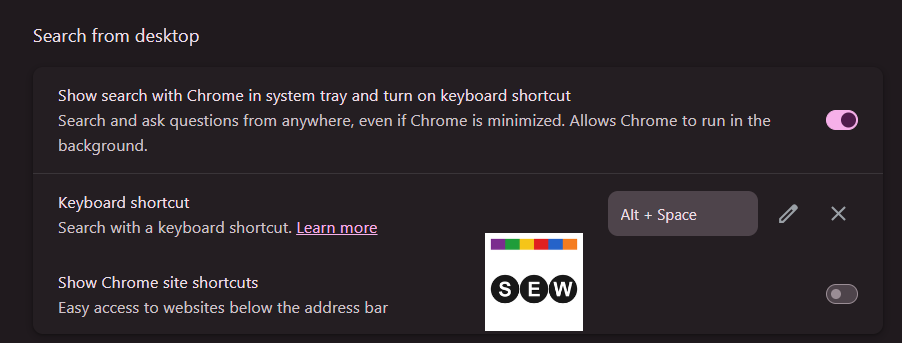
Chrome provides a configurable keyboard shortcut for quicker access. The current Settings page lists Alt + Space and lets users edit or remove the combination if it conflicts with another app.

Chrome’s related Settings screen calls the feature “Search from desktop.” It includes a toggle to show Search with Chrome in the system tray and enable the keyboard shortcut.

Image Credit: Venkat | Search Engine Watch

Earlier Canary builds used “Ask Google from anywhere” wording and placed more emphasis on the keyboard shortcut. The newer onboarding puts more attention on taskbar access, screen-based queries, Google Lens, and AI Mode.

Google is testing the feature in Chrome Canary under the Omnibox Loom name, as part of its Project Omnibox Everywhere work. You may need to enable the relevant Chrome flags to try it, and the feature could change before Google makes it available more widely.

The post Google tests Chrome desktop Search with AI Mode from the Windows taskbar appeared first on Search Engine Watch.

Source:: searchenginewatch.com
OpenAI tests sponsored agents in ChatGPT

Reimagining advertising with AI

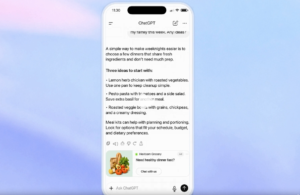
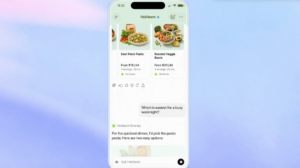
OpenAI is testing sponsored agents within ChatGPT. When a user clicks on an ad in ChatGPT, they can start a conversation with a business-sponsored AI agent, allowing them to ask follow-up questions about products and services, and visit the business’s website directly. This is clearly labeled as a limited test currently running in the U.S.

OpenAI announced this via its blog.

Here is a screenshot of the conversation.

Reimagining advertising with AI

Reimagining advertising with AI

OpenAI also shared several other updates in the blog:

AI campaign creation for ChatGPT ads

Advertisers can now use natural-language prompts in ChatGPT to create campaigns, update campaigns, analyze performance, and get recommendations. This is being done through the Ads Manager plugin.

AI creative tools in ad management

Based on the landing page and campaign objective, advertisers can get suggested ad copy and imagery, and review or edit these suggestions before publishing.

AI-powered text customization

Advertisers can opt in to let AI adapt existing headlines and descriptions based on the conversation context, and automatically translate ad copy into the user’s preferred language.

HubSpot and Shopify integrations

HubSpot is now the first CRM partner for ChatGPT ads. Businesses can create ChatGPT ad campaigns, track performance, and follow up on leads directly from within HubSpot.

Shopify is the first ecommerce partner. U.S. Shopify merchants can now create and manage campaigns using the ChatGPT Ads app. This app will become available internationally starting September 23, in markets where ChatGPT Ads are supported.

The post OpenAI tests sponsored agents in ChatGPT appeared first on Search Engine Watch.

Source:: searchenginewatch.com
Bing tests Top Picks badges within Shopping ad results

top picks

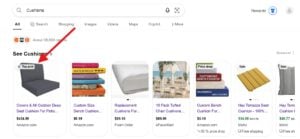
Bing is now testing “Top Pick” badges within Shopping ad results. Along with the badge, the box for that particular result appears larger compared to others.

I think this “Top Pick” badge might be based on past user behavior how often users have clicked on or purchased a particular product for a given keyword and it could reflect the best-selling item for that specific search term.

Here is a screenshot of how it looks.

top picks

Showing a badge with a larger box for a specific product could help increase CTR, giving that website a visibility boost over competing results.

The post Bing tests Top Picks badges within Shopping ad results appeared first on Search Engine Watch.

Source:: searchenginewatch.com
Anthropic merges Claude Cowork into Claude chat

Anthropic is merging Claude Cowork and regular Claude chat into one interface.

Instead of choosing which Claude mode to use, users can simply start a conversation. Claude will decide which capabilities are needed for the task.

The change is rolling out first to Claude Pro and Max users across web, desktop and mobile. Team and Free users will get it later.

Anthropic is also adding Claude Docs and Claude Slides, allowing users to create and edit documents and presentations from the same conversation. Presentations can be exported to PowerPoint or PDF, while Claude Design is also being brought directly into conversations.

The bigger change, though, is what happens to Cowork.

Cowork is becoming part of normal Claude use

Cowork is Anthropic’s system for handling longer, multi-step tasks.

Rather than simply answering a question, Claude can work with files, use connected services, carry out research and complete a series of steps toward a finished result.

Until now, users had to deliberately move into Cowork when they wanted that kind of workflow.

Anthropic says that distinction created unnecessary friction. A task could start as a simple conversation and then become more complicated, forcing users to decide whether they should continue in chat or move into another Claude experience.

Now that decision increasingly belongs to Claude.

A user can start with a simple request, then ask Claude to investigate further, work with connected data, produce a document and turn the findings into a presentation without changing interfaces.

Why this matters for search marketers

Anthropic has already shown that Cowork can be used for marketing tasks that go well beyond writing copy.

One example from Anthropic’s own marketing team is a Google Ads search term audit.

Claude can inspect search terms, identify possible negative keywords, explain why they may need to be excluded and wait for human approval before changes are made.

Anthropic has also demonstrated Cowork being used for scheduled marketing briefings, reporting dashboards and other recurring workflows. (anthropic.com)

Those capabilities are not new.

What is changing is how easily users can reach them.

A search marketer could start by asking Claude why campaign performance changed, then continue into reviewing search terms, investigating the data, summarizing the findings and preparing a client report.

That entire workflow can increasingly begin from the same chat box.

Anthropic is removing the line between chat and agents

This is why the update is more than a cosmetic redesign.

AI assistants have largely trained users to think in terms of questions and answers. Agentic tools such as Cowork are designed around giving the AI a goal and allowing it to complete multiple steps.

Anthropic is now bringing those two behaviors closer together.

Instead of asking users to decide when they need an AI agent, Claude can move from answering a question to completing a larger task as the conversation develops.

For marketers, that makes the difference between asking AI what to do and asking AI to do the work increasingly small.

The post Anthropic merges Claude Cowork into Claude chat appeared first on Search Engine Watch.

Source:: searchenginewatch.com
New Google Ads Spend Benchmarks feature will put peer pressure on your budget

Google Ads is rolling out a new Spend Benchmarks report that compares an advertiser’s weekly spend and clicks with businesses Google considers similar.

The feature was first spotted by paid search specialist Thomas Eccel. Google does not appear to have publicly documented the report yet. The interesting part is not simply that Google is showing advertisers what their peers spend.

It is what the numbers actually say.

More spend, but much more traffic

In Eccel’s example, the advertiser spent €284 over seven days, compared with €268 for its peers.

That is about 6% more spend.

But the same account generated 912 clicks, compared with 765 clicks for its peers, or roughly 19% more clicks.

That puts the advertiser’s implied average CPC at about €0.31, versus roughly €0.35 for the peer group.

So the advertiser appears to be getting clicks around 11% cheaper than its peers.

That makes the spend comparison much less useful on its own.

Peer spend is not a budget recommendation

Knowing what similar advertisers spend can provide useful context, especially for agencies trying to understand whether a client’s budget is unusually high or low.

But similar businesses can have very different margins, conversion rates, customer values and sales economics.

An advertiser spending less than its peers could still be running a better business.

And an advertiser spending more could simply be wasting more money.

That distinction matters because the Spend Benchmarks interface also encourages advertisers to explore what they could get by increasing spend.

For marketers, the more important question remains whether the next dollar spent produces profitable incremental results, not whether competitors are spending more.

The first Spend Benchmarks example makes that point surprisingly well.

The advertiser spent 6% more than its peers, generated 19% more clicks, and appears to have paid about 11% less per click.

Google can tell you what similar advertisers are spending.

It still cannot tell you whether you should spend like them.

The post New Google Ads Spend Benchmarks feature will put peer pressure on your budget appeared first on Search Engine Watch.

Source:: searchenginewatch.com