Ahrefs Lite costs $129 a month and bundles five tools into one login: Site Explorer for backlinks, Keywords Explorer for keyword research, Rank Tracker for 750 keywords, Site Audit for technical checks and competitor analysis. Most people use one or two of them every week. A link builder works in Site Explorer, a blogger works in Keywords Explorer, and a technical SEO works in crawl data.
This guide takes each Ahrefs tool in turn and lists four alternatives for it. For every alternative you get the Ahrefs tool it replaces, the features that do the work, where it beats or trails Ahrefs, and the price from the vendor’s own pricing page.
Map your Ahrefs use before picking a replacement
Open your Ahrefs account and note which tools you open most. Each pattern points to one section of this guide:
- Mostly Keywords Explorer: You plan content and look for keyword ideas. Go to the keyword research section.
- Mostly Site Explorer: You build links, audit backlinks or study competitor links. Go to the backlink section.
- Mostly Rank Tracker: You report rankings to clients. Go to the rank tracking section.
- Mostly Site Audit: You fix technical issues. Go to the site audit section.
- Mostly competitor pages: You study rival traffic and ads. Go to the competitor and PPC section.
If you use several Ahrefs tools, the stack cost table near the end shows whether splitting them across tools still saves money.
Best Ahrefs Alternatives for Keyword Research
These four tools replace Ahrefs Keywords Explorer. In Ahrefs, Keywords Explorer gives search volume, Keyword Difficulty, clicks, Parent Topic, Traffic Potential and the pages that rank now. A replacement needs at least volume, a difficulty score and a view of the current top 10.
Mangools KWFinder
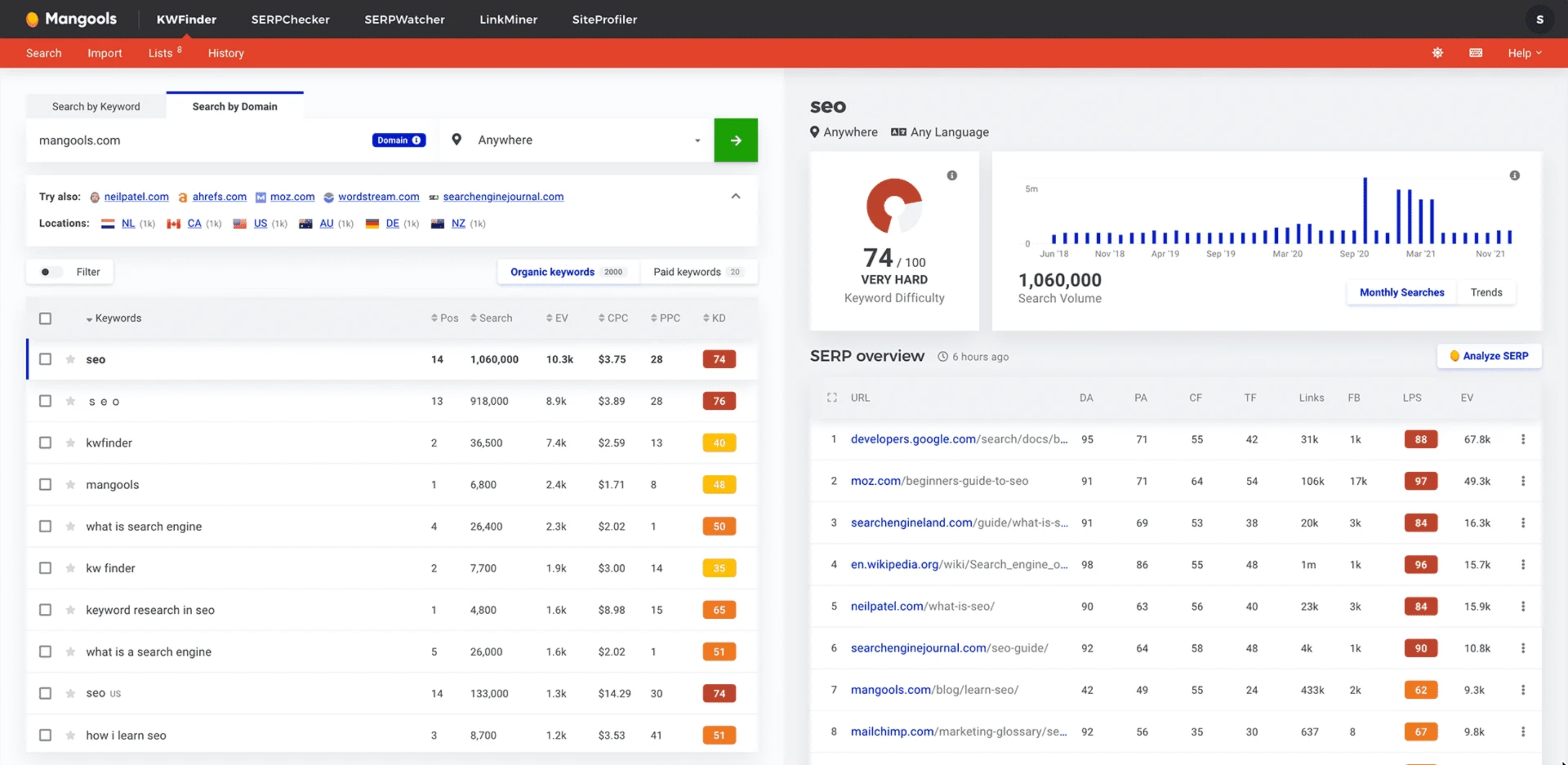
If Keywords Explorer is the only part of Ahrefs you open, Mangools KWFinder is the cheapest way to replace it. It covers the core of keyword research, volume, difficulty and the current top 10, at a fraction of the Ahrefs price, which makes it a popular Ahrefs alternative for bloggers and small sites.
Here is what you get in Mangools KWFinder and how each part lines up with Ahrefs:
- Keyword Difficulty (0 to 100): Each keyword gets a difficulty score worked out from the link strength of the pages in the current top 10.
- Search by domain: Enter a competitor’s URL and KWFinder lists the keywords that site ranks for, with position, volume and difficulty, much like the Organic keywords report in Ahrefs Site Explorer.
- SERP overview: The right-hand panel shows the top 10 results for the chosen keyword with Domain Authority, Page Authority, Citation Flow, Trust Flow and estimated visits for each page.
- Trend chart: A 12-month volume chart shows seasonal keywords before you plan content around them.
- Filters and lists: Filter suggestions by volume, difficulty and words to include or exclude, then save them into keyword lists.
Where KWFinder falls short of Ahrefs is topic grouping. It has no Parent Topic or Traffic Potential, so deciding which keywords belong in one article takes manual work, and Ahrefs handles very large keyword exports better. On price, though, the gap is wide: the Mangools Basic plan costs $18.85 a month billed yearly and allows 100 keyword lookups every 24 hours, about a seventh of Ahrefs Lite.
Semrush
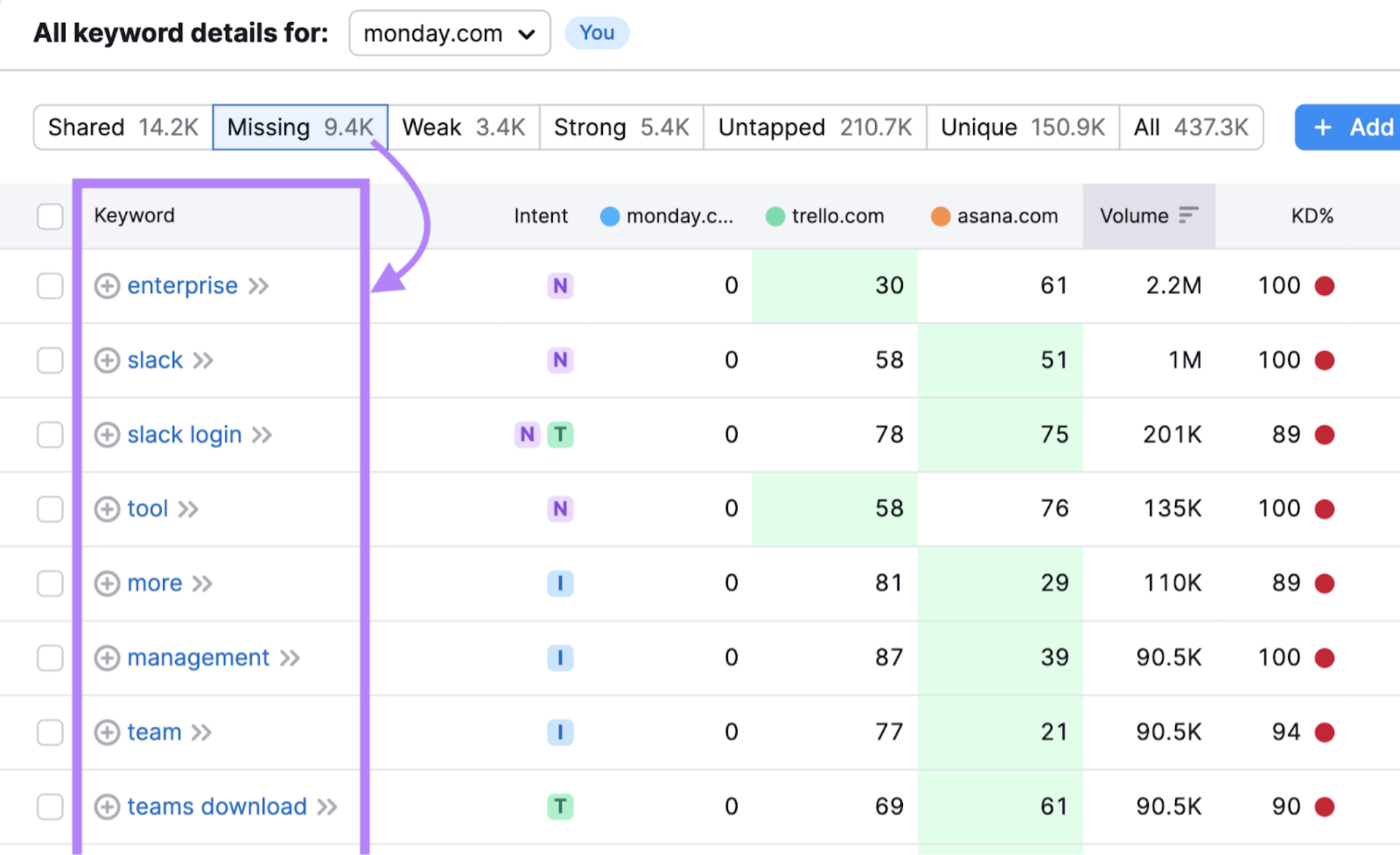
Semrush KWFinder saves money, but some teams switch from Ahrefs because they want a full suite with the same depth. For them, Semrush is the closest like-for-like Ahrefs replacement, and its Keyword Research toolkit matches Keywords Explorer feature for feature.
The four Semrush tools that do the work of Keywords Explorer are these:
- Keyword Magic Tool: Enter one seed keyword and Semrush returns related keywords sorted into topic groups in the left sidebar, with volume, Keyword Difficulty, intent and CPC for each.
- Keyword Overview: One page with volume, difficulty, intent, trend, SERP features and the current top results for a keyword.
- Keyword Gap: Compares your domain with up to four competitors. The Missing tab lists keywords all competitors rank for and you do not, which Ahrefs covers with its Content Gap report.
- Keyword Strategy Builder: Turns a list of keywords into topic clusters with a suggested pillar page and subpages.
The Keyword Magic Tool’s topic groups do the clustering that Ahrefs leaves to Parent Topic, and Keyword Gap is one of the reasons people move away from Ahrefs in the first place. The catch is cost: the SEO plan is $139.95 a month, about the same as Ahrefs Lite, so moving to Semrush changes the workflow, not the bill.
Moz Pro
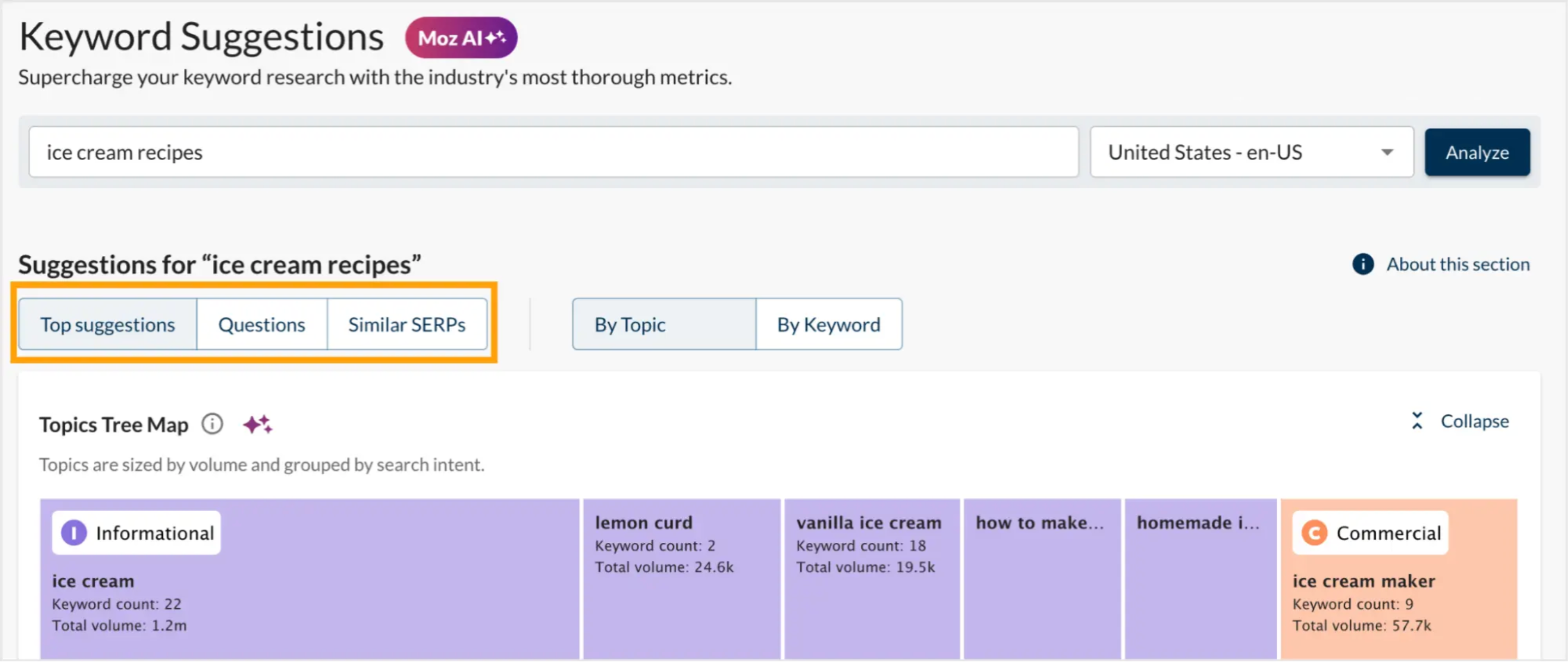
Between the low price of KWFinder and the full Semrush suite sits Moz Pro. Its Keyword Explorer is a solid alternative to Ahrefs Keywords Explorer, with a few metrics that Ahrefs does not show in the same way.
Moz Keyword Explorer gives you these features for each keyword you search:
- Keyword Suggestions with Topics Tree Map: Suggestions are grouped into topic boxes sized by volume, so you can see which subtopics carry the most searches.
- Difficulty, Organic CTR and Priority: Next to volume, Moz shows how many clicks the organic results get after ads and SERP features, and a Priority score that combines volume, difficulty and CTR.
- SERP Analysis: Shows the ranking pages with Page Authority, Domain Authority and linking root domains.
- AI Overviews data: Flags keywords where Google shows an AI Overview.
Organic CTR does a similar job to the clicks data in Ahrefs, and the Priority score saves time when sorting long lists. The weak point is the query limit. Standard costs $99 a month, or $79 a month paid yearly, but allows only 150 keyword queries a month, while Medium, at $179 a month, allows 5,000. Anyone replacing Ahrefs for daily research should budget for Medium.
Google Keyword Planner
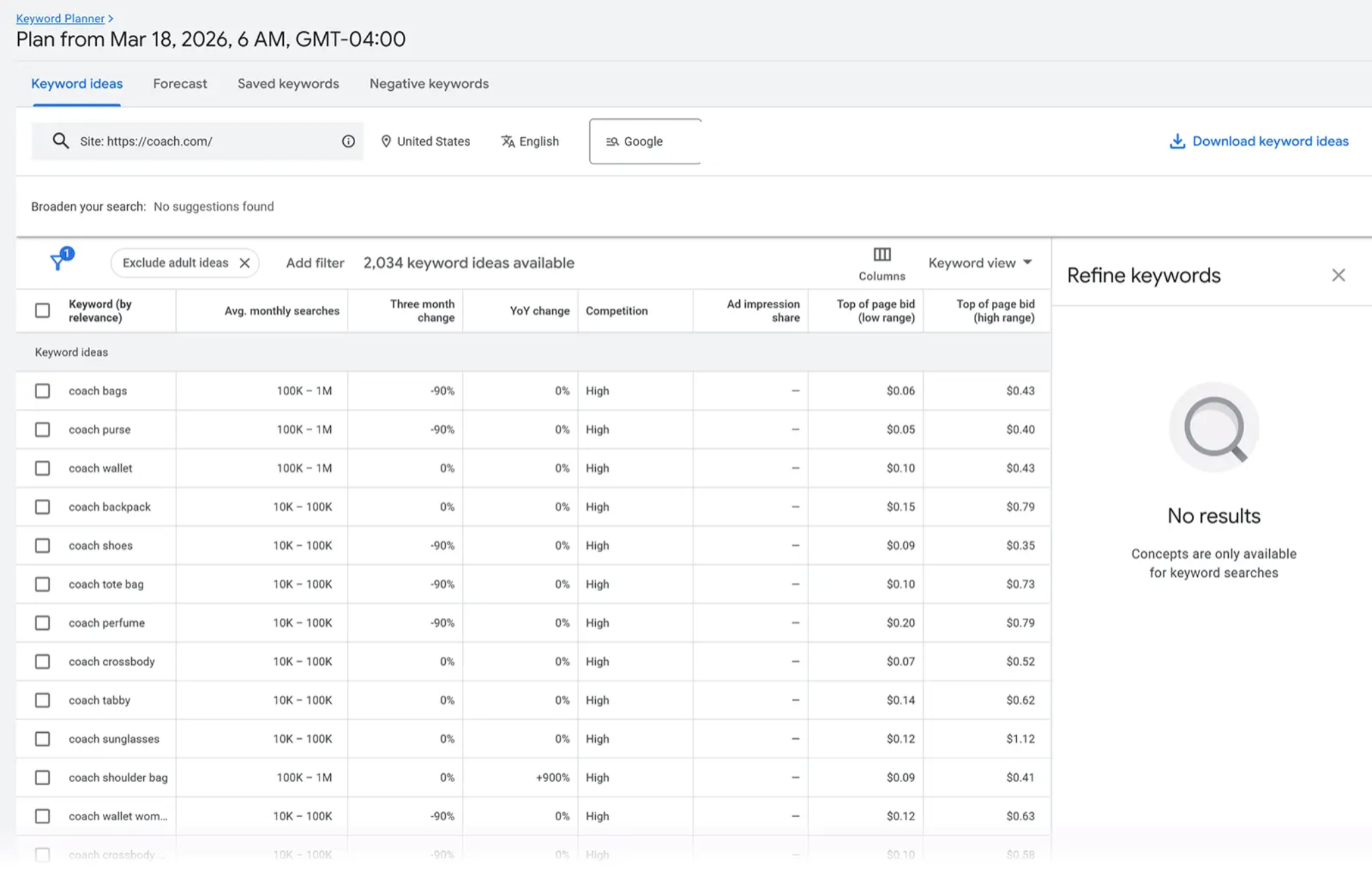
All three tools so far are paid. For anyone who wants a free option instead of Ahrefs for search volumes, Google Keyword Planner is the place to look, as long as you already run or are willing to set up Google Ads.
Planner has fewer features than the paid tools, but these four are useful for keyword research:
- Discover new keywords: Enter a product, service or website URL and Planner suggests related keywords.
- Avg. monthly searches: Search volume comes straight from Google, shown as ranges on accounts without active ad spend.
- Competition and top of page bids: Shows how much advertisers compete for each keyword and the low and high bid range, a useful signal of commercial value.
- Forecasts: Predicts clicks and cost for a keyword list at a chosen budget.
Planner is not a full substitute for Ahrefs because it has no difficulty score and no list of ranking pages. It works best as a free second volume source next to KWFinder, Semrush or Moz Pro. Google also asks you to finish your Google Ads account setup, including billing information, before it shows keyword ideas.
Best Ahrefs Alternatives for Backlink Audits & Link Prospecting
After keyword research, the next Ahrefs tool to replace is Site Explorer, the backlink tool most people pay Ahrefs for. Site Explorer shows Domain Rating, referring domains, anchor text and new and lost links for any site. A replacement needs a large, fresh link index and a way to turn competitor links into a prospect list.
Majestic
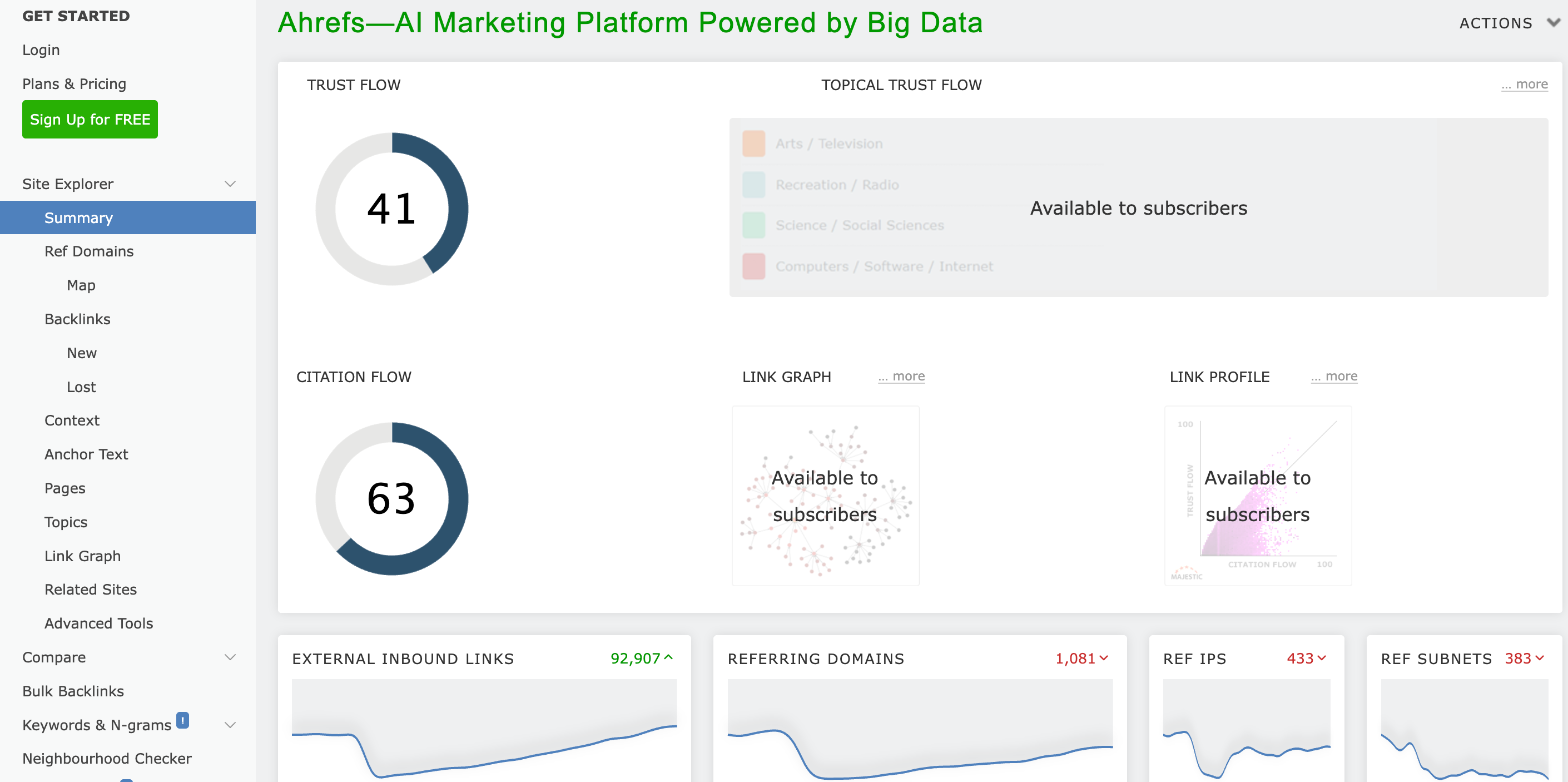
For link work, Majestic is the specialist Ahrefs alternative. It does nothing except backlink data, which is exactly why link builders who only use Ahrefs Site Explorer often move to it.
Majestic’s main reports and metrics for backlink work include:
- Site Explorer summary: For any domain, the summary page lists Trust Flow, Citation Flow, external backlinks and referring domains.
- Trust Flow and Citation Flow: Citation Flow measures how many links point to a URL. Trust Flow measures how close those links sit to a set of trusted seed sites. A site with high Citation Flow and low Trust Flow often has many weak links, which is useful in a backlink audit.
- Topical Trust Flow: Labels each site by topic, such as Health or Business, so you can check whether a prospect’s links come from your niche.
- Fresh and Historic Index: The Fresh Index is updated several times a day. The Historic Index, on Pro, reaches back to June 2006.
- Clique Hunter: Enter several competitor domains and Majestic lists sites that link to more than one of them, which becomes a prospect list.
Trust Flow and Topical Trust Flow give a view of link quality and topic relevance that Domain Rating in Ahrefs does not. In exchange, Majestic has no keyword research, rank tracking or site audit, so it replaces only Site Explorer. Lite costs $49.99 a month for one user, well under Ahrefs Lite, and Pro costs $99.99 a month and adds the Historic Index and Clique Hunter.
Serpstat
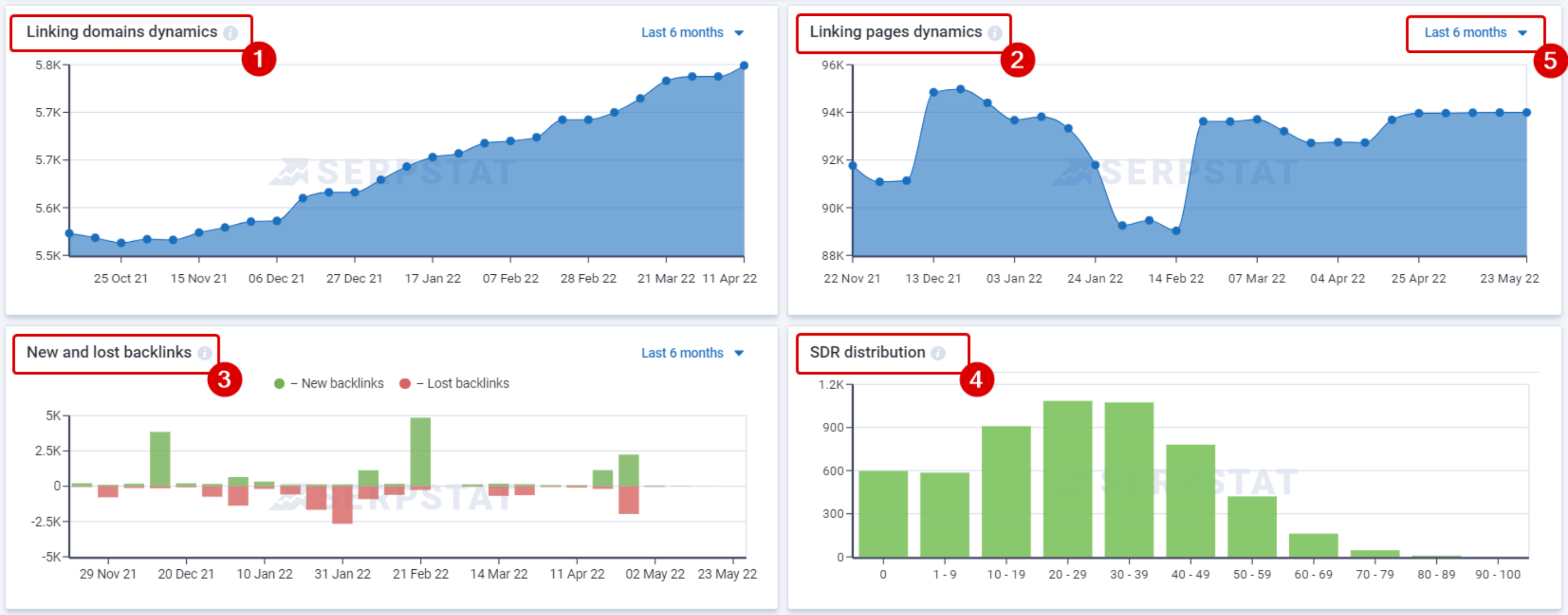
Majestic covers backlinks only. If you want a lower-cost suite that still replaces Ahrefs Site Explorer properly, Serpstat is worth a look, because its backlink module sits next to keyword research, rank tracking and site audit in one plan.
Serpstat’s backlink dashboard gives you most of what Site Explorer shows, plus a few extra checks:
- Serpstat Domain Rank (SDR): A 0 to 100 authority score for each domain, close to Domain Rating in Ahrefs, with a 6-month history chart.
- Referring and malicious domains: Counts unique linking domains and flags malicious ones using Google Chrome’s detection method, which speeds up backlink audits.
- New and lost backlinks: A weekly chart of links gained and lost, plus linking domain and linking page trends for the past 6 months.
- SDR distribution: Shows how many referring domains fall into each authority band, so you can see at a glance whether a profile is built on weak sites.
- Links Intersection: Compares two or three domains and lists the donor sites linking to each, with SDR for every donor, which turns into a prospect list.
- Recrawl tool: Refreshes data for up to 500 URLs a day when you need to confirm a link is still live.
Serpstat’s link index is smaller than the one in Ahrefs, so very large sites may show fewer links. The price makes up for it. The Individual plan costs $911 for two years, about $38 a month, with 2,000 backlink results per report and 100 searches a day. Team costs $1,703 for two years and raises those limits to 10,000 results and 500 searches a day.
SEO SpyGlass
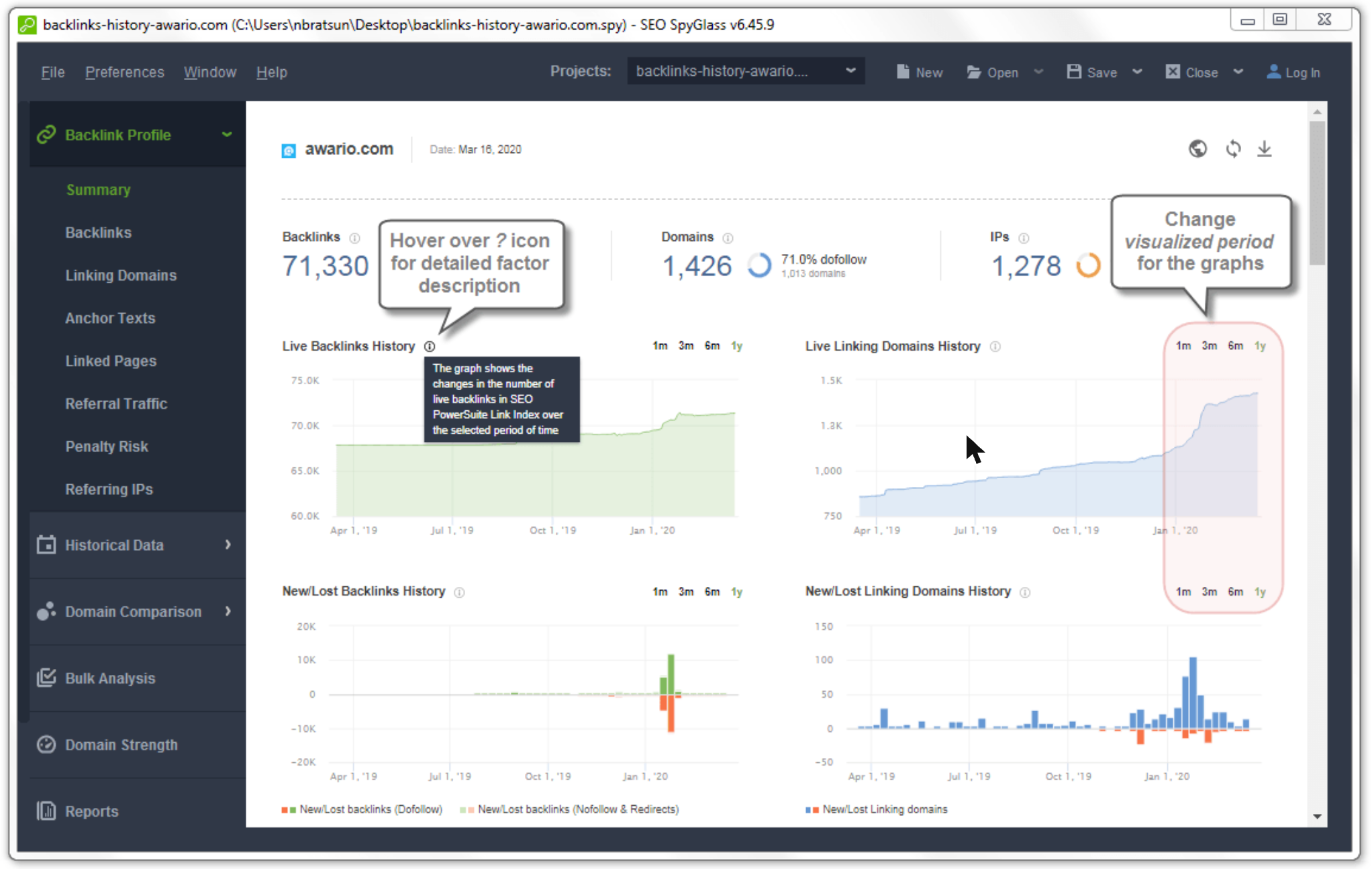
For link builders who prefer a yearly licence to a monthly bill, SEO SpyGlass is a desktop Ahrefs alternative from SEO PowerSuite. It pulls backlinks from its own SEO PowerSuite Link Explorer index and can add links from your Google Search Console and Google Analytics accounts.
These are the SEO SpyGlass reports that matter most for backlink audits and prospecting:
- Backlink Profile Summary: Shows total backlinks, linking domains, IPs and the dofollow share, with live backlink and linking domain history charts and new and lost link charts.
- Penalty Risk: Scores each linking domain for the risk of a Google penalty, the check Ahrefs users usually do by hand.
- Disavow file generator: Builds a disavow file from the links you mark, ready to upload to Google.
- Domain Comparison: Compares your backlink profile with up to 5 competitors on Professional and 10 on Enterprise, showing the domains that link to them and not to you.
- Historical Data: Keeps a record of backlink changes for every project you save.
SEO SpyGlass runs on your own computer, so there are no monthly query limits like Ahrefs credits, but the desktop app needs to stay open for big checks. The free version shows up to 1,100 backlinks for any site. Professional costs $129 a year with unlimited backlinks, and Enterprise costs $259 a year and adds report scheduling and emailing.
Mangools LinkMiner
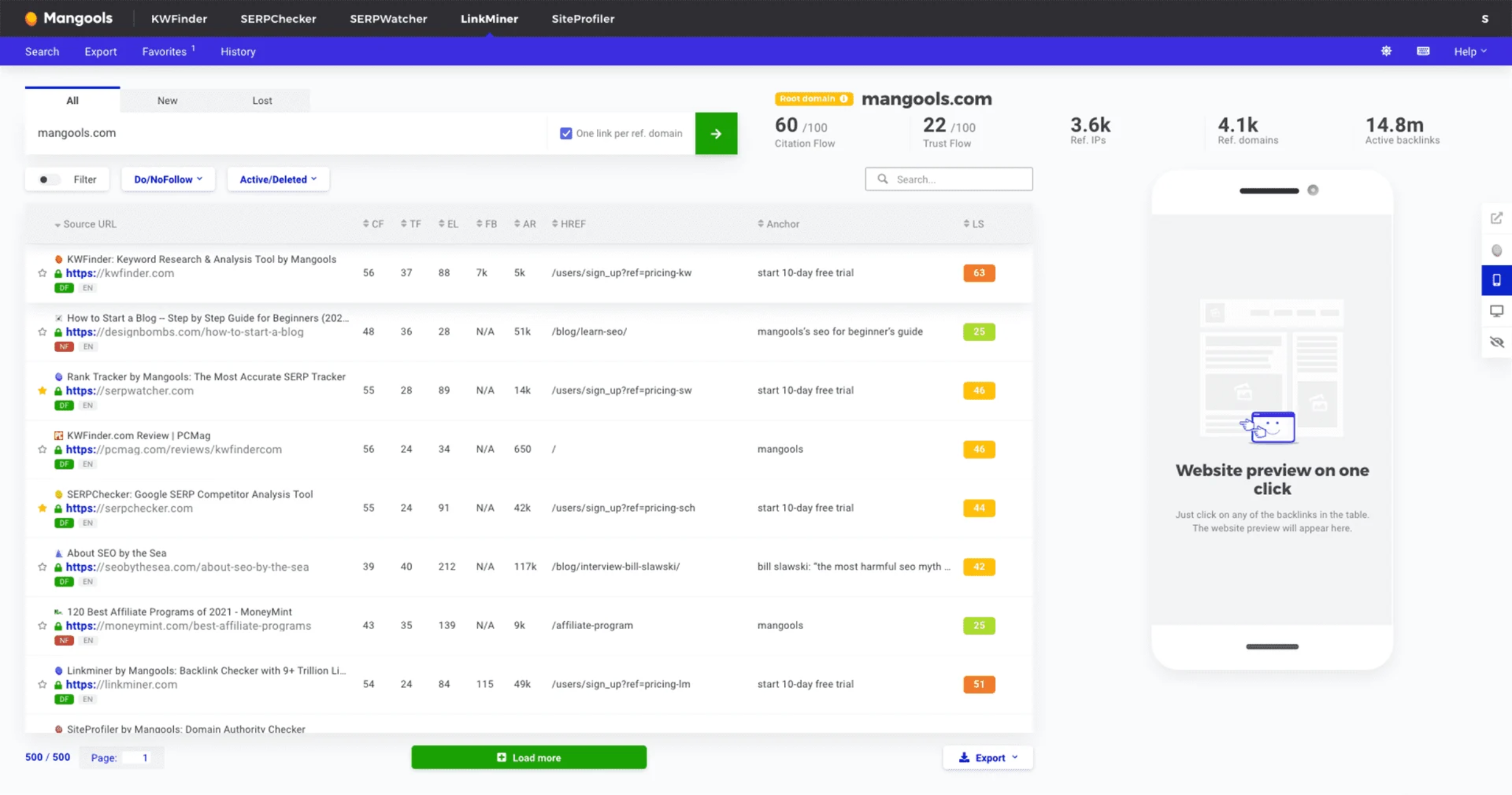
For a much smaller budget, LinkMiner gives basic backlink checks inside the same Mangools plan as KWFinder. It is the cheapest Ahrefs alternative here for anyone who checks links only now and then.
LinkMiner keeps things simple, with three features that cover most quick link checks:
- Backlink list with link strength: Lists a site’s backlinks with Citation Flow, Trust Flow and Mangools‘ Link Strength score.
- Link preview: Click a backlink and LinkMiner opens the linking page with the link highlighted, so you see the context without leaving the tool.
- Filters: Filter for new, lost, dofollow or nofollow links, or hide several links from one site.
LinkMiner has far smaller limits than Ahrefs or Majestic, so it covers a blogger checking a few competitor links a month, not an agency running audits. Since it comes in the $18.85 Mangools Basic plan, billed yearly, you get keyword research and link checks for the price of one tool.
Best Ahrefs Alternatives for Rank Tracking
Once keywords are chosen and links are built, the next Ahrefs tool to replace is Rank Tracker. Ahrefs Lite tracks 750 keywords, and for a freelancer with several clients, that limit arrives quickly. The test for a replacement is how many keywords it tracks, how often it updates and how it reports to clients.
SE Ranking
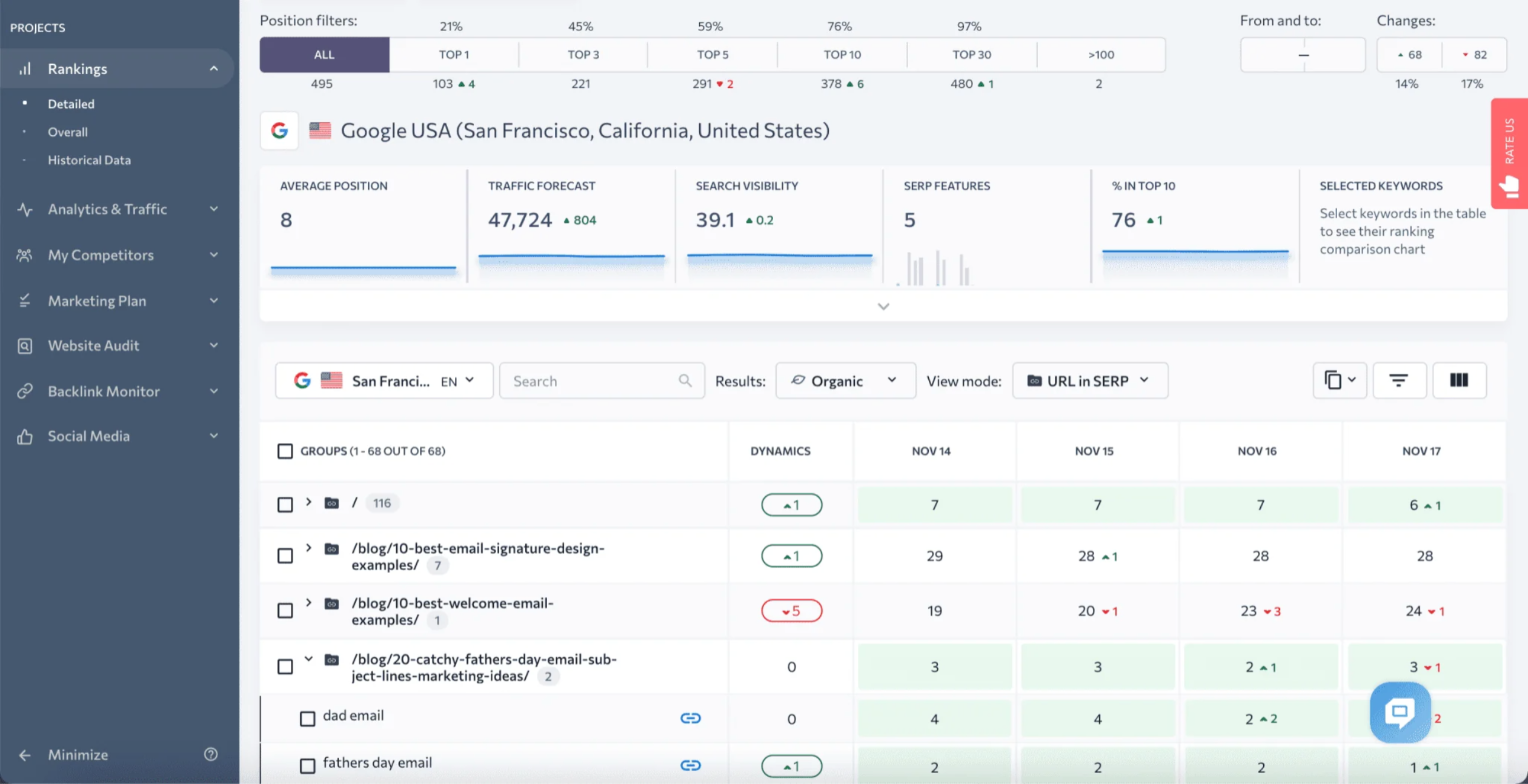
For rank tracking, SE Ranking gives the most keywords for the same money as Ahrefs Lite. It started as a rank tracker, and tracking is still where it beats Ahrefs most clearly.
Once you set up a project in SE Ranking, these are the features you will use day to day:
- Rankings report: Shows each keyword’s daily position, change, search volume and the ranking URL, with average position and search visibility charts at the top.
- Location and device tracking: Track desktop and mobile results separately and set the location down to city level.
- Competitor tracking: Add competitors to a project and see their positions for the same keywords.
- AI visibility tracking: Checks whether your brand appears in AI answers for 25 prompts a day on Core.
- Scheduled reports: Sends white-label reports to clients by email on a schedule.
Core costs $129 a month, the same as Ahrefs Lite, but tracks 2,000 keywords daily across 10 projects, close to three times the Ahrefs limit. Agencies that switch from Ahrefs for client reporting can add the Agency Pack, with white-label reports and 30 client seats, for $69 a month on yearly billing.
AccuRanker
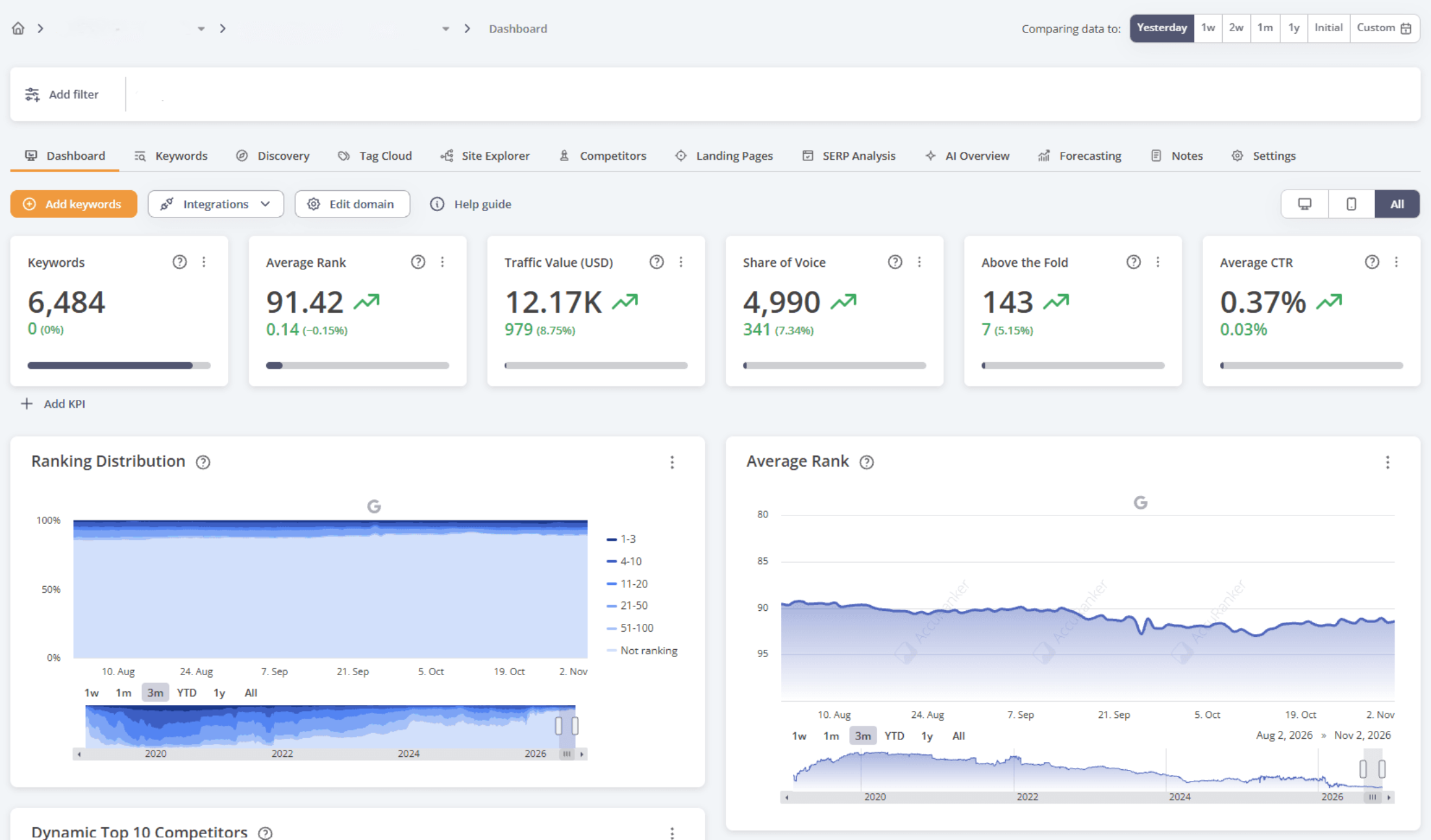
SE Ranking covers most freelancers. Agencies and in-house teams with thousands of keywords often need something faster, and AccuRanker is the Ahrefs Rank Tracker replacement built for that scale.
AccuRanker’s features focus on large keyword sets and fast reporting:
- Dashboard: Shows average rank, share of voice and ranking distribution charts for each domain.
- Share of Voice: Estimates your share of clicks across all tracked keywords, which works better than average rank for large projects.
- On-demand refresh: Updates rankings whenever you click refresh, on top of the daily update.
- Tags: Group keywords by topic, product or landing page and filter every report by tag.
- Google Search Console and Analytics: Pulls clicks and traffic into the rank data.
Because AccuRanker does only tracking, its reports and refresh options go well beyond Ahrefs Rank Tracker, but so does the price. Professional costs €269 a month for 2,000 keywords, or €229 a month on yearly billing, and Expert costs €949 a month for 10,000 keywords with dynamic tagging, Google Data Studio and an unlimited read API.
Wincher
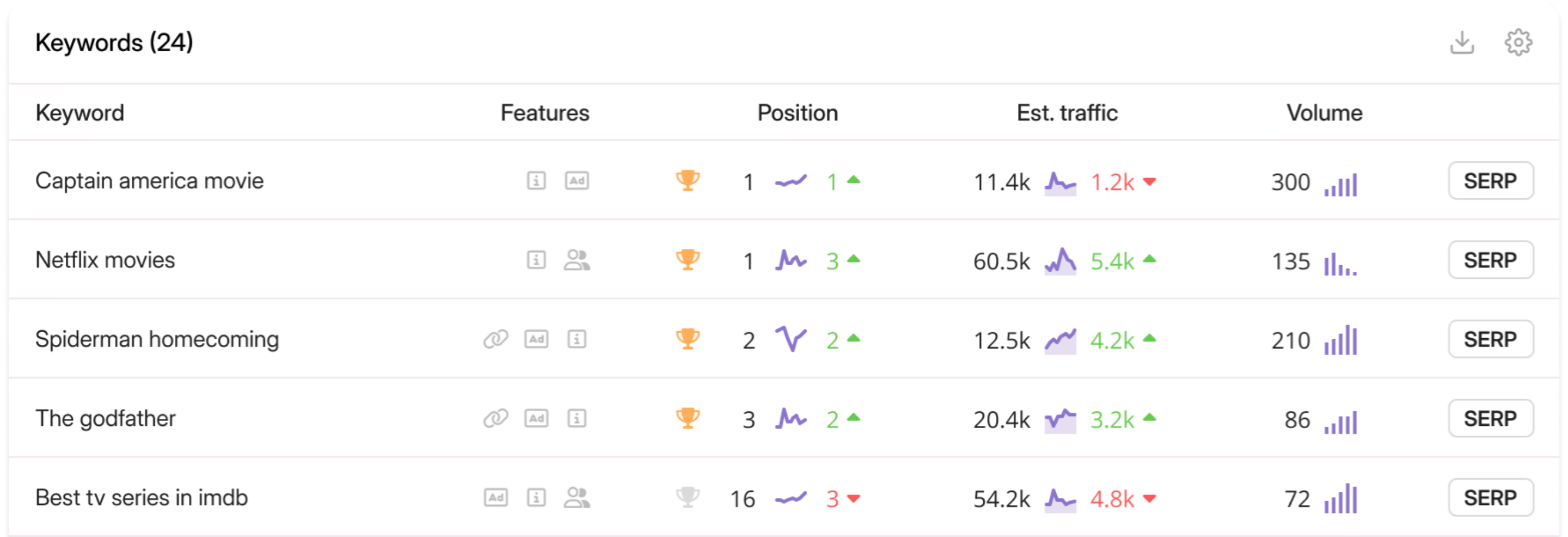
At the other end of the price range, Wincher is a low-cost alternative to Ahrefs for daily rank tracking on a handful of sites.
Wincher keeps its feature set small, and these are the parts that matter for tracking:
- Keyword table: Lists each keyword’s position, daily change, estimated traffic and search volume.
- Daily updates: Rankings update every day on all plans.
- Competitor tracking: Compare your positions with competitors for the same keywords.
- WordPress plugin: Shows rankings inside WordPress for each post.
Wincher Basic tracks fewer keywords than Ahrefs Lite but costs far less, at $49 a month for 500 keywords, up to 10 websites and one user. Standard, at $89 a month for 1,000 keywords, adds on-demand updates, white-label reports and API access, and Professional costs $319 a month from 5,000 keywords.
Mangools SERPWatcher
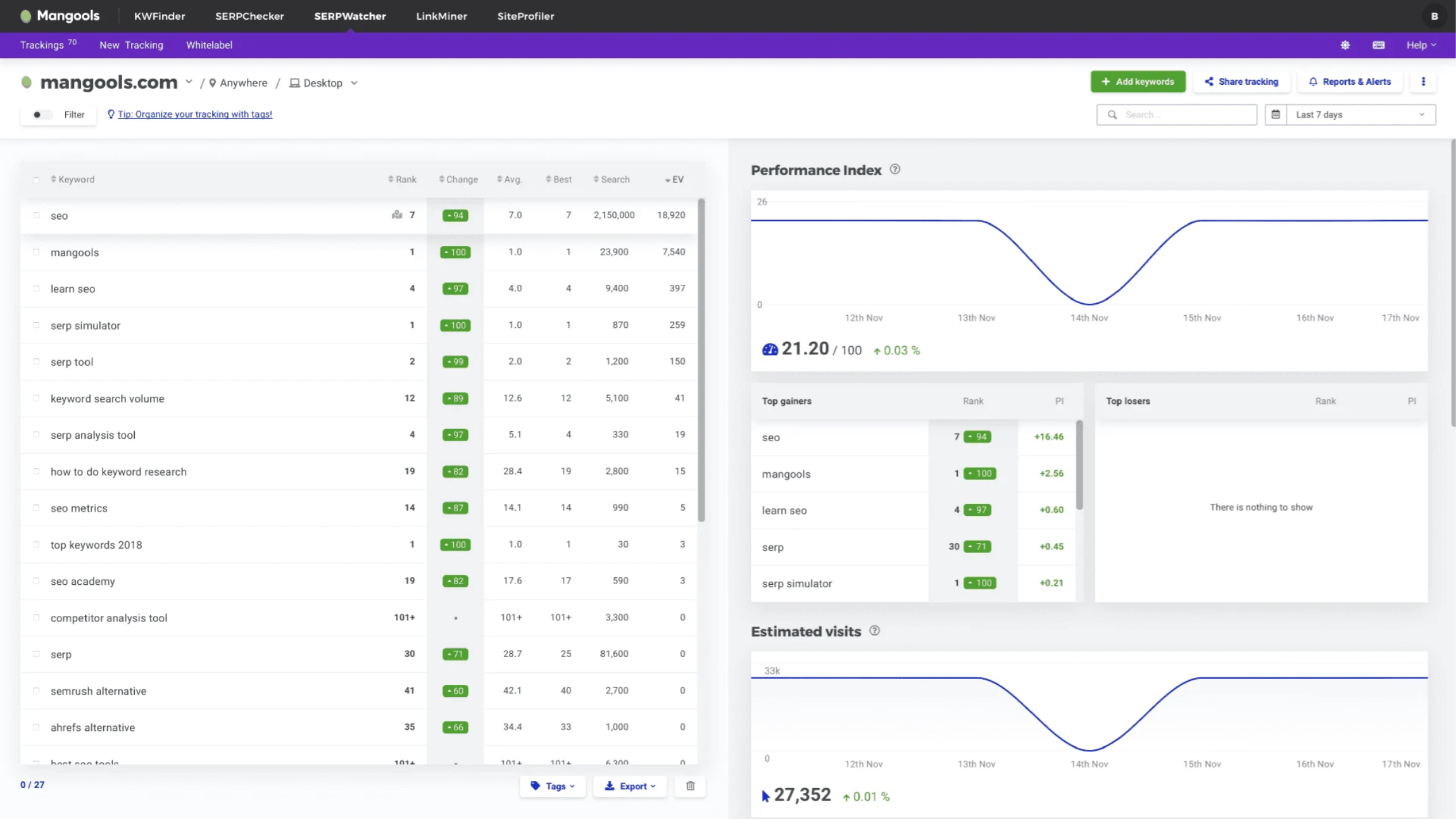
If even Wincher is more than you need, SERPWatcher completes the Mangools plan next to KWFinder and LinkMiner, so one cheap subscription replaces three Ahrefs tools at a basic level.
SERPWatcher covers the basics of rank tracking with these features:
- Performance Index: One score from 0 to 100 that sums up how visible your tracked keywords are.
- Position history: Shows each keyword’s position over time with estimated visits.
- Email alerts: Sends an alert when a keyword moves past a threshold you set.
- Shareable reports: Creates a link to a read-only report for clients.
On Basic, rankings update once a week, which is enough for a personal site but too slow for client reporting, where one of the daily trackers above is the better Ahrefs replacement. SERPWatcher is included in the $18.85 Mangools Basic plan, billed yearly.
Best Ahrefs Alternatives for Technical Site Audits
Rankings often stall because of technical problems, so the next Ahrefs tool to replace is Site Audit. Ahrefs Site Audit runs in the cloud and flags common issues. Technical SEOs often want more control over how a site is crawled, which is where desktop crawlers come in.
Screaming Frog SEO Spider
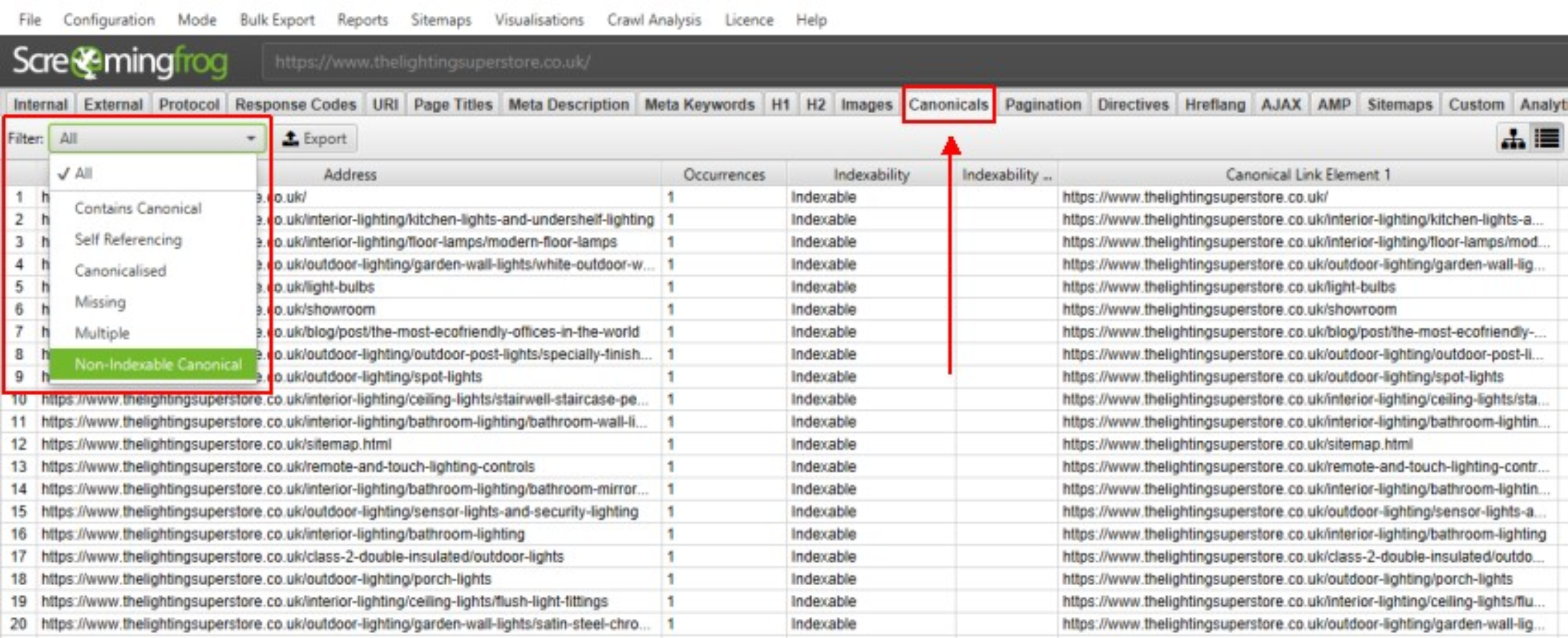
For technical audits, Screaming Frog is the Ahrefs Site Audit alternative most technical SEOs already know. It is a desktop crawler for Windows, macOS and Ubuntu, so you control exactly how a site is crawled.
A Screaming Frog audit relies on these features:
- Tabs for each issue type: Response codes, page titles, meta descriptions, canonicals, directives, hreflang and more each have their own tab and filters, such as the Canonicals tab.
- JavaScript rendering: With a licence, it renders pages like a browser to audit JavaScript sites.
- Integrations: Connects Google Analytics, Search Console and PageSpeed Insights to add traffic and speed data to each URL.
- Custom extraction: Pulls any element from pages with XPath, CSS selectors or regex, such as prices or schema.
- Exports: Sends any filtered list to a spreadsheet for developers.
That control is the main reason to move away from Ahrefs Site Audit for this job. The trade-off is that large crawls use your own computer’s memory instead of the cloud. The free version crawls up to 500 URLs, and a licence costs $279 a year, about $23 a month.
Sitebulb
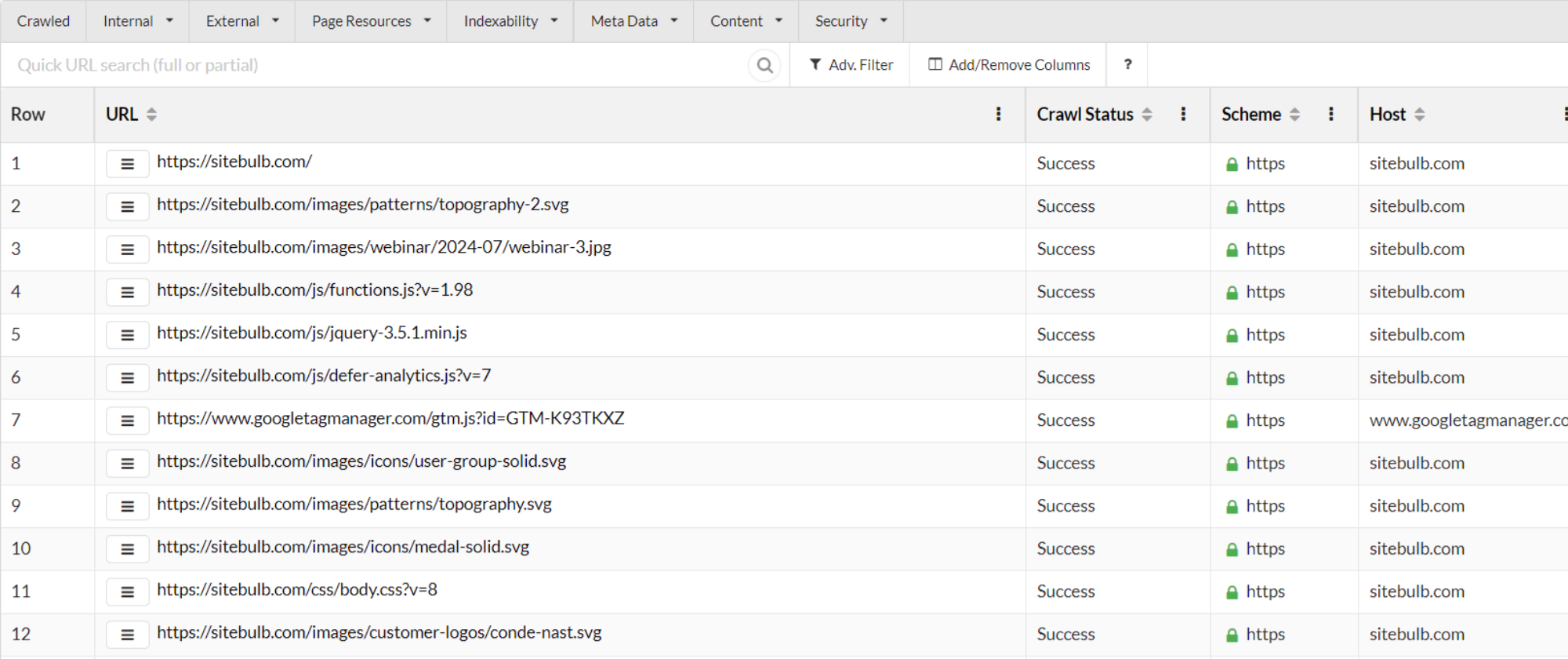
Screaming Frog shows the data, but it leaves the explaining to you. Sitebulb is a desktop crawler that does the same job and explains each issue, which makes it a good Ahrefs Site Audit replacement when audits go to clients.
Sitebulb’s features are built around explaining what it finds:
- Hints: 300+ prioritized hints, each with a plain explanation of the issue and how to fix it.
- URL Explorer: Lists every crawled URL with status, indexability and filter tabs.
- Audit comparison: Compares two audits to show which issues were fixed and which are new.
- PDF reports: Builds custom PDF reports for clients.
Its hints explain issues in more detail than Ahrefs Site Audit, and JavaScript crawling comes on every plan at no extra cost. Lite costs $18 a month for audits of up to 10,000 URLs, Pro costs $42 a month for up to 500,000 URLs, and Sitebulb Cloud starts at $125 a month. There is a 14-day free trial.
Google Search Console
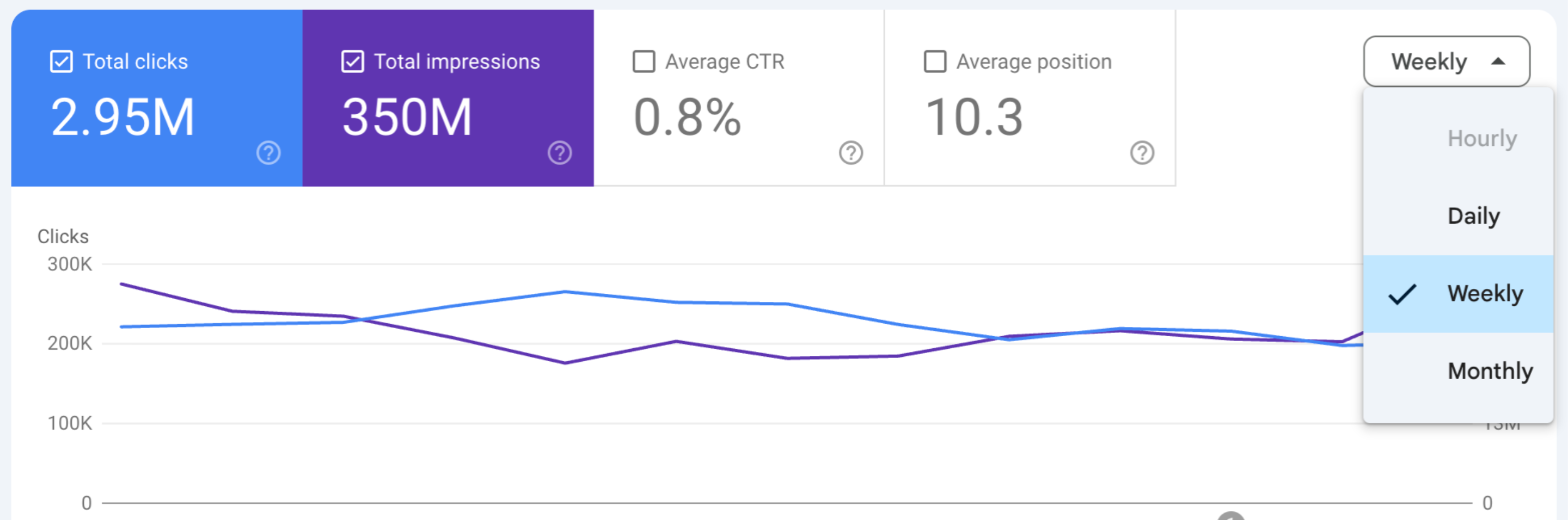
While the two crawlers show what a bot finds, Google Search Console shows what Google itself sees on your site. It is the free Ahrefs alternative every site owner should already use.
For technical audits, these Search Console reports matter most:
- Page indexing report: Lists which pages are indexed and the reason others are not, such as noindex, redirect or crawled but not indexed.
- Performance report: 16 months of clicks, impressions, CTR and position by query and page, with date comparisons and regex filters.
- Core Web Vitals report: Groups URLs by speed and layout issues on mobile and desktop.
- Links report: Shows top linked pages, top linking sites and top anchor text.
Search Console shows Google’s own data instead of the estimates in Ahrefs, but only for sites you verify, and it does not crawl a site the way Ahrefs Site Audit does. Pair it with Screaming Frog or Sitebulb for full audits. It is free.
WebSite Auditor
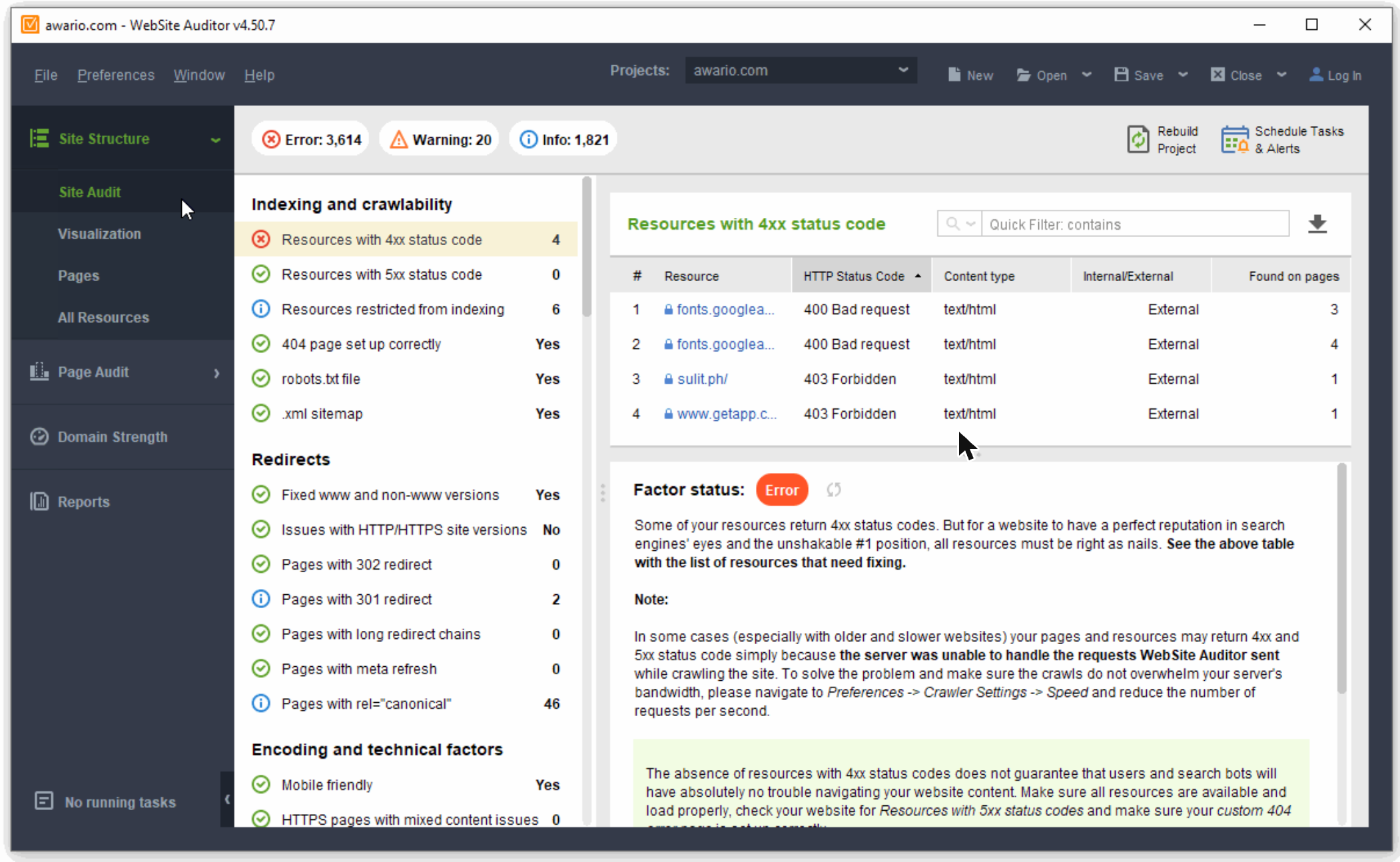
The last crawler on this list comes from the same SEO PowerSuite family as SEO SpyGlass. WebSite Auditor is a desktop Ahrefs Site Audit replacement with a yearly licence, and it sits between Screaming Frog’s raw data and Sitebulb’s explanations.
WebSite Auditor splits a technical audit into these parts:
- Site Audit: Groups issues into indexing and crawlability, redirects, encoding and technical factors, and more, with an error, warning or info count at the top.
- Factor explanations: Click any issue and WebSite Auditor lists the affected URLs and explains what the problem is and how to fix it.
- Pages and All Resources: Tables of every crawled page and file with status code, click depth, internal links and word count.
- Visualization: Draws your site structure as a graph so you can spot orphan pages and deep pages.
- Schedule Tasks & Alerts: Re-runs audits on a schedule and alerts you when new issues appear.
WebSite Auditor goes deeper than Ahrefs Site Audit on page-level detail, while Ahrefs is easier for teams that want everything in the cloud. The free version audits up to 500 URLs. Professional costs $149 a year for unlimited crawling, and Enterprise costs $359 a year and adds scheduled reports and CSV, SQL and HTML exports.
Best Ahrefs Alternatives for Competitor and PPC Research
The last Ahrefs job to replace is competitor research. Ahrefs focuses on organic search, while agencies that also run Google Ads need to see competitors‘ ads and budgets, and some teams want total traffic across every channel.
SpyFu
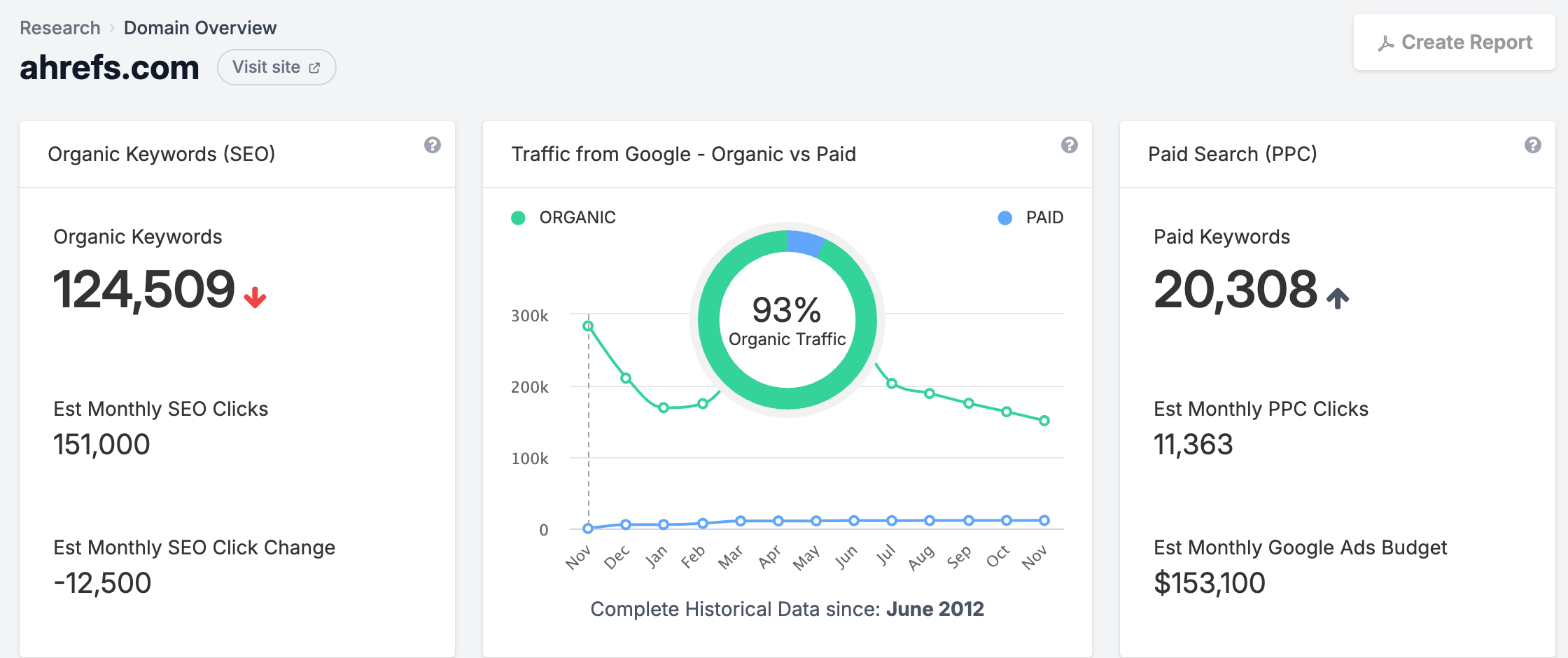
For competitor and PPC research, SpyFu covers the side Ahrefs barely touches: competitors‘ Google Ads. That makes it the go-to Ahrefs alternative for agencies that run search ads.
These are the SpyFu reports that cover what Ahrefs leaves out:
- Domain overview: Shows a competitor’s organic keywords, paid keywords, estimated monthly Google Ads budget and top competitors.
- Ad history: Shows every ad a competitor has run for a keyword, with more than 10 years of history. An ad that ran for months usually performed well.
- Kombat: Compares up to three domains and shows shared and unique keywords.
Ahrefs shows paid keywords but little ad history, while SpyFu keeps more than 10 years of it. Its link and organic data are thinner than Ahrefs, though. Basic costs $39 a month with up to 10,000 rows per search, and Pro costs $119 a month after a discounted first month and removes the row limits.
Similarweb
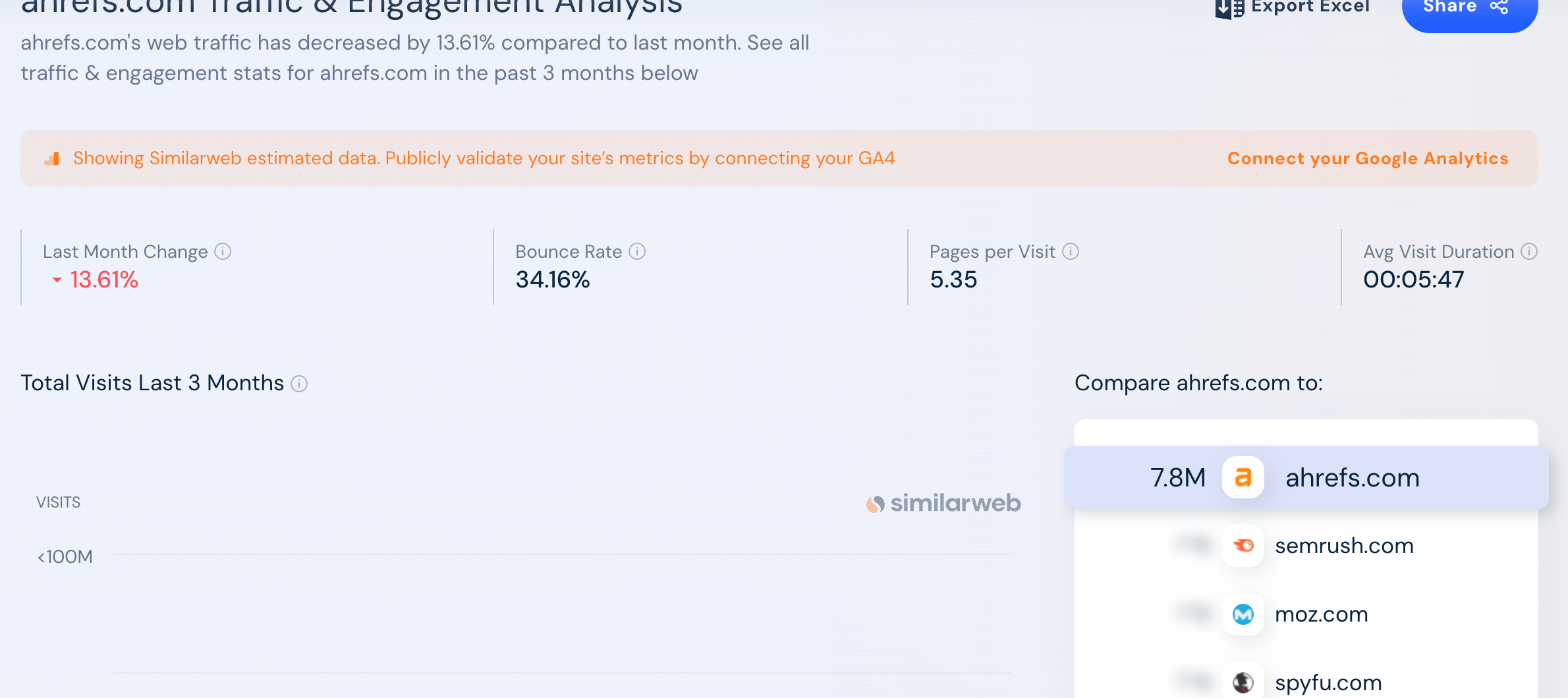
SpyFu answers what competitors spend on ads. Similarweb answers where all of their traffic comes from, which goes beyond the search-only estimates in Ahrefs.
Similarweb’s competitor data is split into these reports:
- Traffic and engagement: Shows total visits, visit duration, pages per visit and bounce rate for any site, and compares up to five sites side by side.
- Marketing channels: Splits traffic into direct, search, referral, social, email, display and paid.
- Audience and geography: Shows top countries and audience interests.
Ahrefs estimates organic and paid search traffic only, so Similarweb is the better choice when a competitor grows through social, email or referrals. Competitive Intelligence costs $125 a month billed yearly, or $199 month to month, with 3 months of history. Competitive Intel & SEO & AEO, at $333 a month billed yearly, adds keyword research, a rank tracker, site audit and backlinks, and a third plan adds ad intelligence for $542 a month billed yearly.
Ubersuggest
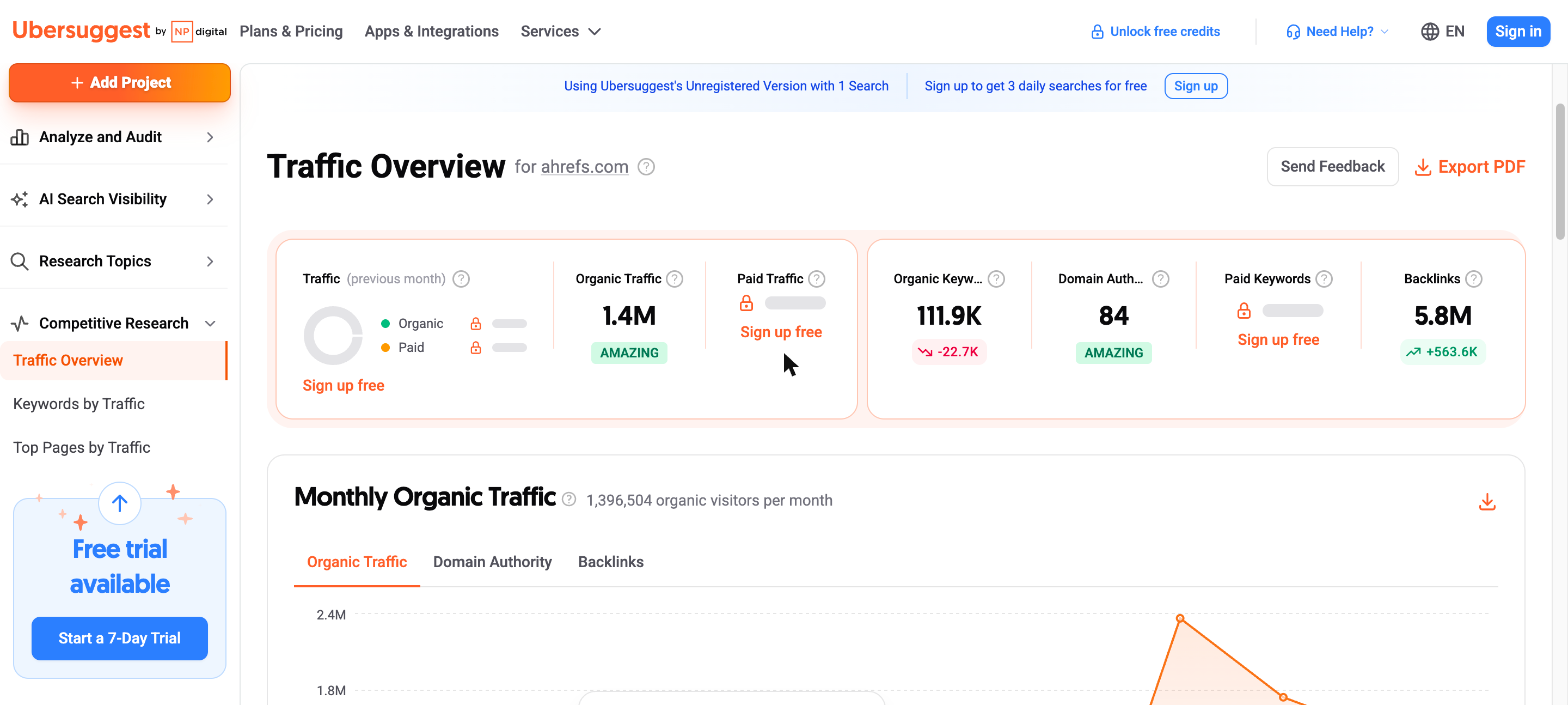
Similarweb is built for large budgets. For a small business that wants a quick look at rival sites instead of paying for Ahrefs, Ubersuggest from NP Digital is one of the cheapest competitor research tools.
Ubersuggest’s Competitive Research menu has three main reports:
- Traffic Overview: Shows a competitor’s estimated organic traffic, organic keywords, Domain Authority and backlinks on one screen, with a monthly organic traffic chart.
- Keywords by Traffic: Lists the keywords sending a competitor the most organic visits, with position and volume.
- Top Pages by Traffic: Lists the competitor pages that get the most organic traffic and the keywords each one ranks for.
The menu also has an AI Search Visibility section that checks how a brand appears in AI answers.
Ubersuggest’s data is less detailed than Ahrefs, and a few figures, such as paid traffic, are locked on the free view. On the other hand, the free view gives one search without an account and three a day with a free account. Paid plans cost $29, $49 and $99 a month for Individual, Business and Enterprise, or $290, $490 and $990 as a one-time lifetime payment.
Google Ads Transparency Center
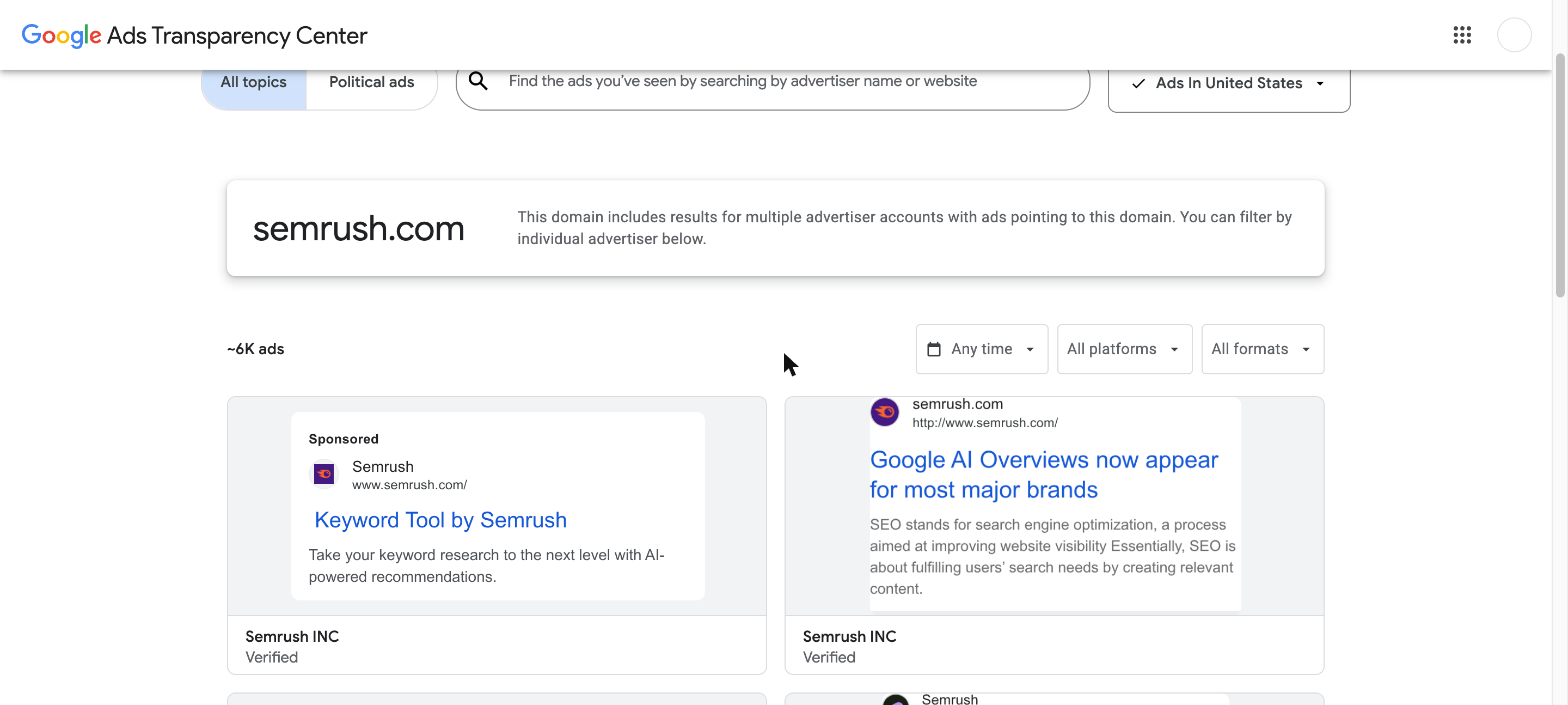
To finish the list, Google Ads Transparency Center is a free way to see competitors‘ ads straight from Google, which Ahrefs does not show at all. It pairs well with SpyFu, since SpyFu estimates budgets while Google shows the ads themselves.
The Transparency Center gives you these search options and filters:
- Search by advertiser or website: Enter a company name or domain to see every ad from verified advertisers that point to it, with an estimated ad count.
- Region filter: Shows only the ads that ran in a chosen country.
- Date filter: Narrows the results to ads that ran in a chosen date range.
- Platform and format filters: Splits ads by Google product, such as Search, YouTube or Display, and by text, image or video format.
The Transparency Center shows the ads but no keywords, budgets or click data, so use it next to a paid tool instead of as a full replacement for Ahrefs. It is free.
What a replacement stack costs next to Ahrefs Lite
Splitting jobs across tools is only worth it if the total stays lower than Ahrefs Lite. One common stack for a freelancer who does link building, content planning and technical audits looks like this.
| Job |
Ahrefs Lite |
Replacement |
Monthly cost |
| Backlinks |
Site Explorer |
Majestic Lite |
$49.99 |
| Keyword research |
Keywords Explorer |
Mangools Basic, billed yearly |
$18.85 |
| Site audits |
Site Audit |
Screaming Frog, $279 a year |
$23.25 |
| Own-site search data |
Estimated traffic |
Google Search Console |
Free |
| Total |
$129 |
Four tools |
$92.09 |
The stack saves about $37 a month and goes deeper in each job. It also means four logins and no single dashboard. If that costs you more than an hour a month, Ahrefs Lite is still the better deal.
Questions about replacing Ahrefs
What is the best free Ahrefs alternative?
Google Search Console for your own site, since it shows real queries, clicks and links. Ahrefs Free also gives site audit and backlink data for websites you verify.
Which Ahrefs alternative has the best backlink data?
Majestic is the specialist choice, with Trust Flow metrics and a Historic Index going back to 2006. Serpstat is the cheaper suite option, and SEO SpyGlass works well for link builders who prefer a yearly licence.
What is the cheapest rank tracker to replace Ahrefs?
Mangools SERPWatcher comes in the $18.85 Basic plan with weekly updates. For daily updates, Wincher Basic costs $49 a month for 500 keywords.
Can Screaming Frog or Sitebulb replace Ahrefs Site Audit?
For audits, yes, and both go deeper. Neither covers backlinks, keywords or rank tracking, so each replaces only that one job.
The post Ahrefs alternatives for specific SEO jobs appeared first on Search Engine Watch.
Source:: searchenginewatch.com