Archiv für den Autor: Andreas

Google Ads gets a CRM backstop for broken conversion tags

Google Ads is documenting a beta feature that lets advertisers supplement website conversion tags with offline data from backend systems such as CRMs and order databases.

The feature, called multi-source conversions, connects an existing Google tag web conversion with an additional data source through Google Ads Data Manager or the Data Manager API. Search Engine Land first reported the new documentation.

Google says the setup can help advertisers “fill in any potential gaps” in conversion measurement by combining tag-based website data with backend conversion records. The feature is currently in beta, so accounts may not see it yet.

How it works

The key field is the transaction ID.

Google uses the transaction_id to match an uploaded backend record with the conversion captured by the website tag, within the same conversion action. If the IDs match, Google can use the offline upload to supplement missing user-provided data, such as email or phone number.

That matters for enhanced conversions and Smart Bidding because tags do not always capture the full data payload. Browser restrictions, ad blockers, consent settings or tagging errors can leave advertisers with an incomplete conversion record.

Google recommends uploading the additional data as soon as possible, ideally within 24 hours of the conversion event.

Value updates can overwrite tag values

The beta also changes how conversion value corrections can work.

If the uploaded backend record has the same transaction ID as the tag event, Google says the uploaded conversion value becomes the source of truth and permanently overwrites the value originally recorded by the tag.

That could be useful for advertisers whose checkout value changes after the tag fires, such as refunds, upsells, cancellations or final basket reconciliation.

It also creates a very obvious risk: bad uploads can poison reporting and value-based bidding. Google warns that currency units must match the tag format. For example, sending cents where the tag reports dollars can inflate conversion values.

Limits to know

Multi-source conversions are available only for website conversion actions set up manually with code through the Google tag or Google Tag Manager. Google says the feature is not available for imported Google Analytics conversions or URL-based conversion actions.

Google also warns advertisers not to create duplicate conversion actions that count the same sale. Deduplication happens within a single conversion action, not across separate conversion actions.

There is also a 14-day trial period. During that period, additional source data is used for reporting and diagnostics, but does not affect bidding. After the trial ends, valid uploaded data can flow into both reporting and bidding.

Our take

This is a useful fix for advertisers with messy but recoverable measurement, especially ecommerce and lead-gen accounts where the backend record is cleaner than the browser event.

The catch is operational, not conceptual. Multi-source conversions depend on clean transaction IDs, consistent value formatting and fast uploads. If those basics are wrong, the feature can create a more confident version of bad data.

For paid search teams, the practical check is simple: look at whether purchase or lead events have reliable transaction IDs across both the tag and backend system. If they do, this beta could make Google Ads conversion data less fragile. If they do not, the first job is still plumbing.

The post Google Ads gets a CRM backstop for broken conversion tags appeared first on Search Engine Watch.

Source:: searchenginewatch.com

Google explains how to get star ratings next to your ads

Google has added a section to its Merchant Center help page explaining how online stores can qualify for star ratings alongside their ads. Barry Schwartz reported the update at Search Engine Roundtable, crediting an earlier report by Hana Kobzová at PPC News Feed.

These ratings reflect customers‘ experience with a store, rather than their opinion of an individual product.

What your store needs

Google says stores generally need at least 100 eligible reviews from customers who have completed a purchase, although the exact number can vary. For paid text and Shopping ads, the average score must be 3.5 out of 5 or higher. Below that, the stars stop appearing alongside ads.

Ratings are also calculated separately for each country. Reviews from UK shoppers, for example, count towards a store’s UK rating, not its US rating.

One way to collect feedback is through Google Customer Reviews. Merchants add a survey invitation after checkout, and buyers who opt in can receive an email asking them to rate their shopping experience.

There is one detail Google still needs to clear up. The new section says reviews count for 24 months, but the troubleshooting section on the same page still refers to five years. The page does not explain the difference.

Our take

Start by checking that the reviews you collect are being shared with Google. Meeting the review and score requirements does not guarantee stars on every ad: Google says their appearance also depends on the ad auction and other factors.

Source: Barry Schwartz, Search Engine Roundtable.

The post Google explains how to get star ratings next to your ads appeared first on Search Engine Watch.

Source:: searchenginewatch.com
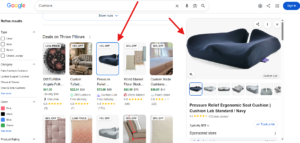
Google tests new image design in product grid

Free listing new

Google is testing a new design for displaying images within the product grid. When searching for something on Google, we noticed the main product image now appears differently the image design now looks shorter in length compared to before.

Here is a screenshot of the new design.

Here is a screenshot of the usual design.

Free listing old

This might be a new intentional design test, though it’s also possible this is simply a bug. Either way, personally, I’m not a fan of this new shorter image design within the product grid.

The post Google tests new image design in product grid appeared first on Search Engine Watch.

Source:: searchenginewatch.com
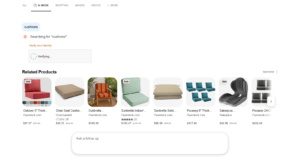
Bing Copilot shows ads before users complete the verification

Copilot shows ads before users complete the CAPTCHA

Bing Copilot is showing ads before a user completes the verification. I searched for something in Bing Copilot, which now appears to be renamed as “AI Mode” in Bing. When I entered my query, a verification appeared, but Bing was already showing ads before I filled it in.

Here is a screenshot of this behavior.

It was interesting to see, since the ads appeared before the human verification step was finished. This could be a display quirk, or it may just be how Bing loads ad results ahead of the verification check.

The post Bing Copilot shows ads before users complete the verification appeared first on Search Engine Watch.

Source:: searchenginewatch.com

Bing now showing sitelinks for ads in Copilot results

bing ads sitelink

Bing is now showing sitelinks for ads appearing within Copilot results. We recently covered Bing testing ads in Copilot results for both Shopping and sponsored ads, and now we’re seeing sitelinks added to these ads as well.

Here is a screenshot of this.

Showing sitelinks within these ads could be helpful for advertisers, since it gives users extra information upfront and can catch their attention more effectively than a standard ad alone.

The post Bing now showing sitelinks for ads in Copilot results appeared first on Search Engine Watch.

Source:: searchenginewatch.com