Archiv für den Autor: Andreas

Google tests new sitelink design for ads on mobile

new sitelink on mobile

Google is testing a new sitelink design for ads on mobile. We’ve recently covered several different sitelink variations Google has been testing for ads, and now both Brodie Clark and I have spotted another new design specifically for mobile.

Here is a screenshot of the design shared by Brodie Clark.

Here is a screenshot of the design I spotted.

New sitelink on mobile-1

Google regularly tests different sitelink designs for ads, so it’s hard to say which version, if any, will eventually roll out to everyone. Still, it’s good to see Google continuing to experiment with new formats within the SERP.

The post Google tests new sitelink design for ads on mobile appeared first on Search Engine Watch.

Source:: searchenginewatch.com

Google updates video structured data documentation

creator property

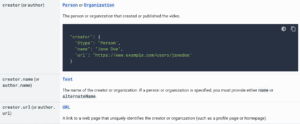
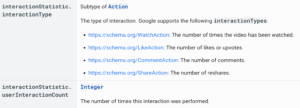
Google has updated its video structured data documentation. This update adds support for the creator property and clarifies the interactionStatistic section within VideoObject structured data. We found this via SER.

What changed with the creator property?

Google added a new section documenting the creator property. The documentation also mentions support for the author property.

What changed with interaction statistics?

Google updated the interactionStatistic section, clarifying which interaction types are supported within structured data.

Here is the screenshot of the creator property section.

Here is the screenshot of the interactionStatistic section.

interactionStatistic

Here is the updated video structured data documentation.

Google said these updates are intended to document support for the creator and author properties and clarify the supported interaction types for interactionStatistic in VideoObject structured data.

The post Google updates video structured data documentation appeared first on Search Engine Watch.

Source:: searchenginewatch.com

Microsoft tests AI Mode branding for Copilot Search across Bing and Edge

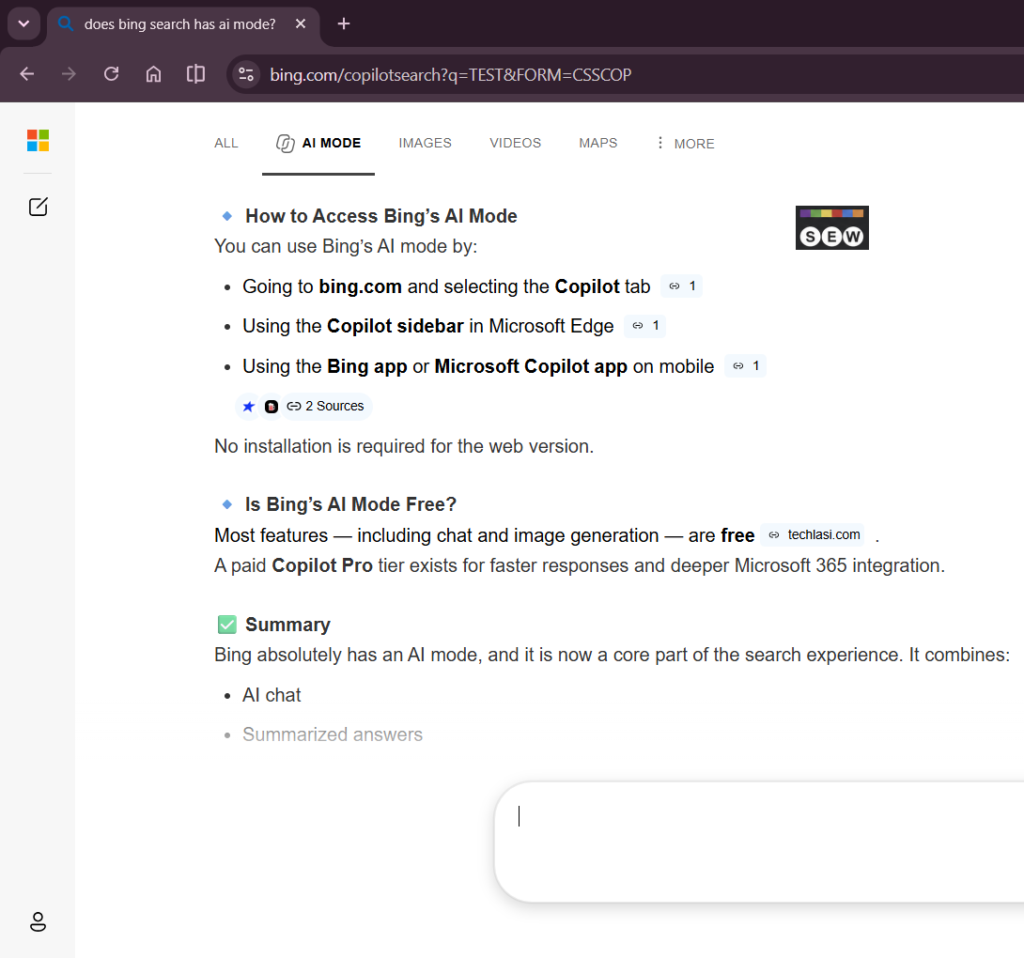
Microsoft is testing AI Mode branding for its AI-powered search experience in Bing and Edge. We noticed the AI MODE tab is now appearing more often in Bing search, while Edge is testing its own AI Mode experience.

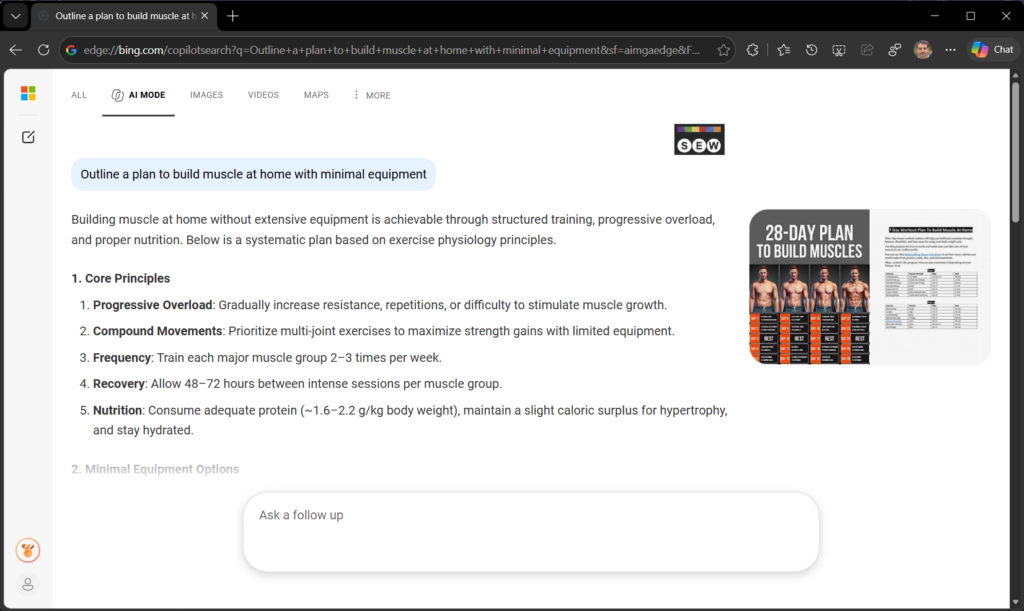
We first reported Bing’s AI MODE tab earlier this week. The tab appears alongside All, Images, Videos and Maps. Clicking AI MODE takes users to bing.com/copilotsearch, the same destination Microsoft uses for Copilot Search.

Image Credit: Venkat | Search Engine Watch

Microsoft introduced Copilot Search in Bing as its AI-powered search experience and still uses that name in its official documentation. The Bing test therefore puts a new AI MODE label on what is still the Copilot Search destination.

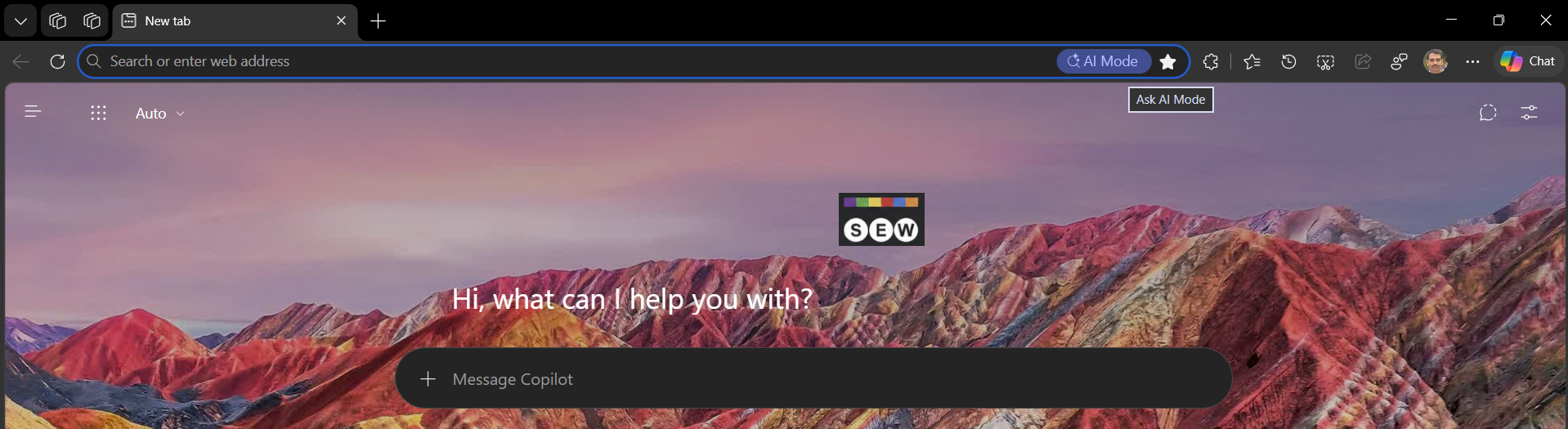
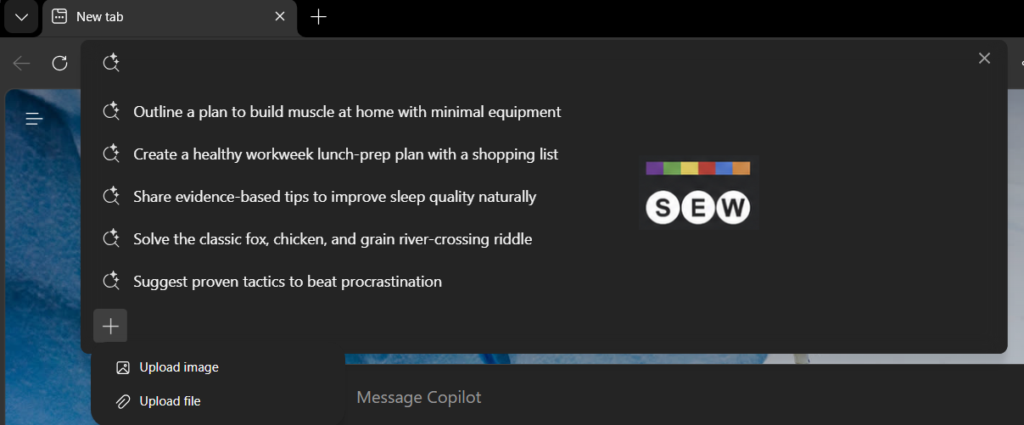
Microsoft is also testing AI Mode in Edge. Unlike the Bing test, Edge is putting a dedicated AI Mode button directly in the address bar when Bing is set as the default search engine.

Clicking the button opens suggested AI prompts, while a + button lets users upload images or files to ask questions. Edge’s AI Mode can also take users into the Bing AI Mode experience, which can lead to Copilot Search.


Image credit: Venkat | Search Engine Watch

Image Credit: Venkat | Search Engine Watch

Microsoft has not announced plans to rename Copilot Search to AI Mode. However, the Bing and Edge tests show the company experimenting with AI Mode in two different parts of its search ecosystem: as a search tab in Bing and as a dedicated entry point in Edge. Both experiences can lead users to Microsoft’s Copilot-powered search experience.

The post Microsoft tests AI Mode branding for Copilot Search across Bing and Edge appeared first on Search Engine Watch.

Source:: searchenginewatch.com

Microsoft Copilot now lets marketers build their own apps and dashboards

Microsoft is adding a new Code workspace to Copilot that could make it considerably easier for marketing teams to build their own small tools.

Users will be able to describe an app, dashboard, tracker, automation or workflow in natural language and have Copilot build it. Microsoft says Code uses the same underlying technology as GitHub Copilot, but is designed to make software creation accessible beyond developers.

For marketers, the obvious use cases include internal reporting dashboards, campaign trackers and small workflow tools.

An agency, for example, could potentially create a dashboard around recurring client data without first commissioning a standalone application. Microsoft specifically lists interactive dashboards, desktop widgets and cloud-hosted internal apps among the things Code can produce.

The company has also introduced Copilot Managed Runtime, which provides hosting for applications built through Code, Cowork and Copilot Studio inside an organization’s Microsoft 365 environment.

That matters because generating code is only part of the problem. Internal tools also need somewhere to run, access to company data and controls over who can use them.

Code runs software in a sandboxed environment and Microsoft says applications can be hosted inside a customer’s tenant.

Copilot is becoming more than chat

Code is part of a larger redesign of Microsoft Copilot.

The new Copilot is organized around Home, Code and Autopilot. Home combines Chat and Microsoft’s Cowork system, while Autopilot is a persistent agent that can continue carrying out assigned work without waiting for another prompt. Word, Excel and PowerPoint are also being brought directly into Copilot.

Microsoft is also changing how some of this work is charged.

Normal Copilot tasks such as chat, summaries and drafting remain covered by user subscription licenses. More compute-intensive features including Cowork, Code and Autopilot use usage-based billing. Microsoft is adding controls that allow organizations and individual users to track that spending.

Home and Code are beginning their rollout through Microsoft’s Frontier early-access program, with broader availability following. Autopilot is moving into private preview at the end of September.

Our take

The interesting part for marketers is not that Copilot can write code. AI coding tools have been doing that for some time.

It is that Microsoft is trying to turn small internal software into something an ordinary employee can create, host and share from the same environment where they already work.

For agencies, that raises an interesting question: how many reporting dashboards, campaign trackers and small marketing tools still need to be bought as separate software?

We would want to test Code before answering that. Building a dashboard from a prompt is one thing. Making sure its calculations are correct, maintainable and cheaper than the tool it replaces is another.

The post Microsoft Copilot now lets marketers build their own apps and dashboards appeared first on Search Engine Watch.

Source:: searchenginewatch.com

Google tests new loading button for AI Overviews

 new loading button for AI Overviews

Google is testing a new loading button for AI Overviews within search results, instead of showing the “Show more” button. When a user searches for something, the AI Overview appears in the SERP. Within seconds, a loading button shows and then disappears, revealing a long AI Overview with no “Show more” button at all.

Here is a screenshot.

This might be part of an ongoing test tied to Google AI Overviews. In recent days, we’ve also seen Google stop showing the “Show more” button altogether, instead displaying the entire AI Overview by default.

The post Google tests new loading button for AI Overviews appeared first on Search Engine Watch.

Source:: searchenginewatch.com