Kategorie-Archiv: SEO

Bing tests removing favicons from sponsored results

removing favicons from sponsored results

Bing is now testing sponsored results without favicons. I spotted this while searching for something on Bing — the sponsored results appeared with just the website name and URL below it, no favicon included.

Here is a screenshot of how it looks.

removing favicons from sponsored results

Showing sponsored results without favicons feels a bit off, and personally, I’m not like of this test, since favicons play an important role in helping users quickly recognize a website.

The post Bing tests removing favicons from sponsored results appeared first on Search Engine Watch.

Source:: searchenginewatch.com

Google AI Mode now sends users directly to retailers instead of the free listing panel

AI Mode now sends users directly to retailers

Google AI Mode is now sending users directly to retailer websites instead of opening the free listing panel. We previously saw Google test this same behavior within the product carousel in SERP, and now it appears to be happening within AI Mode as well. This ties into other recent coverage of Google testing more product results within AI Mode. Now, Google is sending users directly to retailer websites from within this format too.

Brodie Clark covered this and shared it on X and the SERP timeline.

He wrote: “After testing direct links from product grids in traditional search and the Shopping tab, Google is now doing the same for a newer format of product grid results within AI Mode. Normally, clicking on the results would expand the retailer comparison overlay, with the feature now going directly to the retailer’s website.”

Here is a screenshot of this.

I tried to replicate this myself but couldn’t, so this test may currently be limited to a smaller group of users.

This raises an interesting question. If Google starts sending users directly to retailer websites across both the SERP page and AI Mode, this could reduce visibility and traffic for the other stores that would normally appear within the free listing panel’s comparison overlay. It also raises a question about how sponsored results fit into this since the free listing panel typically shows both sponsored and organic store listings side by side.

I was able to replicate it, but only for specific types of searches.

For generic queries like “running shoes” or “headphones,” clicking on a product in AI Mode whether on the image or the text — still redirects to the free listing panel, not directly to the retailer’s website.

However, for more specific, brand-based queries like “New Balance shoes,” clicking on the text within the AI Mode carousel redirects directly to the retailer’s website, while clicking on the image instead opens a free listing panel.

Here is the video I took showing this behavior.

Image Credit: pickpik

The post Google AI Mode now sends users directly to retailers instead of the free listing panel appeared first on Search Engine Watch.

Source:: searchenginewatch.com
AI SEO tools for small business: 3 free options I’d start with

For a small business with an existing website, I’d start with Google Search Console to find which pages are getting attention in Google. Its AI reporting feature has limited access, but the underlying data is free. Add Microsoft Clarity when visitors arrive but fail to enquire or buy: its AI summaries help you review what happened on the site.

Bing Webmaster Tools earns the third place through its built-in Copilot assistant and free search diagnostics. These tools help you investigate specific problems before committing to another SEO subscription.

Tool What I’d use it for Actual AI feature Cost and access
Google Search Console Investigating changes in Google search performance Natural-language configuration of report filters, comparisons and metrics Free. AI feature remains experimental and limited to a small percentage of users; 20 requests per user per day.
Microsoft Clarity Finding problems visitors encounter on important pages Copilot summaries of recordings and heatmaps; chat about dashboard data Free. Tracking code required for these features; Copilot access may require onboarding.
Bing Webmaster Tools Understanding Bing performance and investigating site issues Copilot answers questions about your site and the tools Free. Microsoft announced Copilot availability for all users; its launch documentation specifies English.

This is a documentation-based selection, checked against the providers‘ current public pages. We have not run a comparative account test or measured traffic gains. The examples below are illustrative workflows, not reported customer results.

I’ve spent 20 years building publishing websites and have advised small businesses on SEO. For this shortlist, I’m interested in what an owner can learn about an existing site: which page deserves work, what a visitor struggles with, and what a search engine can see. A long list of article generators would leave those questions unanswered.

1. Google Search Console: find the pages that deserve attention

Search Console gives you Google’s own reporting on your website. You can see the searches associated with your pages, how often results appeared, and how many clicks followed. That makes it my first choice when an owner asks why a service page has become quieter or which existing page to improve. The Performance report lets you examine those changes by page, query, device and date.

The AI feature is narrower than the phrase “AI SEO” might suggest. Google’s AI-powered configuration turns a written request into report settings. It can prepare a comparison or apply filters, reducing the work needed to get the right view. You still interpret the evidence and make the website changes.

For an illustrative plumbing business, a useful request would be:

Compare clicks and impressions for pages containing “boiler-repair” in the URL during the last 28 days with the previous 28 days. Show mobile traffic only.

The result gives the owner a focused question to investigate. If fewer people are seeing the page, check the queries and search positions involved. If visibility is similar but clicks have fallen, inspect how the page appears for the affected searches and whether its title accurately describes the service. Neither pattern, on its own, proves the cause.

There is a material access limit: Google’s current help page still describes a small test group and a daily allowance of 20 requests per user. The assistant cannot sort tables or export data. Review its proposed settings before applying them.

If the AI control is missing, use the report’s page filter for the relevant URL, select mobile, and compare the two date ranges manually. You can answer the same business question without buying another tool. Search Console’s value here comes from the data; the AI feature saves some setup work.

More involved analysis is a separate task. SEW’s example of analysing a Search Console export with AI treats its query classifications as tentative. A plausible AI explanation should lead you back to the underlying rows before it becomes a decision.

2. Microsoft Clarity: investigate what happens after the click

Clarity deserves a place when a website gets visitors but too few useful enquiries or sales. Its recordings and heatmaps help you examine how people use a page. Microsoft describes the service as free, with no traffic limits or required paid upgrade.

This is behavior analysis that can support your SEO work. Finding a problem on a landing page may help you get more from the traffic you already attract. It does not establish why the page ranks where it does.

The practical AI feature is Grouped Session Insights. Copilot can summarize multiple recordings, and you can open the recordings referenced in its findings. That gives a busy owner a way to choose which sessions deserve closer inspection.

Return to the plumbing example. Suppose the boiler-repair page is still receiving clicks, but enquiries have dropped. In Clarity, narrow the view to that page, mobile devices and the relevant traffic filters. Summarize a group of recordings, then watch the sessions behind any reported problems.

If the recordings show repeated attempts to use a phone number that is not clickable, test that element on your own phone. If the enquiry form fails, reproduce the failure before changing the page. The owner now has a specific repair to make. A summary of ten recordings is still a small sample, so it should not become a claim about every visitor.

Clarity also offers Copilot chat, but its documented scope is dashboard data. It does not understand your website’s design well enough to offer design-specific recommendations, and chat is separate from the recording and heatmap summaries.

You need the Clarity tracking code installed. Microsoft’s Copilot setup guidance also describes an onboarding checklist and a notification when access becomes available. Until the site has collected relevant sessions, there is little for an AI summary to explain. Its usage restrictions also exclude sites and apps targeting under-18s.

3. Bing Webmaster Tools: get AI help with search diagnostics

Bing Webmaster Tools is worth opening before paying for a separate tool to explain basic Bing performance or crawl problems. Its free features include search reporting, URL inspection and a site scan that checks issues such as broken links and missing metadata. If you already have a verified Search Console property, Microsoft provides an option to import verified sites.

Microsoft made Copilot in Bing Webmaster Tools available to all users in March 2025. The assistant answers site-related questions and helps users understand performance and navigate the tools. The announcement specifies English; check availability if you need another language.

For our example business, I’d use Copilot to help understand Bing’s report for the boiler-repair page, then verify any explanation in Search Performance or URL Inspection. A question such as “How do I check whether this URL is indexed?” is a reasonable way to find the relevant tool. The owner still needs to inspect the result and make any necessary fix in the website.

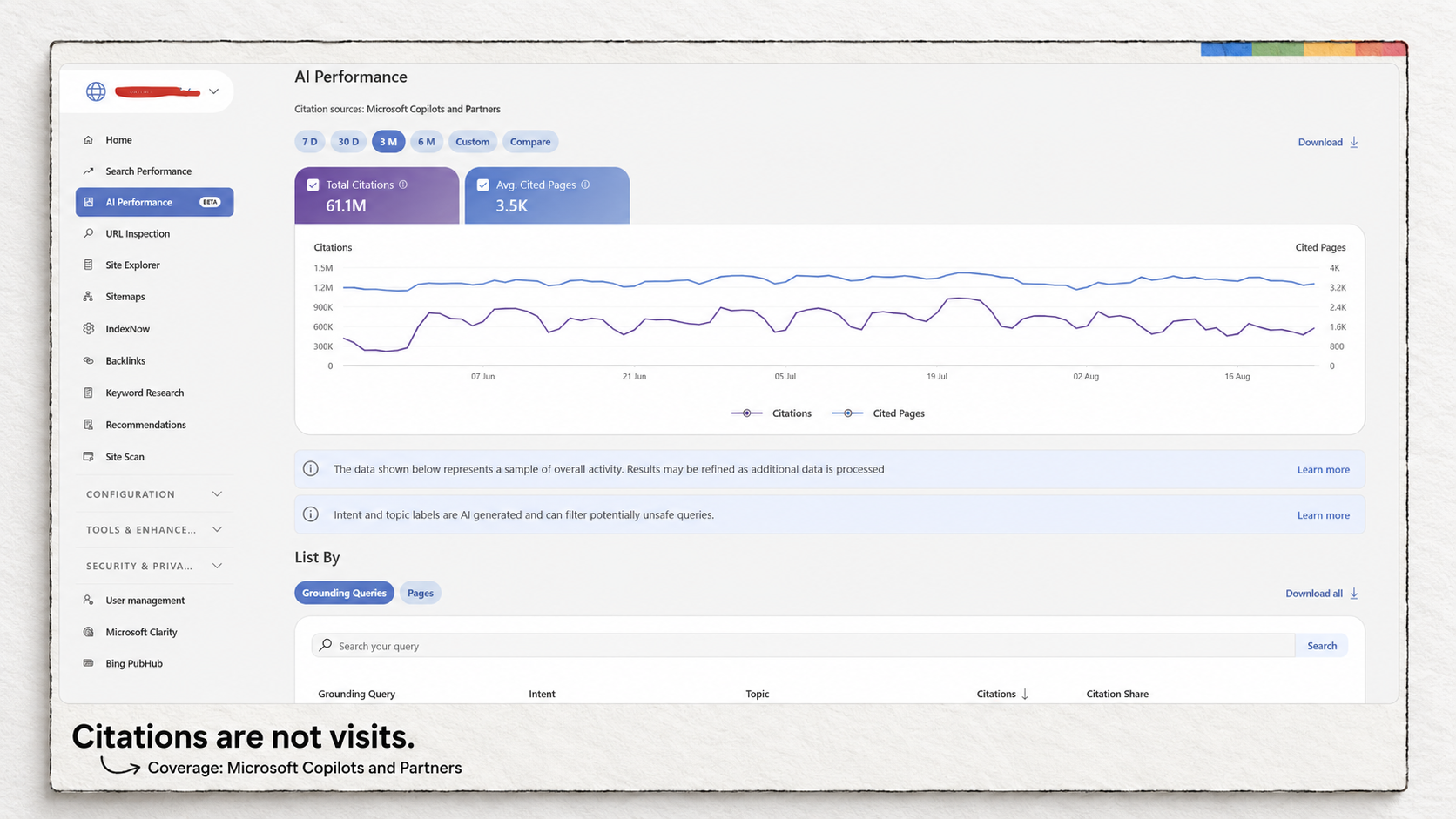
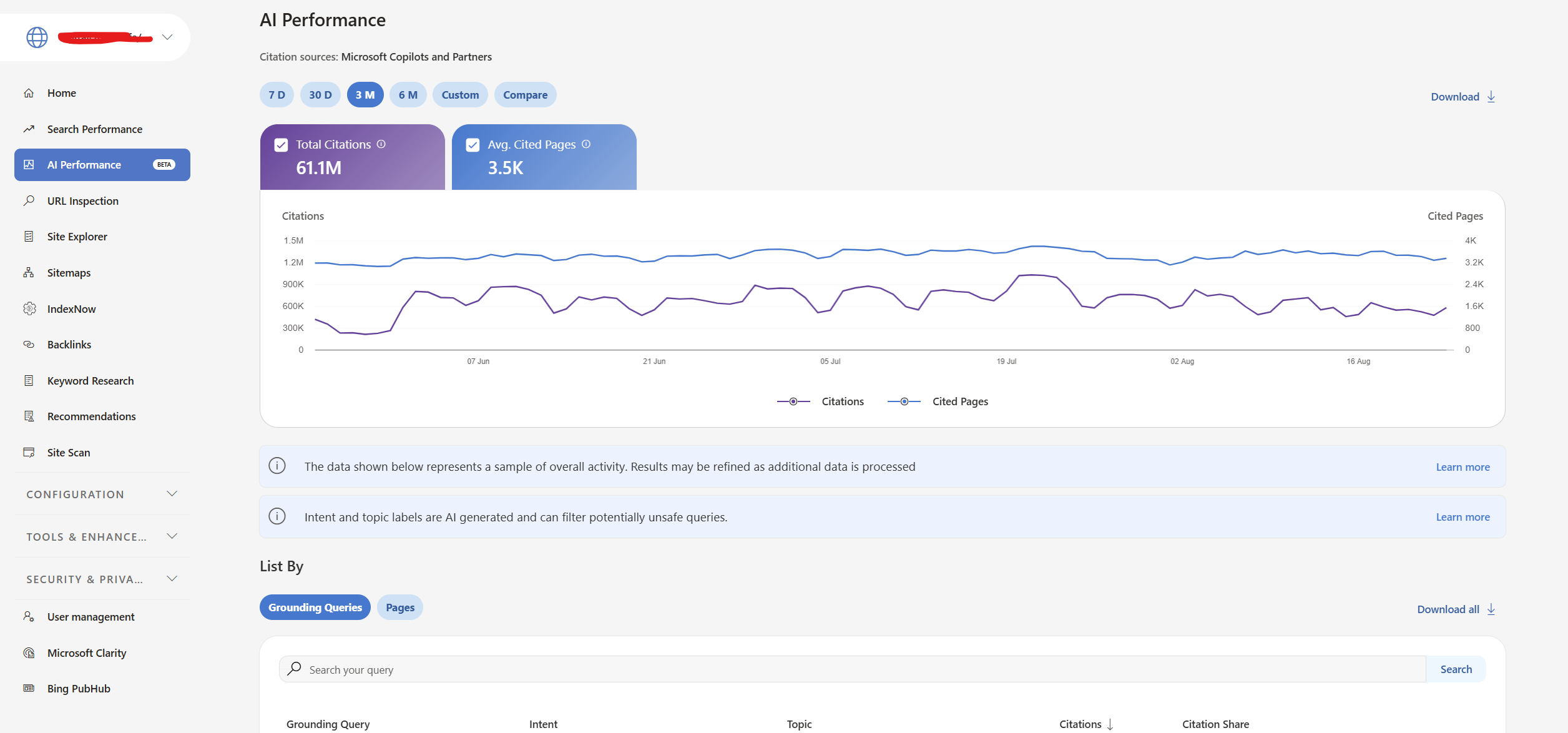
Bing also has an AI Performance report, introduced in public preview. It records citations across Microsoft Copilot, AI-generated Bing summaries and selected partner integrations. This is reporting about AI visibility, separate from Copilot’s assistance inside the product.

If an advice page appears in that report, check that its service details and supporting information are accurate. The report can identify cited pages and show citation trends. It does not tell you that those citations produced customers, and it is not comprehensive monitoring of every AI service. Microsoft also says the grounding-query data is a sample.

Bing’s data describes its own search environment and supported AI experiences. Use Search Console for questions about Google performance. A page appearing in one system does not establish its status in the other.

What would make a paid tool worth adding?

For a local business, begin by separating website analysis from profile management. Google Business Profile already lets eligible businesses manage information, publish updates and respond to reviews for free. Search Console does a different job. You do not need Localo merely to change opening hours or reply to a Google review.

A different requirement could justify looking at paid software. Localo’s local rank tracker, for example, documents recurring checks from multiple locations and a map of the results. That could matter to a business investigating whether it appears near its premises but disappears in other neighborhoods. A Search Console performance report does not reproduce that task. The additional measurement is the reason to evaluate the product; an AI label adds nothing to that argument.

The same distinction applies to content software. None of the three recommended workflows supplies a complete article-production process with briefs, review assignments and publishing. A business regularly commissioning articles may need that coordination. An owner improving one service page can first use the search queries, service knowledge and visitor evidence already available to decide what is missing.

For the plumbing example, I would start with the boiler-repair page: check its Google performance, investigate any mobile enquiry problem, and verify its status in Bing. After making a change, record the date and compare the relevant search data and actual enquiries over a comparable period. Account for seasonal demand and other changes before attributing the result to the edit.

The post AI SEO tools for small business: 3 free options I’d start with appeared first on Search Engine Watch.

Source:: searchenginewatch.com
3 AI visibility tools for small agencies, with 2 free options

For a small agency reporting where a client’s pages appear in Google and Microsoft AI answers, I’d start with Google Search Console and Bing Webmaster Tools. Their free reports let you identify the pages appearing in the AI experiences each provider covers.

To follow what ChatGPT, Gemini and Perplexity say about a client and its rivals, consider HubSpot AEO. Its $50-per-brand monthly plan checks questions you choose each day. You can read the answers it collects to see whether the business is merely mentioned or actually recommended.

Tool Monthly software cost What it helps you answer The main limit
Google Search Console $0 Which pages appeared in Google’s AI Overviews and AI Mode? The dedicated report measures impressions, with no query breakdown.
Bing Webmaster Tools $0 Which pages were cited, and what retrieval phrases appear in the report? Covers Microsoft Copilot, Bing AI summaries and selected partners. Citation share does not name rivals.
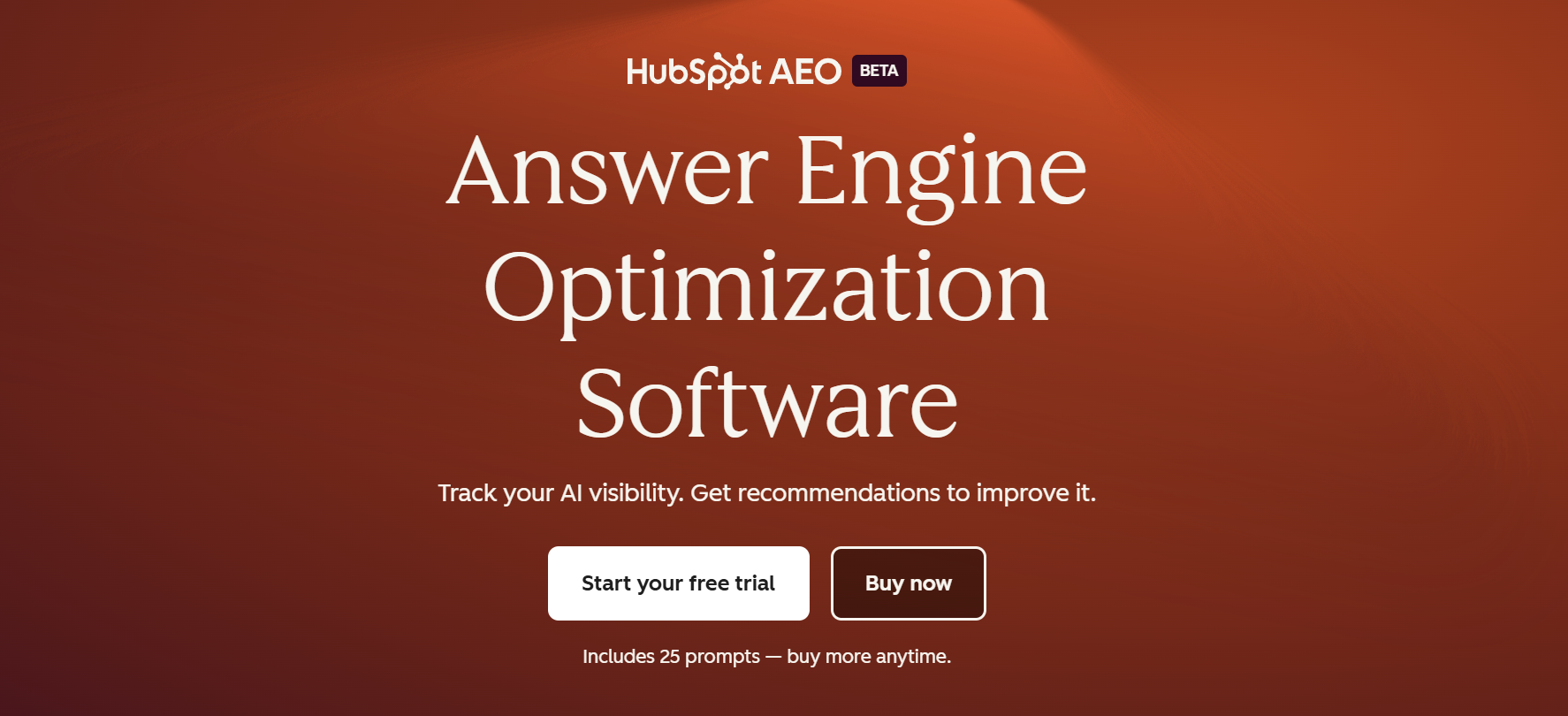
HubSpot AEO $50 per brand How do answers to 25 chosen prompts describe the business and its competitors across three engines? Each brand needs a separate subscription. Agency exports and client permissions remain unverified.

Based on published features and terms, with the main claims rechecked on 20 September 2026. We haven’t tested tracking accuracy. Prices use monthly billing in US dollars, before tax; setup and reporting still take agency time.

1. Google Search Console: see which pages appear in Google’s AI answers

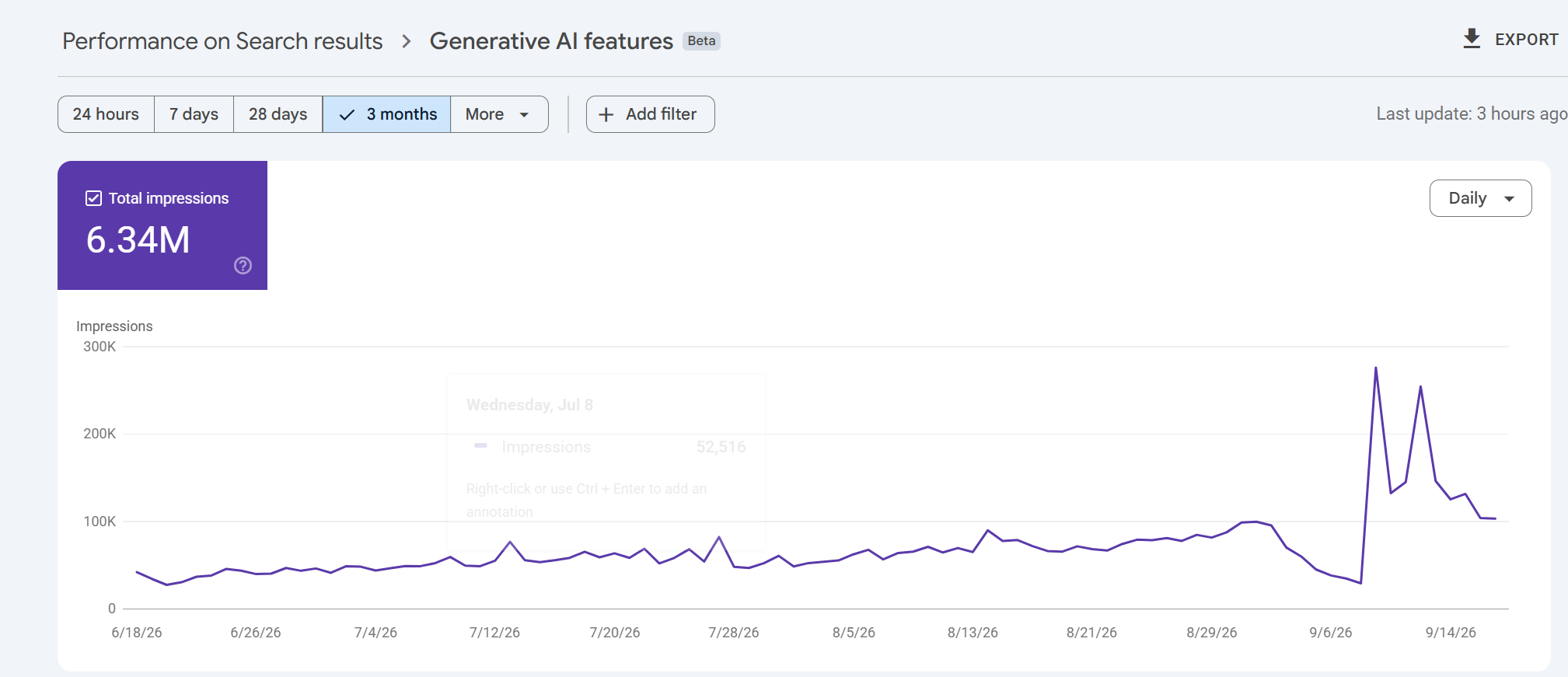
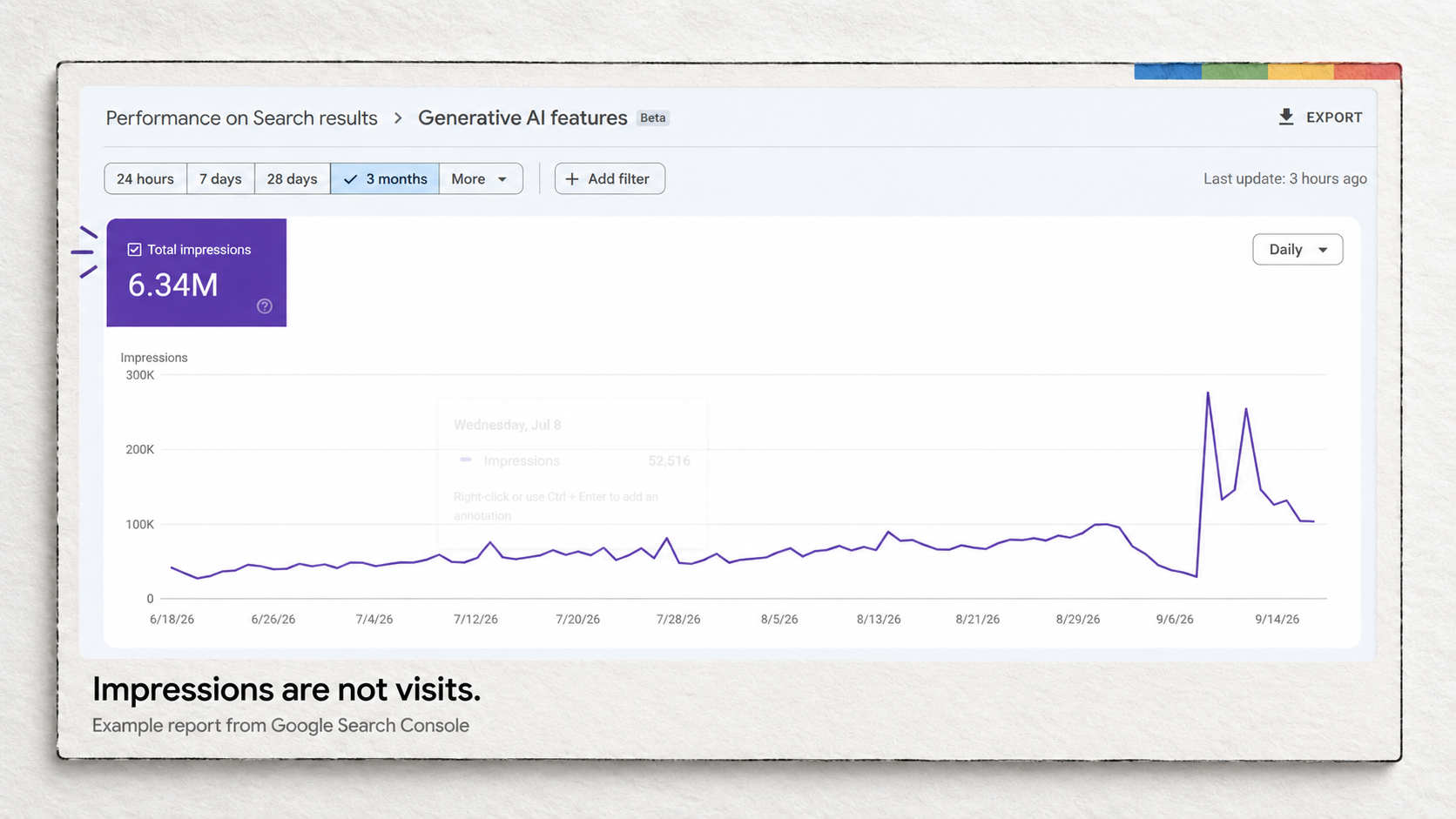
Search Console now has a dedicated view of impressions from AI Overviews and AI Mode. Google introduced its generative AI performance reports in June 2026 and says the rollout reached websites worldwide on August 31. Agencies can now report those appearances separately from the broader search-performance figures.

The report shows which pages appeared, with breakdowns by country, device and date. An impression records a link to the site appearing in a supported AI feature. It doesn’t establish that someone visited the page.

Suppose a client sells commercial coffee machines. Look for its buying guides, product pages and installation advice in the page report, then group those URLs in your own monthly report. You can show the client which kinds of content appeared and how their impressions changed over equivalent periods. That is more informative than handing over one site-wide total.

The report won’t explain why one page appeared more often than another. Google’s documented metrics and dimensions contain no dedicated clicks, click-through rate or query breakdown. It also doesn’t cover the Gemini app. Sites with too few impressions may not see the report at all.

There is a small export detail worth catching before it reaches a client: Google says unavailable values shown as ~ or – become zeros in the downloaded data. Check those against the screen before describing a zero as a loss of visibility.

2. Bing Webmaster Tools: see cited pages and the subjects being looked up

Bing Webmaster Tools gives the agency a second free source of AI visibility data. Its AI Performance report covers citations in Microsoft Copilot, AI-generated Bing summaries and selected partner integrations. It shows cited URLs, citation counts and phrases used to retrieve source material.

Those phrases are called grounding queries. They describe what the system looked up while assembling an answer, which can differ from the question a person typed. An answer about the cost of equipping a café could involve searches for maintenance and cleaning as well as machine prices. SEW’s explanation of query fan-out shows how that branching works. Treat these phrases as retrieval context, rather than a transcript of customer questions.

Microsoft’s June update added topics, intents, citation share and period comparisons, in global preview. Citation share measures your site’s portion of all citations for the same grounding query. It does not reveal the competing domains or measure your share of traffic. Comparing periods shows whether citation activity changed; changing demand or AI systems can affect that activity alongside your own page updates.

For a monthly client report, record the cited pages, relevant retrieval phrases and changes over the same reporting periods. Keep Bing’s citation totals separate from Google’s impressions because they count different things. Agencies already managing verified Search Console properties can import those sites into Bing Webmaster Tools, reducing the setup work.

3. HubSpot AEO: pay for daily checks on questions you choose

A client asking “Does ChatGPT recommend us over our competitor?” needs a different kind of evidence. Their own site might be cited without the business being recommended. Equally, an answer could recommend them using information from another website.

HubSpot AEO, currently in beta, lets you follow chosen prompts, inspect returned answers and see the brands and sources involved. Its standalone subscription costs $50 a month for 25 prompts checked daily across ChatGPT, Gemini and Perplexity. No additional HubSpot subscription is required.

For the coffee-equipment client, you could track a question such as “Which commercial coffee machines suit a café serving 200 drinks a day?” Review which suppliers the collected answers recommend and the reasons they give. A brand-mention score alone won’t tell you whether an answer describes the client’s products accurately or recommends them for the wrong setting.

Consider an agency starting with three clients and 25 questions for each. HubSpot sells a separate instance for each brand, so the cost is 3 × $50 = $150 a month for 75 tracked questions. Adding a fourth client with the same allowance brings the bill to $200. Daily checks build a history for each question; they don’t turn those 25 questions into a representative sample of everything a client’s customers ask.

If a client already has Marketing Hub Professional or Enterprise, AEO is included. Check that account’s allowance before adding a standalone subscription.

Agency reporting needs a closer look before purchase. We couldn’t verify the available export formats or how access can be separated between clients. During the trial, try producing the report you intend to deliver and check who can view each brand’s data. HubSpot belongs here for its documented monitoring features and price; its suitability for an automated agency-reporting workflow remains unconfirmed.

Choose prompts from the decisions the client’s customers actually face. For the coffee business, that might include selecting equipment for a particular café size, comparing running costs and finding local servicing. Keep the wording consistent when comparing periods, and record any additions separately. Changing the questions can change the score even when nothing about the business has improved.

As SEW’s reporting on the limits of AI visibility scores explains, the questions, platforms and repetitions affect the result. Include the tracked questions and dated example answers in the client report. That gives the client enough context to distinguish an accurate recommendation from a passing mention. Report visits and enquiries separately using your analytics and sales records.

The post 3 AI visibility tools for small agencies, with 2 free options appeared first on Search Engine Watch.

Source:: searchenginewatch.com
Reciprocal links in SEO: when linking back becomes a problem

Reciprocal links happen when two websites link to each other. They aren’t automatically bad for SEO. You might cite a useful article on another site, and its editor might later recommend something you’ve published. The trouble starts when people arrange links primarily to manipulate search rankings, which falls under Google’s link-spam policy.

So you don’t need to remove a good citation just because that website links to you. You do need to look more closely at an offer that makes a backlink conditional on inserting someone else’s link.

What reciprocal links look like in practice

Imagine you run a marketing publication. You write about email campaigns and link to a software company’s research because it supports a point in your article. A few months later, that company publishes a guide and links to your explanation of newsletter sponsorships.

You now have reciprocal links. The articles cover different subjects, the links appeared at different times, and neither editor needed permission from the other. Each found something worth recommending.

The same thing can happen between businesses that work together. A hotel might link to a walking-tour company so guests can book an excursion. The tour company might recommend the hotel to visitors who need somewhere to stay. Both links give someone a useful next step.

Now imagine an agency asks you to add its client to an old article. In return, it promises a link from another website, provided you use the exact words it supplies and leave the link in place.

That offer asks you to publish a link to secure one for yourself. A backlink report may show the same two-way connection in all these examples, but it won’t show you the emails behind the arrangement.

What Google says about reciprocal links

Google lists Excessive link exchanges and partner pages created solely for cross-linking as examples of link spam. It also flags contracts that require a link without letting the publisher qualify it, for example with nofollow. The policy focuses on links created mainly to manipulate rankings.

Google doesn’t publish a permitted percentage or monthly allowance. A small exchange isn’t automatically acceptable simply because it is small.

For a publisher considering an offer, the terms provide a useful starting point. Can you choose the source that best supports the article? Can you reject the proposed wording? Would the other party still want the placement if you qualified the link? Their answers help explain what they are trying to buy or trade.

A related website can still propose an awkward placement. An email-marketing company, for example, might have relevant research for your newsletter guide but insist that you link to its pricing page instead. Review the actual page readers will reach, rather than approving the request because the companies cover similar subjects.

Related reading: black hat SEO techniques to avoid.

What about three-way link exchanges?

In a three-way exchange, your site links to a company and a separate website supplies the promised backlink. You may never receive a link from the company you recommended.

Our assessment is that adding another website doesn’t resolve the underlying problem if the arrangement still trades links for ranking credit. It also exposes a weakness in reciprocal-link audits: a report looking only for two sites linking to each other can miss the deal entirely.

Can reciprocal links help your SEO?

A useful link can bring readers to your website, whether or not you have linked to its source. Google also uses links to discover pages and help assess their relevance. Neither point establishes that arranging a swap will improve your rankings.

An Ahrefs study, last updated in March 2020, found reciprocal links on 73.6% of 140,592 websites in its sample. The sites each had more than 10,000 estimated monthly visits from Google, and the research compared followed incoming and outgoing links.

Plenty of those sites had reciprocal links and still received search traffic. But the study didn’t test what happened when websites started swapping links. It also selected sites that already had traffic, so sites that had lost theirs could be missing from the sample. Ahrefs explicitly acknowledges that limitation.

The finding helps explain why discovering reciprocal links shouldn’t cause immediate alarm. It doesn’t establish that a link-exchange campaign works.

Why a reciprocal-link percentage can mislead you

Before worrying about a percentage in a backlink report, check what it counts. The same website can have a reciprocal-link ratio of 30% or 2%, depending on the calculation.

Take this made-up example: your site links to 40 other domains, receives links from 600 domains, and has 12 domains in both groups.

Two ways to measure the same set of links
What you’re measuring Calculation Result
Of the domains you link to, how many link back? 12 ÷ 40 30%
Of the domains linking to you, how many receive a link back? 12 ÷ 600 2%

Both numbers are correct. Neither tells you whether the links were independently chosen or negotiated.

Counts of individual links introduce another difference. A link repeated in a website’s footer can appear on hundreds of pages while representing a connection with just one domain. Before comparing your number with someone else’s, establish whether both reports count links, pages or domains and use the same calculation.

These percentages can help you find relationships to investigate. They can’t give you a safe quota for future swaps.

A link can stop helping without a manual penalty

Google explained in its December 2022 link-spam update that its SpamBrain system could neutralize unnatural links, removing the ranking credit they had passed. That gives you another possible outcome to consider: time spent arranging links that no longer provide the benefit you expected.

A manual action is a separate matter. It follows a human review, and Google reports it in Search Console’s Manual actions report. An empty report doesn’t prove your exchanged links are helping. Equally, a fall in traffic doesn’t prove reciprocal links caused it.

How to check the reciprocal links you already have

If you are reviewing a handful of known exchanges, start with the pages and the original emails. Those emails may tell you exactly why a link was added, including whether someone promised a return placement or specified the wording.

To find incoming examples for free, open Google Search Console’s Links report. Under External links, select More beneath Top linking sites. Choose a domain, then one of your linked pages, to investigate the pages linking to it.

Google’s documentation explains that this is a sample, not a complete backlink list. It can include links that have since disappeared and doesn’t identify nofollow links. A link missing from Search Console may simply be missing from its sample.

Find your links to those websites separately, using your CMS or an existing crawl. Then open both pages and read the paragraphs containing the links. Check where they lead, what the clickable words say, and whether the destinations still support the surrounding text.

Keep a useful citation if it still belongs in the article. If a link was inserted purely to complete a swap, revisit that placement. A spreadsheet of domains alone won’t tell you which sentence needs changing.

For a large website, a crawler can help locate outgoing links across thousands of pages. A separate backlink index may find incoming links that Search Console’s sample misses. Those tools can save time finding the pages; you still need to examine what was published and any agreement behind it.

When to use nofollow or sponsored

You don’t need to add nofollow to an ordinary editorial link just because the destination links back to you. Google’s outbound-link guidance says regular links need no special rel attribute.

For advertising and paid placements, Google prefers rel="sponsored", although it also accepts nofollow. For other cases where you don’t want Google to associate your site with the destination, nofollow may be appropriate. Apply the attribute to the actual relationship.

If you are cleaning up manipulative outgoing links, Google’s manual-action guidance calls for removing them or changing them so they no longer pass ranking credit. Changing a link on your own site doesn’t change the backlink on somebody else’s.

Should you disavow reciprocal links?

Finding a reciprocal link is not, by itself, a reason to disavow it. Google says most sites don’t need the disavow tool. Its criteria are considerably narrower: a substantial number of spammy, artificial or low-quality incoming links, together with a manual action or a likelihood of one.

Where those conditions apply, Google recommends trying to get the problematic links removed first. Disavowing is for incoming links you can’t remove. It won’t fix an outgoing link that you control.

SEW’s take: keep the decision with the editor

For publishers, a useful test is what happens when the proposed link doesn’t survive editing. Can you leave it out, replace it with a better source, or change the wording without owing someone another backlink?

If you’ve promised to publish the link regardless, you’ve given away that decision. A relevant domain or an impressive backlink score won’t make the sentence any more useful to the reader.

You can still invite people to send research, tools or explanations worth citing. A reply to an exchange request could be as simple as:

Send the resource and tell us which part of the article it supports. We’ll consider it on that basis. You don’t need to link to us.

The post Reciprocal links in SEO: when linking back becomes a problem appeared first on Search Engine Watch.

Source:: searchenginewatch.com