Kategorie-Archiv: SEO

Bing tests “Related searches based on your browsing” below sponsored ads

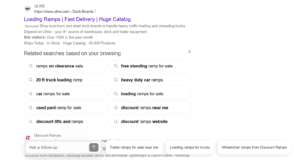
Related searches based on your browsing

Bing is testing a “Related searches based on your browsing” box below sponsored ads. Google tested the same thing recently, which you can see in my earlier post on X, and now Bing appears to be trying a similar approach within its sponsored results.

Here is a screenshot of this.

I think these suggestions are probably based on the user’s search history rather than their actual browsing, but it’s not confirmed. Showing this type of keyword below the ads looks like a good idea to me.

The post Bing tests “Related searches based on your browsing” below sponsored ads appeared first on Search Engine Watch.

Source:: searchenginewatch.com
Bing tests larger CTA button on sponsored ads

Bing tests larger CTA button on sponsored ads

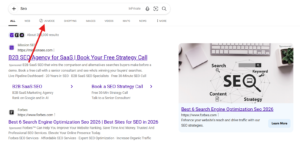
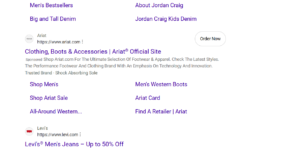
Bing is testing a larger CTA button on sponsored ads. I spotted this while searching for something on Bing. The CTA button on the ads is usually smaller, but today it appeared noticeably larger.

Here is a screenshot of this.

Bing tests larger CTA button on sponsored ads Bing tests larger CTA button on sponsored ads

larger CTA button on sponsored ads

A larger CTA button can catch the user’s attention more easily, which may be good for advertisers.

The post Bing tests larger CTA button on sponsored ads appeared first on Search Engine Watch.

Source:: searchenginewatch.com
Google updates Merchant Center product image quality guidelines

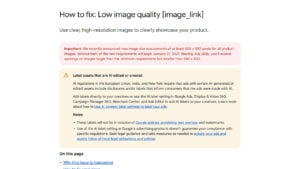
merchant-center-low-image-quality

Google has updated its product image quality guidelines in Merchant Center. Previously, products with poor images could be blocked from showing on Google. Under the update, poor image quality alone should no longer stop a product from being shown.

What changed in the update?

  • Poor image quality: Blurry, pixelated, or low-resolution images are categorized as poor quality.
  • Minimum image size: Starting January 31, 2027, all product images must be at least 500 × 500 pixels. Google began issuing warnings for images smaller than this in July 2026.
  • Promotional overlays: Products may still be disapproved if the image includes promotional text, such as “Buy Now,” prices, shipping details, special offers, or other promotional terms.
  • Automatic image improvements: Google’s Automatic Image Improvement feature can fix certain image issues, but it can’t fully resolve complex problems like excessive text or large watermarks.

Google has relaxed the rule that kept products from being displayed because of poor image quality. However, the minimum image size and promotional overlay rules are still mandatory.

Merchants should still check their product images against the 500 × 500 requirement before the January 31, 2027 deadline, and remove any promotional text from images to avoid disapprovals.

This update was spotted by Hana Kobzová.

The post Google updates Merchant Center product image quality guidelines appeared first on Search Engine Watch.

Source:: searchenginewatch.com
Bing now showing AI Mode tab more widely instead of Copilot

bing ai mode

Bing appears to be showing the “AI Mode” tab more widely than before. We recently covered Bing testing an “AI Mode” tab in place of the Copilot tab. When I opened Bing in a different browser, I saw “AI Mode” there too, in places where I used to see Copilot. It looks like this rename is rolling out to more users.

Here is a screenshot of this.

This is just based on my own exploration of Bing. When I switched browsers, Bing showed “AI Mode” more often than before. Earlier, those same browsers showed Copilot.

The post Bing now showing AI Mode tab more widely instead of Copilot appeared first on Search Engine Watch.

Source:: searchenginewatch.com
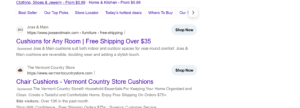
ChatGPT tests a shopping question box with a find button

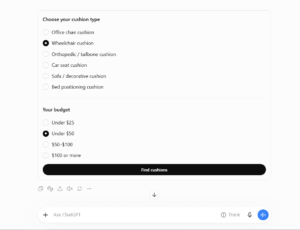
shopping question box with a find button

ChatGPT is now showing a set of questions to help narrow down what a user wants. We recently saw something similar in Google AI Mode, but ChatGPT’s version looks different.

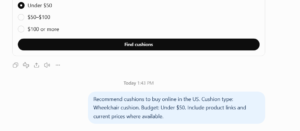
I searched for “cushions.” ChatGPT first showed an answer, and below it, at the bottom of the page, a recommendation box appeared where I could choose a type. It then listed options based on my search and suggested a budget. Below that, a “Find” button appears. When a user clicks it, ChatGPT turns the selections into a new query.

Here is a screenshot of this.

shopping question box with a find button

Showing this below the answer could be helpful for users, since it lets them refine what they want without typing a new prompt. Google tested a similar follow-up question format in AI Mode earlier.

The post ChatGPT tests a shopping question box with a find button appeared first on Search Engine Watch.

Source:: searchenginewatch.com